Set up local mimo to use GonkaGate in one npx command.
npx @gonkagate/mimo-code-setup









From API key to a verified mimo setup in one short walkthrough:
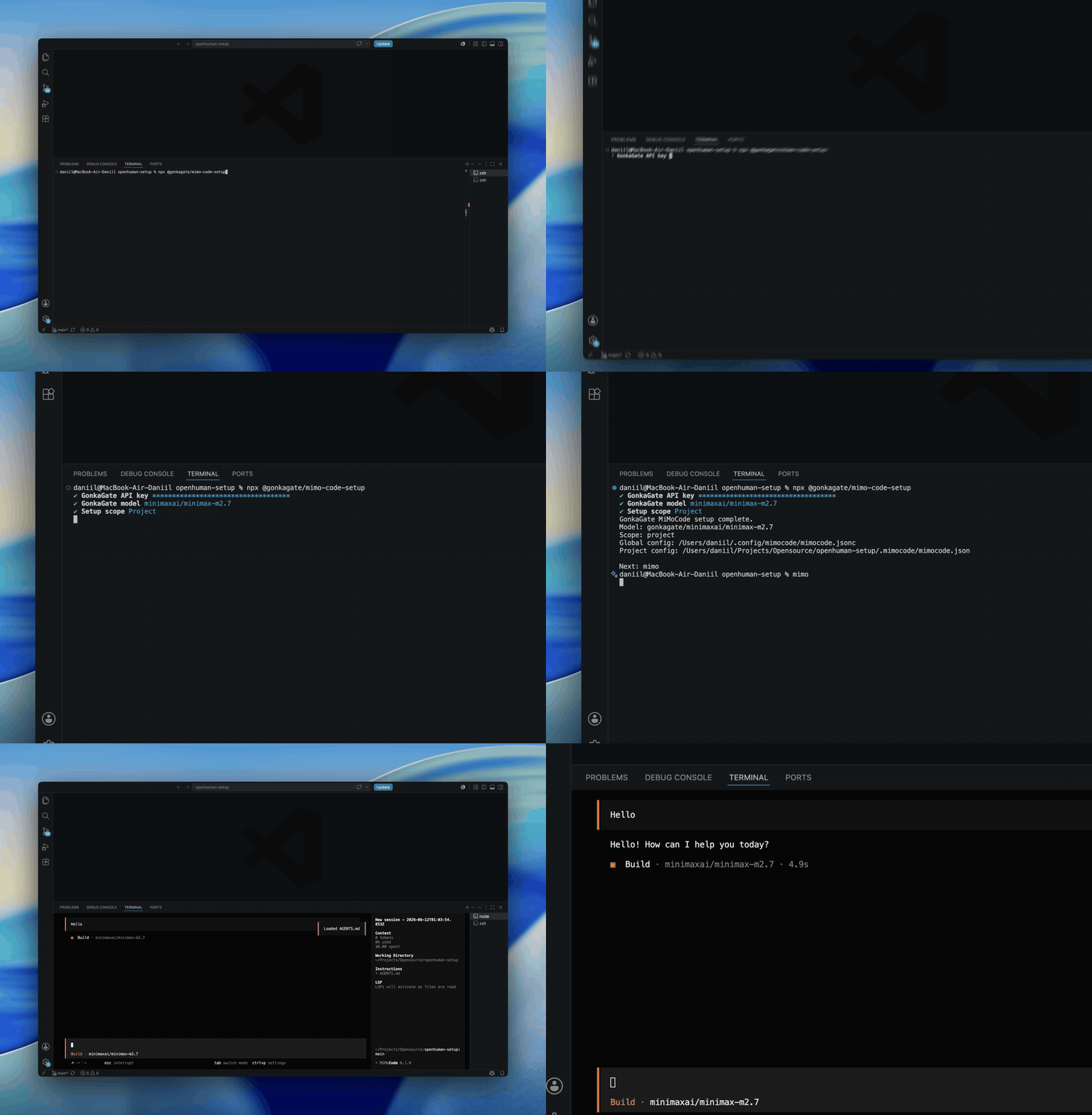
Need an API key first? Get one on GonkaGate.
@gonkagate/mimo-code-setup is the onboarding CLI for people who already use
MiMoCode and want it configured to use GonkaGate without hand-editing
MiMoCode config files, exporting secrets through shell profiles, or dealing
with provider internals.
The installer walks you through the setup, writes the minimum safe MiMoCode
config, verifies that MiMoCode actually resolves GonkaGate the way it should,
and then sends you back to plain mimo.
- Configures local
mimoto use GonkaGate as a custom provider. - Keeps the secret out of repository-local config.
- Preserves unrelated MiMoCode settings instead of replacing whole files.
- Verifies the real resolved MiMoCode result instead of assuming writes worked.
- Supports macOS, Linux, native Windows, and WSL.
Use this if you are setting up your own machine:
npx @gonkagate/mimo-code-setupThe happy path is:
- The CLI checks that
mimois installed and supported. - It asks for your GonkaGate API key in a masked prompt.
- It calls
GET /v1/modelsand offers every model returned by GonkaGate. - It asks whether GonkaGate should be activated for
userorprojectscope. - It writes the managed config, verifies the result, and tells you to go back
to plain
mimo.
Use this for automation or scripts:
npx @gonkagate/mimo-code-setup --scope project --yesYou can pass the secret through GONKAGATE_API_KEY:
GONKAGATE_API_KEY=gp-... npx @gonkagate/mimo-code-setup --scope project --yesOr through stdin with --api-key-stdin:
printf '%s' "$GONKAGATE_API_KEY" | npx @gonkagate/mimo-code-setup --api-key-stdin --scope project --yes --jsonIf you run non-interactively, pass --scope or --yes. In a git repository,
the recommended default is usually project; outside a repo, it is usually
user.
You need:
- Node
>=22.14.0 - local MiMoCode installed and available as
mimoon yourPATH - a GonkaGate API key in the usual
gp-...format from GonkaGate
Current MiMoCode baseline:
- minimum verified MiMoCode version:
0.1.0 - audited upstream package:
@mimo-ai/cli0.1.0as of June 11, 2026
The default public flow is:
npx @gonkagate/mimo-code-setupUnder the hood, the shipped runtime:
- validates local
mimo - accepts the secret only through a masked prompt,
GONKAGATE_API_KEY, or--api-key-stdin - fetches the live GonkaGate model catalog from
https://api.gonkagate.com/v1/models - resolves the selected model and activation scope
- writes only the minimum safe MiMoCode config layers
- verifies the durable plain-
mimooutcome and the current session's effective MiMoCode outcome - finishes by returning the user to plain
mimo
For project scope, the installer keeps the provider definition and secret
binding in user scope and writes only activation settings to repo-local
.mimocode/mimocode.json.
The important managed locations are:
- durable global config target:
~/.config/mimocode/mimocode.json - created global config filename when no existing target is present:
mimocode.jsonc - project config target:
.mimocode/mimocode.json - managed secret file:
~/.gonkagate/mimo-code/api-key - managed install state:
~/.gonkagate/mimo-code/install-state.json - project-config rollback backup path:
~/.gonkagate/mimo-code/backups/project-config
The canonical installer-owned secret binding is exactly:
provider.gonkagate.options.apiKey = {file:~/.gonkagate/mimo-code/api-key}
That binding belongs in user config. The repo-local file stays commit-safe by default and must not contain the secret or the secret file path.
Safe secret inputs:
- masked interactive prompt
GONKAGATE_API_KEY--api-key-stdin
Not supported:
- plain
--api-key - shell profile mutation
.envgeneration- repository-local secret storage
The installer never prints the GonkaGate key. It also redacts secret-bearing fields on user-facing diagnostics.
On macOS, Linux, and WSL, the managed secret file and directory use owner-only permissions, and reruns repair drifted owner-only secret protections in place without rewriting unchanged secret contents.
On native Windows, managed files stay inside the current user's profile and
rely on inherited per-user ACLs instead of portable chmod-style enforcement.
The runtime is live-catalog-first:
- the stable provider id is
gonkagate - the managed user-level provider key is
provider.gonkagate - the canonical base URL is
https://api.gonkagate.com/v1 - the setup model list is fetched from
https://api.gonkagate.com/v1/modelsafter safe API-key intake - the current provider package is
@ai-sdk/openai-compatible - the current transport target is
chat_completions - future migration should add
responsessupport without renaming the product - the selected setup model remains the activation default through
modelandsmall_model provider.gonkagate.modelsis generated from every model returned by/v1/modelsdocs/model-validation.mdtracks MiMoCode workflow proof separately from live catalog availability
This installer does not treat a successful file write as success by itself. Success is based on effective MiMoCode config.
For durable verification, mimo --pure debug config is the final truth source.
The installer uses that resolved result to verify model, small_model,
provider.gonkagate, the current transport and base URL shape, and the live
model catalog shape.
The installer also runs mimo models gonkagate and checks that the selected
GonkaGate model is visible to MiMoCode.
MiMoCode override state matters here:
MIMOCODE_CONFIGMIMOCODE_CONFIG_CONTENTMIMOCODE_CONFIG_DIRMIMOCODE_AUTH_CONTENTMIMOCODE_DISABLE_PROJECT_CONFIG
If the resolved config proves a provider or model blocker but no locally inspectable layer explains it, the installer reports an inferred higher precedence or managed blocker instead of a vague mismatch.
Secret-binding provenance is verified separately from resolved-config
verification. user_config is the durable layer allowed to own
provider.gonkagate.options.apiKey, and project config must not define that
key.
The durable migration anchor remains install-state.json. Its
lastDurableSetupAt field means the last durably verified setup, even if a
later current-session-only check is still blocked or failed.
Rerunning the installer is the official safe update path.
That rerun flow refreshes GonkaGate-managed config, secret storage, and install-state metadata. It also normalizes only installer-owned GonkaGate activation in the old target instead of deleting unrelated MiMoCode settings.
For project scope:
- user-level config still owns the provider definition and secret binding
- repo-local
.mimocode/mimocode.jsoncontains only activation settings - if repo-local config must be rewritten, rollback backups go under
~/.gonkagate/mimo-code/backups/project-config
Native Windows is part of the supported runtime contract. Managed files stay
inside the current user's profile and rely on inherited per-user ACLs instead
of portable chmod-style enforcement.
WSL remains supported too.
Before treating setup behavior, docs, or package changes as ready, run:
npm run ci