I started coding this project alone, but I crossed paths with Copilot and we decided to join forces and work on it together.
It has been a great help for coding javascript, jquery, as well as testing, debugging, and documentation.
This project is mirrored on Codeberg and Github, and the artifacts are pushed to Codeberg/GEANT/packages.
If Open Source is your thing, please consider starring and contributing on Codeberg: codeberg/GEANT/docker-encompass.
If you are searching for an OpenVox / Puppet ENC implementation, this repository provides an
OpenVox / Puppet External Node Classifier with Docker deployment, host/group classification, and ENC
API endpoints.
enCompass is a Django-based OpenVox / Puppet External Node Classifier (ENC) packaged for Docker.
It provides a web UI to manage hosts and groups, plus read-only ENC endpoints exposed by both enCompass
and enCapsule.
enCapsule is an optional agent for enCompass that can be used to provide high availability for the ENC API.
It does not depend on a database and boots up in just 1 second, making it ideal for an autoscaling setup.
This repository also includes optional enCryptor and deCryptor components that enable certificate
auto-signing flows through CSR challengePassword generation and validation.
An optional puppet-enc Go binary is also provided as a faster, dependency-free drop-in replacement for
the puppet-enc.sh shell script used to integrate Puppet Server with the ENC API.
Demo site: encompass-demo.geant.org
Repository URL: codeberg.org/GEANT/docker-encompass
site.pp vs enCompass ENC: codeberg.org/GEANT/docker-encompass/docs/SITEPP_VS_ENC.md

- Features
- Application Flow
- Development Guide
- Deployment
- Endpoints
- enCryptor + deCryptor (Optional)
- puppet-enc (Optional)
- Puppet ENC Integration
- Migration Notes
- Puppet ENC Keywords
- Configuration
- Data Backup
- HA considerations
- enCapsule Agent Runtime
- Security Checklist
- Doubts and open questions
- ToDo
- License
- Full developer notes: codeberg.org/GEANT/docker-encompass/docs/DEVELOPMENT.md
- Sync flow chapter: codeberg.org/GEANT/docker-encompass/docs/DEVELOPMENT.md#encompass-to-encapsule-sync-flow
- Host and group management UI
- ENC host query view for classification checks
- Autoscale is possible. The container is stateless
- LDAP and Database authentication modes
- Optional read-only basic auth for ENC endpoints
- Optional SSL listeners through Nginx
- Persistent YAML data via Git repository
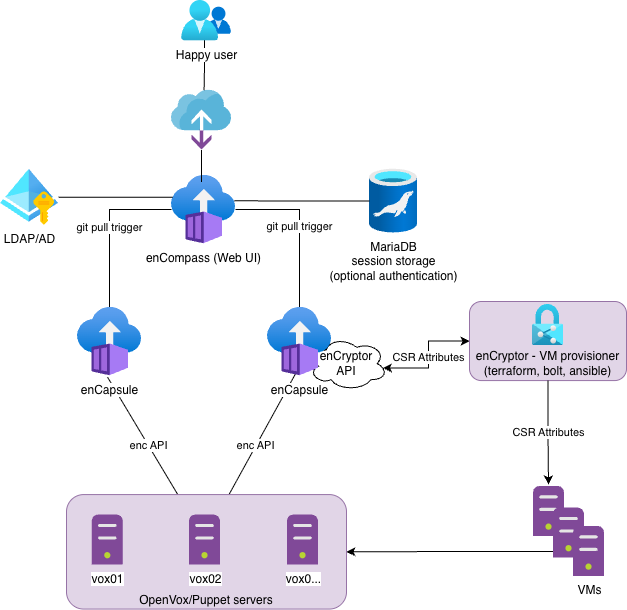
You can use encompass.nomad and encapsule.nomad and adjust them to your needs.
The job contains:
- service registration for Consul
- secrets templates fetched from Vault
- tags declarations for Traefik
Help needed!
- Docker + Docker Compose
- Open local ports:
8080,8081,8443,8444
The following instructions are not intended for a production grade deployment.
-
Copy environment variables file:
cp vars.example vars
-
Review and update
varsfor your environment (LDAP host, secrets, allowed hosts, SSL paths, etc.). -
Build and start:
docker compose up --build
-
Open UI:
http://localhost:8080/encompass/
- enCompass
8080: web UI (HTTP)8081: ENC read-only endpoint (HTTP)8443: web UI (HTTPS, whenENC_USE_SSL=true)8444: ENC read-only endpoint (HTTPS, whenENC_USE_SSL=true)
- enCapsule (optional profile)
9081: ENC read-only endpoint (HTTP; container8081exposed on host9081in Docker Compose)9444: ENC read-only endpoint (HTTPS; container8444exposed on host9444whenENC_USE_SSL=true)
Additional enCompass CSR endpoints (usable for external provisioning):
GET /hosts/<fqdn>/csr_attributesGET /groups/<name>/csr_attributes
Response example:
---
custom_attributes:
  challengePassword: secure_password
CSR endpoint authentication:
- Set
CSR_API_KEYinvars. - Send the token in header
X-CSR-API-KEY. - Applies to both enCompass and enCapsule CSR endpoints.
Example:
curl -s -H "X-CSR-API-KEY: $CSR_API_KEY" \
  http://enc.example.org:8081/hosts/node1.example.org/csr_attributes
enCryptor is an optional helper component for provisioning workflows that
retrieve CSR challengePassword values from enCompass/enCapsule and write the
expected YAML blob for autosign use cases.
deCryptor is an optional Puppet autosign policy helper that validates incoming
CSR challengePassword values against enCompass/enCapsule.
Component names are enCryptor and deCryptor; executable names are
encryptor and decryptor.
Full documentation:
- docs/ENCRYPTOR.md
- codeberg.org/GEANT/docker-encompass/docs/ENCRYPTOR.md
- docs/DECRYPTOR.md
- codeberg.org/GEANT/docker-encompass/docs/DECRYPTOR.md
puppet-enc is a compiled Go binary that calls the ENC API and serves as a
drop-in replacement for puppet-enc.sh. On busy Puppet Servers it is roughly
2–3× faster and uses 3–4× less CPU per invocation compared to the shell script.
Full documentation:
This project is relevant to searches and documentation around:
- Puppet ENC
- Puppet External Node Classifier
- external_nodes and node_terminus integration
- Dockerized Puppet ENC
- high-availability ENC endpoint for Puppet Server
In principle you can simply use curl against the ENC endpoint as follows:
curl -s http://enc.example.org:8081/hosts/\$1For production use on a busy Puppet Server, the recommended approach is the
puppet-enc Go binary (see puppet-enc (Optional) and
docs/PUPPET-ENC.md). If deploying a compiled binary is
not practical, the shell script puppet-enc.sh is available as a fallback.
sudo install -m 0755 puppet-enc /etc/puppetlabs/puppet/enc/puppet-encNo external dependencies required.
Create a wrapper so Puppet can pass the node certname ($1):
sudo tee /etc/puppetlabs/puppet/enc/enc-wrapper.sh >/dev/null <<'EOF'
#!/usr/bin/env bash
exec /etc/puppetlabs/puppet/enc/puppet-enc \
  --node "$1" \
  --server encompass.example.org \
  --srv
EOF
sudo chmod 0755 /etc/puppetlabs/puppet/enc/enc-wrapper.shsudo install -m 0755 examples/puppet-enc.sh /etc/puppetlabs/puppet/enc/puppet-enc.shRequired tools on Puppet Server: bash, curl, dig, getopt
sudo tee /etc/puppetlabs/puppet/enc/enc-wrapper.sh >/dev/null <<'EOF'
#!/usr/bin/env bash
exec /etc/puppetlabs/puppet/enc/puppet-enc.sh \
  --node "$1" \
  --server encompass.example.org \
  --srv
EOF
sudo chmod 0755 /etc/puppetlabs/puppet/enc/enc-wrapper.sh
Help:
Usage: puppet-enc --node <node> --server <hostname> [--srv | --rrdns --port <port> | --port <port>] [--user <username> --password <password>]
       puppet-enc -h | --help

  -n, --node      Node to query
  -s, --server    Server hostname/IP to connect
  -u, --user      Username (jointly required with --password)
  -p, --password  Password (jointly required with --user)
      --srv       Resolve endpoint via SRV record _puppet8._tcp.<server>
      --rrdns     Resolve <server> to multiple A/AAAA records and try each with --port
--port Static port (required for non-SRV mode)In /etc/puppetlabs/puppet/puppet.conf:
[server]
node_terminus = exec
external_nodes = /etc/puppetlabs/puppet/enc/enc-wrapper.sh
Apply and verify:
sudo systemctl restart puppetserver
sudo puppet config print node_terminus external_nodes --section master
The ENC command must return valid YAML for the requested node and exit with code 0.
If you are migrating from site.pp-based classification to ENC, you can start safely with a minimal ENC setup:
- Keep only
defaultin ENC and assign one test profile/class. - Validate one or a few nodes first.
- Gradually add host/group-specific rules after confidence is built.
About lookup/precedence:
- enCompass ENC data resolves in this order: exact host -> first matching group selector ->
default. - In OpenVox/Puppet compilation,
site.ppis evaluated before ENC classification is applied. - This means broad catch-all logic in
site.ppcan conflict with or dilute the intended ENC-driven model.
Operational guidance:
- Avoid keeping competing classification logic in both ENC and
site.ppfor the same nodes. - Remove or narrow broad catch-all rules in
site.ppwhen adopting ENC. - If ENC omits
environment, Puppet uses the node/default environment (commonlyproduction). - Detailed comparison: site.pp vs enCompass ENC.
Main runtime configuration is in vars (copied from vars.example).
DEBUG: Django debug modeDJANGO_SECRET_KEY: Django secret key (generate a unique value)CSR_CHALLENGE_KEY: dedicated symmetric key for encrypted CSRchallengePasswordstorageALLOWED_HOSTS,CSRF_TRUSTED_ORIGINS,CORS_ALLOWED_ORIGINSTIME_ZONE,LANGUAGE_CODE
MYSQL_NODES is the single configuration knob for the database endpoint:
- One node: direct connection (single MySQL/MariaDB, external HAProxy, ProxySQL, or any LB).
- Multiple nodes: enCompass generates an internal HAProxy config at startup and routes MySQL traffic through a Unix socket (
/run/haproxy-mysql.sock).
MYSQL_NODES=mysql.example.org
# or with explicit port:
MYSQL_NODES=192.168.0.1:3306MYSQL_NODES=10.0.0.10:3306,10.0.0.11:3306,10.0.0.12:3306HTTP check against a monitoring port (e.g. Galera clustercheck on 9200):
MYSQL_NODES=10.0.0.10:3306,10.0.0.11:3306,10.0.0.12:3306
MYSQL_MONITORING_PORT=9200
MySQL-protocol check (requires a haproxy user on the DB with no password):
MYSQL_NODES=10.0.0.10:3306,10.0.0.11:3306,10.0.0.12:3306
MYSQL_HAPROXY_CHECK_USER=haproxy
-- on each Galera node:
CREATE USER 'haproxy'@'%';If neither option is set, plain TCP connection checks are used.
- enCompass now keeps a dedicated encrypted map for CSR attributes under
/data/csr_challenges.yaml. - Entries are created automatically on host/group save with get-or-create behavior (no overwrite of existing value).
- Canonical entity names are
host/<fqdn>andgroup/<groupname>. - Re-encrypt existing values when rotating the CSR encryption token:
python manage.py rotate_csr_challenge --host node1.example.org --old-token "$OLD_TOKEN" --new-token "$NEW_TOKEN"
python manage.py rotate_csr_challenge --group default --old-token "$OLD_TOKEN" --new-token "$NEW_TOKEN"
python manage.py rotate_csr_challenge --all --old-token "$OLD_TOKEN" --new-token "$NEW_TOKEN"--old-tokendefaults toCSR_CHALLENGE_OLD_KEYwhen omitted.--new-tokendefaults toCSR_CHALLENGE_KEYwhen omitted.
ENCOMPASS_LOGGING: Django/UI runtime log level (DEBUG|INFO|WARNING|ERROR|CRITICAL)ENCAPSULE_LOGGING: enCapsule agent log level (DEBUG|INFO|WARNING|ERROR|CRITICAL)LDAP_LOGGING: runtime dropdown in Global Settings -> LDAP Settings (DEBUG|INFO|WARNING|ERROR|CRITICAL), defaultERROR(restart required)
- Predefined environments are managed in Global Settings.
- On first boot, the default list is:
["production"].
UI behavior:
Feature Branch can be enabled/disabled by the local Admin in the Global Settings.
- When it's enabled users can type any environment name in the host/group edit forms (free-text input).
- When disabled, the environment field is a drop-down populated from the predefined environments list.
Host selectors in groups.yaml (hosts list):
- Plain value (for example
web-) => prefix match (hostname.startswith("web-")) - Regex value wrapped in slashes (for example
/^web-[0-9]+\.example\.org$/) => regex full match
Resolution order:
- Exact host entry in
hosts.yaml - Then first matching selector in
groups.yamlorder (andhostslist order inside each group) - Then
defaultgroup
Validation guardrails:
- Group host selectors are validated on create/update to prevent ambiguous overlaps across groups.
- Overlapping selectors (for example plain prefixes like
test-andtest-app-) are rejected with a validation error. ENC_OVERLAPPING_DEFINITIONS_ENABLED=truedisables that overlap rejection and allows overlapping enCompass definitions.- This deviates from the recommended non-overlapping selector pattern, but remains deterministic and convenient for migrations because merge resolution order is unchanged (first matching selector wins).
The UI page /encompass/unclassified_hosts/ lists nodes considered unclassified.
A node is marked unclassified when its resolved ENC payload (environment, classes, parameters) matches the ENC default group profile.
Configuration:
UNCLASSIFIED_HOSTS_ENABLED: enable/disable the unclassified hosts page logic (true/false, default:true)- PuppetDB settings are managed in Global Settings:
PUPPETDB_SCHEMA(httporhttps, default:http)PUPPETDB_HOST(default:puppetdb.example.org)PUPPETDB_PORT(integer, default:8080)PUPPETDB_TIMEOUT(integer seconds, default:20)- Optional auth modes:
none,token,basic - Optional mTLS: client certificate and key paths
- Optional TLS controls: custom CA certificate path or "Skip TLS Verify"
The nodes endpoint is built internally as:
${PUPPETDB_SCHEMA}://${PUPPETDB_HOST}:${PUPPETDB_PORT}/pdb/query/v4/nodes
Authentication behavior:
- Local Django/MySQL authentication is always enabled.
- LDAP is optional and acts as a fallback when enabled in Global Settings.
- If a username exists in both local DB and LDAP, local DB authentication wins.
LDAP access groups:
- Users must be members of one of these LDAP groups to log in:
enc_adminorenc_viewer. enc_admingrants read/write access to hosts and groups management.enc_viewergrants read-only access to the UI.- With Active Directory profile, nested group membership is supported.
LDAP connection/search settings are managed in Global Settings.
LDAP user attribute map behavior:
- The LDAP User Attribute Map Profile selector supports
DefaultandCustom. Defaultuses the common directory attributesgivenName,sn, andmail.Customlets you provide a JSON mapping when your directory uses different attribute names.
Access control note:
- Global Settings is available only to the local
adminaccount. - LDAP users (including
enc_admin) cannot open Global Settings.
LDAP group mirroring behavior:
- The Mirror LDAP Groups into Django toggle (in Global Settings -> LDAP Settings) controls whether LDAP memberships are mirrored into local Django
auth_groupentries on login. - The required LDAP access groups remain
enc_adminandenc_viewer; mirroring only affects local Django group copies. - Set it to disabled to avoid importing all AD groups into Django.
Local Django auth mode bootstraps two local users on first start:
admin(initial password:admin)viewer(initial password:viewer)
Change these initial passwords immediately from the User Settings page.
Set ENC_VIEWER_PASSWORD to protect read-only ENC endpoints with basic auth.
- Username:
encompass - Password: value of
ENC_VIEWER_PASSWORD
Leave empty to disable endpoint basic auth.
Enable HTTPS listeners by setting:
ENC_USE_SSL=trueENC_SSL_CERT_PATHENC_SSL_KEY_PATH
The application accepts the Git SSH private key in either of these forms:
GIT_SSH_PRIVATE_KEY: inline key content (works well indocker-composeenv files)GIT_SSH_PRIVATE_KEY_FILE: path to a file containing the key (recommended for Kubernetes/Nomad secrets)
Set only one of the two variables above (they are mutually exclusive).
Branch behavior:
GIT_BRANCH: branch used by enCompass for clone/fetch/checkout/commits/pushes.GIT_HOST: SSH Git host.GIT_REPO_PATH: repository path on the host (for examplepuppet/enc-data.git).GIT_REPO_USERNAME: SSH username used for Git operations.GIT_SSH_KEY_TYPE: SSH key algorithm (rsa,ed25519,ecdsa).GIT_REPO_URL: optional full repository URL override. If unset, runtime scripts composessh://<GIT_REPO_USERNAME>@<GIT_HOST>/<GIT_REPO_PATH>.
Typical setup:
- Set
GIT_BRANCH=main(or your target branch, for exampledevor a feature branch).
Once configured on the Vox/Puppet server, ENC becomes essential for its operation and must be highly resilient.
enCompass is stateless and supports autoscaling. It can be set up to run at least two instances for High Availability and inherently load balancing.
The database is only crucial for the UI’s operation but is irrelevant for the ENC endpoint.
The repository now includes an agent runtime named enCapsule.
- It serves only read-only ENC endpoints (
/hosts,/groups) and/healthz. - It does not run Django migrations and does not require MySQL to start.
- It uses the same shared ENC core logic as enCompass.
A full description of enCapsule and its sync flow with enCompass is available in the enCapsule documentation.
docker compose --profile encapsule up --build encapsuleDefault exposed port in compose profile:
9081-> enCapsule read-only ENC API9444-> enCapsule read-only ENC API (HTTPS, whenENC_USE_SSL=true)
You can configure a token and trigger a pull/update of ENC data:
ENCAPSULE_SYNC_TOKEN=<your-token>POST /syncwith headerX-Encapsule-Token: <your-token>
Example:
curl -X POST \
  -H "X-Encapsule-Token: ${ENCAPSULE_SYNC_TOKEN}" \
http://localhost:9081/syncUse /usr/local/bin/encapsule-sync.sh from the enCompass runtime after a successful Git push.
When host/group data is changed from enCompass, the application automatically:
- commits changed ENC YAML files (if any),
- pushes to the configured Git branch,
- triggers enCapsule sync fan-out.
Git sync execution is configurable in Global Settings:
GIT_SYNC_MODE:sync(default, request waits) orasync(background worker)GIT_SYNC_TIMEOUT: timeout in seconds (default30)GIT_SYNC_RETRIES: retry count after first failure (default2)GIT_SYNC_RETRY_DELAY: seconds between retries (default2)
Common variables:
ENCAPSULE_SYNC_TOKEN: shared token expected by each enCapsule/sync(must be set in environment on both services)- Routing settings are managed in Global Settings:
ENCAPSULE_SYNC_SCHEME:httporhttps(defaulthttp)ENCAPSULE_SYNC_TIMEOUT: curl timeout in seconds (default5)ENCAPSULE_SYNC_PORT: default port for host-only targets (default8081)ENCAPSULE_SYNC_USE_SRV:truefor SRV names,falsefor direct targetsENCAPSULE_SYNC_HOST: one or more comma-separated entries
Accepted ENCAPSULE_SYNC_HOST entries:
- With
ENCAPSULE_SYNC_USE_SRV=false(default):enc-a.internal(uses default port8081)enc-a.internal:9081(explicit port)http://enc-a.internal:9081/sync(full URL)
- With
ENCAPSULE_SYNC_USE_SRV=true:encapsule-sync.service.internal(SRV name)_encapsule-sync._tcp.enc.example.org(SRV name)- Note: host:port and full URLs are rejected in SRV mode.
Example:
ENCAPSULE_SYNC_HOST="encapsule-a.internal,encapsule-b.internal"
ENCAPSULE_SYNC_TOKEN="<shared-token>"
Example:
ENCAPSULE_SYNC_HOST="_encapsule-sync._tcp.enc.example.org"
ENCAPSULE_SYNC_TOKEN="<shared-token>"
Run manually:
/usr/local/bin/encapsule-sync.shThe script sends requests in parallel and fails if any target fails.
If ENCAPSULE_SYNC_HOST is empty, the script exits successfully without sending requests.
In Nomad, SRV entries are typically easiest. In non-SRV environments, use explicit hostnames/IPs.
Host/group YAML data is stored in the configured Git repository.
When using LDAP authentication, the data stored in the database is not critical. It can be rebuilt from scratch and only session cookies will be lost.
When the authentication backend is MySQL, the database stores user information. It’s recommended to back up your MySQL database when Database authentication is used.
- Set a strong
DJANGO_SECRET_KEY - Disable
DEBUGin production - Restrict
ALLOWED_HOSTSandALLOWED_CIDR_NETS - Change initial local user passwords after first startup
- Enable
USE_SSLfor production exposure
- enCompass allows setting empty classes for
hosts/groups, which is valid and it might come to hand in some edge cases. Is it sensible and appropriate?
- create end-user documentation with screenshots and examples. This is a critical piece that’s currently missing.
- approval flow for host/group changes. It might be a requirement in some environments, but it adds complexity and overhead.
- add hints in the UI or validation for the classes. This feature is available in Foreman.
- OpenLDAP is currently untested. Contributions are welcome.
This project is licensed under the GNU General Public License v3.0 or later (GPL-3.0-or-later). See LICENSE for details.
SPDX-License-Identifier: GPL-3.0-or-later