DSP Communication Protocol
DSP Architecture and client server communication
API
DSP is mainly composed by two elements:
-
A client-side (html, js, css) element developed with Angular Framework;
-
A server-side element.
All communications between client and server-side are based on an Restful API. It’s possible to see DSP architecture in a layered view:
-
Browser send restful requests to server-side through AJAX angular functions;
-
Requests are managed by index.js that is the facade server elements;
-
index.js dispatches all requests to appropriate handler modules;
-
handler module uses data layer to interact with low level functions such as to save files or to send docker commands.

Restful API is described in this Figure:

All Request are managed by index.js file, so components in the Figure are only logical modules different for the type of requests (even if each one has a relative component in handler layer).
All requests follows the CRUD approach by using HTTP verbs in order to do create, destroy or edit operations for labels/labs/configurtion and are managed by handlers:
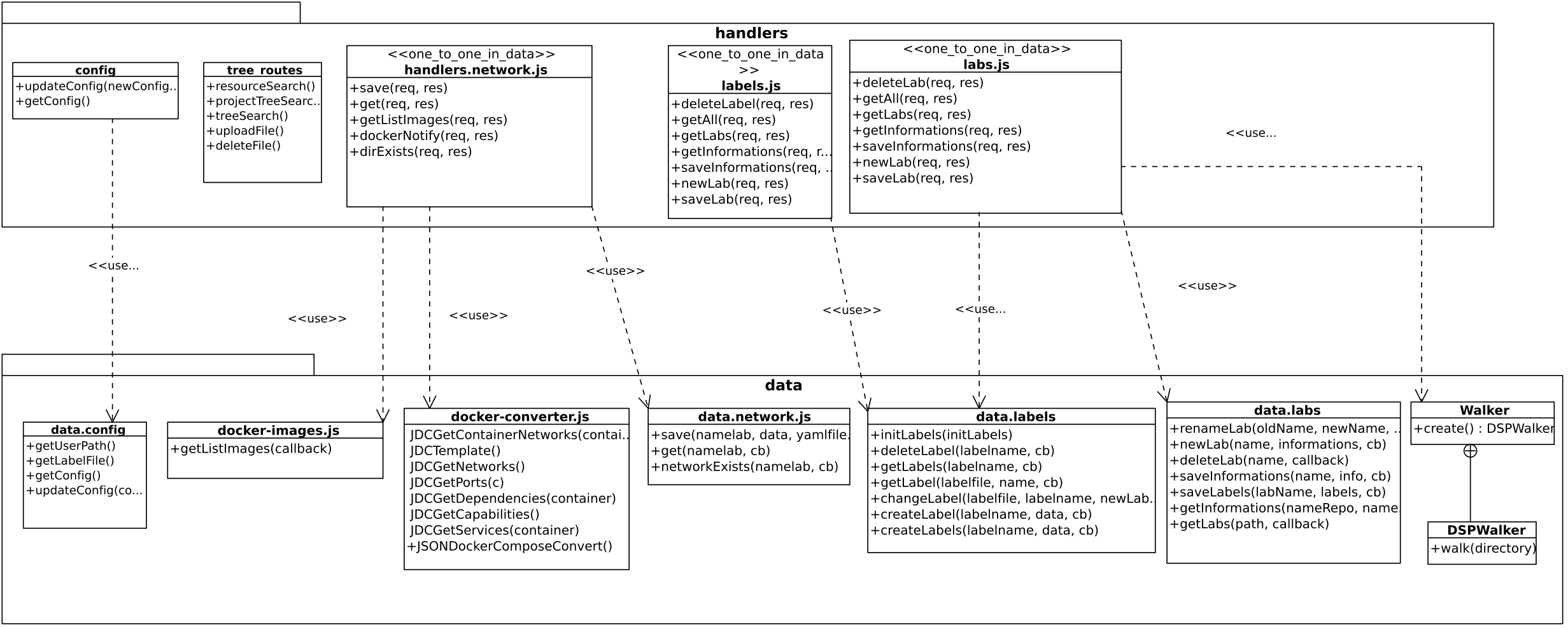
Handler layer is described in Server-side Paragraph.
WebSocket communication
DSP also uses WebSocket protocol to manage communications that requires server notifies to client:
-
During the installation it’s important to notify the user about the installation process status;
-
During any docker command execution user is notified about the process status and if there is some error;
-
During git repository update or download the user is notified about the git pull / clone process status.
A top level view of WebSocket client server is showed in this Figure:
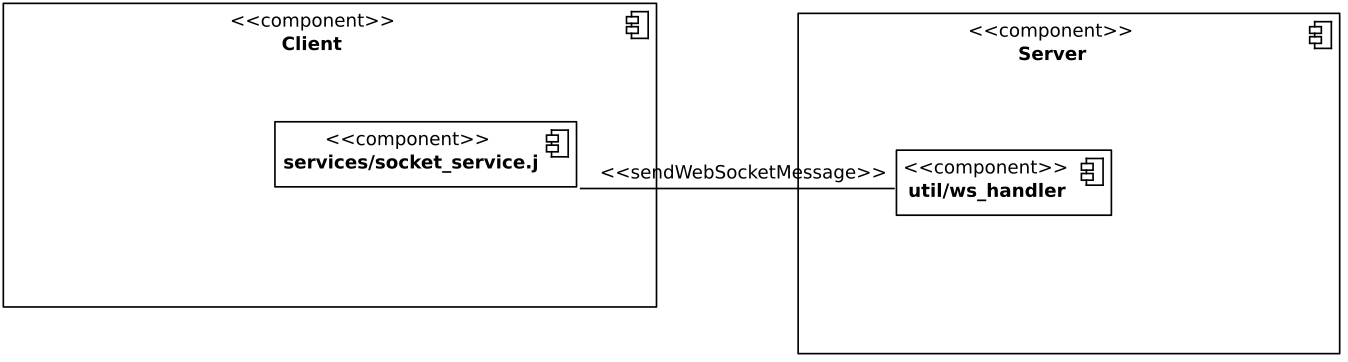
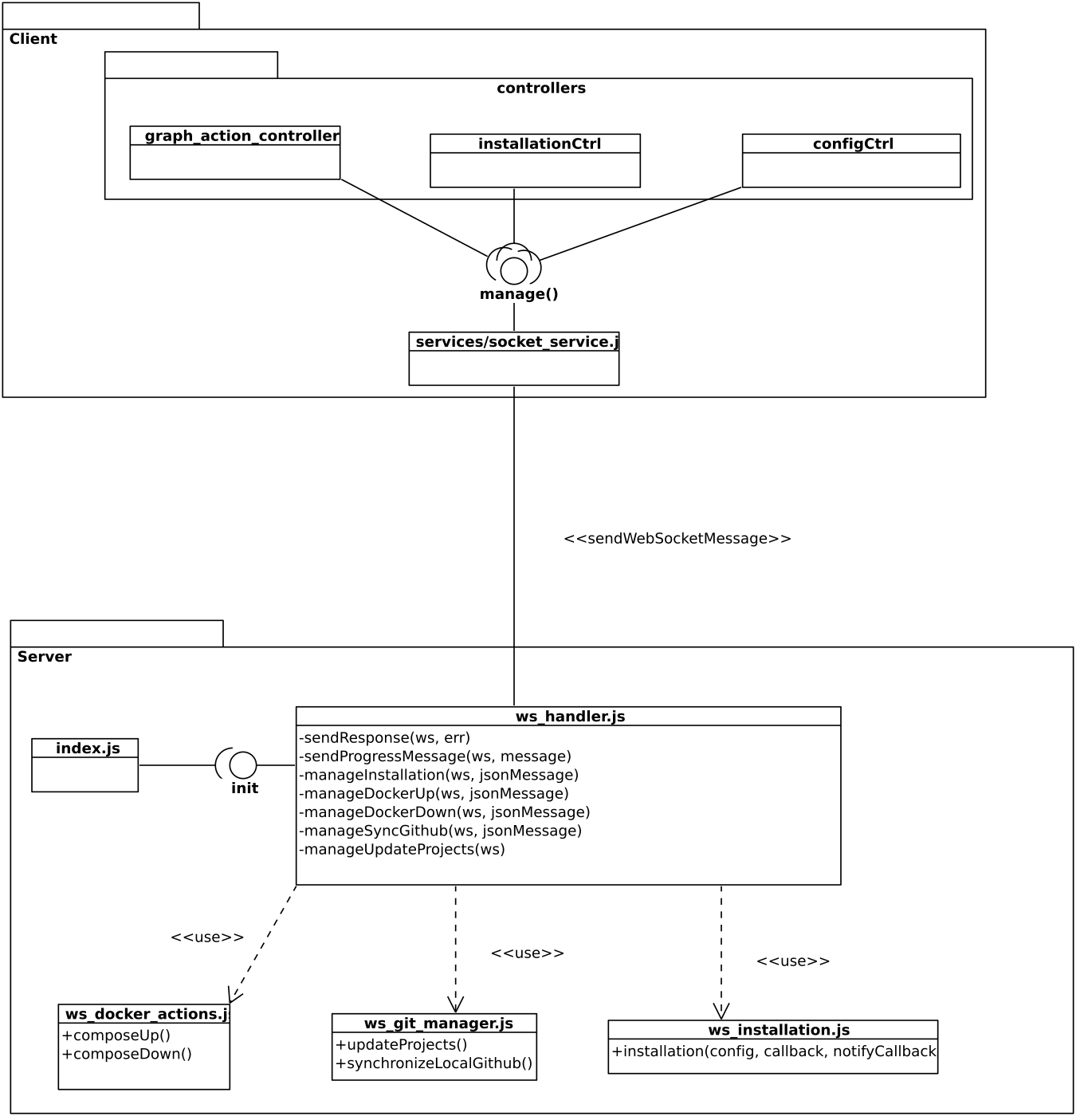
Client element that send messages to WebSocketServer is socket_service. Messages are captured by ws_handler on server-side and are managed. By expanding this view it’s possible to observe a more thorough vision of the communication:
Client side
socket_service offers a manage method that is use by all controllers that want to initialize a web socket communication:
function SocketService() {
  var socket;
  console.log(this);
  this.manage = function manage(jsonToSend, handlerMessage) {
      if (socket) socket.close();
      socket = new WebSocket('ws://localhost:8080');
      socket.onopen = function() {
        //Send compose up
        socket.send(jsonToSend);
        console.log(socket);
      }
      socket.onmessage  = handlerMessage;
  };
}
Controllers that use socket_service are:
-
graph_action_controller: when docker-compose command are sent;
-
installationCtrl: to start installation operation;
-
configCtrl: to update git repositories.
Server side {#server-side .unnumbered}
index.js facade module initializes the WebSocketServer when the user starts the application by using init method of ws_handler:
\\index.js
...
// Initialize web socket handler
webSocketHandler.init(server);

server.listen(port, () => {
  if (localConfig.config.test) { log.warn('Testing mode enabled'); }
  log.info(`Server listening on port${port}`);
});
....
init method creates a new websocket server and defines message protocol:
exports.init = function init(server) {
  const wss = new websocket.server({
    server,
    permessagedeflate: false,
  });

  wss.on('connection', (ws) => {
    ws.on('message', (message) => {
      const jsonmessage = json.parse(message);
      switch (jsonmessage.action) {
        case 'installation' :
          manageinstallation(ws, jsonmessage);
          break;
        case 'docker_up' :
          managedockerup(ws, jsonmessage);
          break;
        case 'docker_down' :
          managedockerdown(ws, jsonmessage);
          break;
        case 'synchronize_github' :
          managesyncgithub(ws, jsonmessage);
          break;
        case 'update_projects' :
          manageupdateprojects(ws, jsonmessage);
          break;
        default:
          log.error(`in web socket message:
            ${jsonmessage.action} is no registered`);
          sendresponse(ws,
            new error(`${jsonmessage.action} is not registered`));
          break;
      }
    });
  });
};
When a connection is done (on event) and a message is received (message event) received json message is parsed and action parameter it’s analyzed; then ws_handler calls his private methods to manage different client requests. These private methods serves the request by using other modules that interpret json parsed message parameters and complete the request (for example in manageInstallation ws_installation.js module is used, while in managedockerup ws_docker_actions.js module is used).