

It is possible to check the PS4 game update pkg directly from the PlayStation servers,
Providing the "Title ID" and "PS4 HMAC-SHA256 Patch Pkg URL Key"
Download: PS4 pkg update
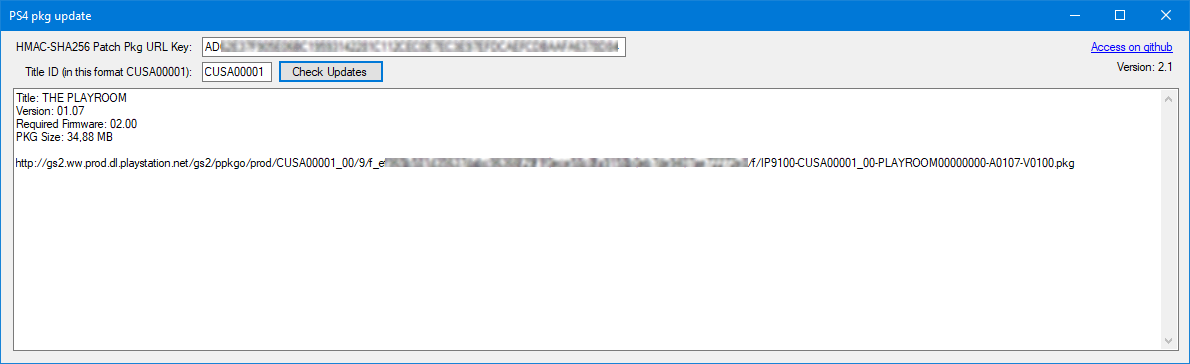

Enter the "Title ID" and "HMAC-SHA256 Patch Pkg URL Key" into their respective fields.
Click "Check Updates" to retrieve information about the game update.
- Open Command Prompt and navigate to the directory where
ps4_pkg_update_console.exeis located:
cd path/to/ps4_pkg_update_console- Run the program with the required arguments:
ps4_pkg_update_console.exe -key <HMAC-SHA256 Patch Pkg URL Key> -title <Title_ID>- Open a terminal and navigate to the directory where
ps4_pkg_update_update.pyis located:
cd path/to/ps4_pkg_update- Execute the program with the following command, providing the necessary arguments:
python ps4_pkg_update.py -key <HMAC-SHA256 Patch Pkg URL Key> -title <Title_ID>- Download the
linux-x64.rarfile and extract it to a directory on your Linux machine. - Open a terminal and navigate to the directory where
ps4_pkg_update_consoleis located:
cd path/to/linux-x64/ps4_pkg_update- Make the executable file
ps4_pkg_update_consoleexecutable, if necessary:
chmod +x ps4_pkg_update_console- Execute the program with the following command, providing the necessary arguments:
./ps4_pkg_update_console -key <HMAC-SHA256 Patch Pkg URL Key> -title <Title_ID>
Replace <HMAC-SHA256 Patch Pkg URL Key> and <Title_ID> with actual values.
Make sure to replace path/to/ps4_pkg_update_console and path/to/linux-x64/ps4_pkg_update with the actual paths where ps4_pkg_update_console executable is located on your Windows and Linux systems respectively.