GoVibe is an open-source remote control system that lets you connect from an iPhone or iPad to live terminal and iOS Simulator sessions running on a Mac host app.
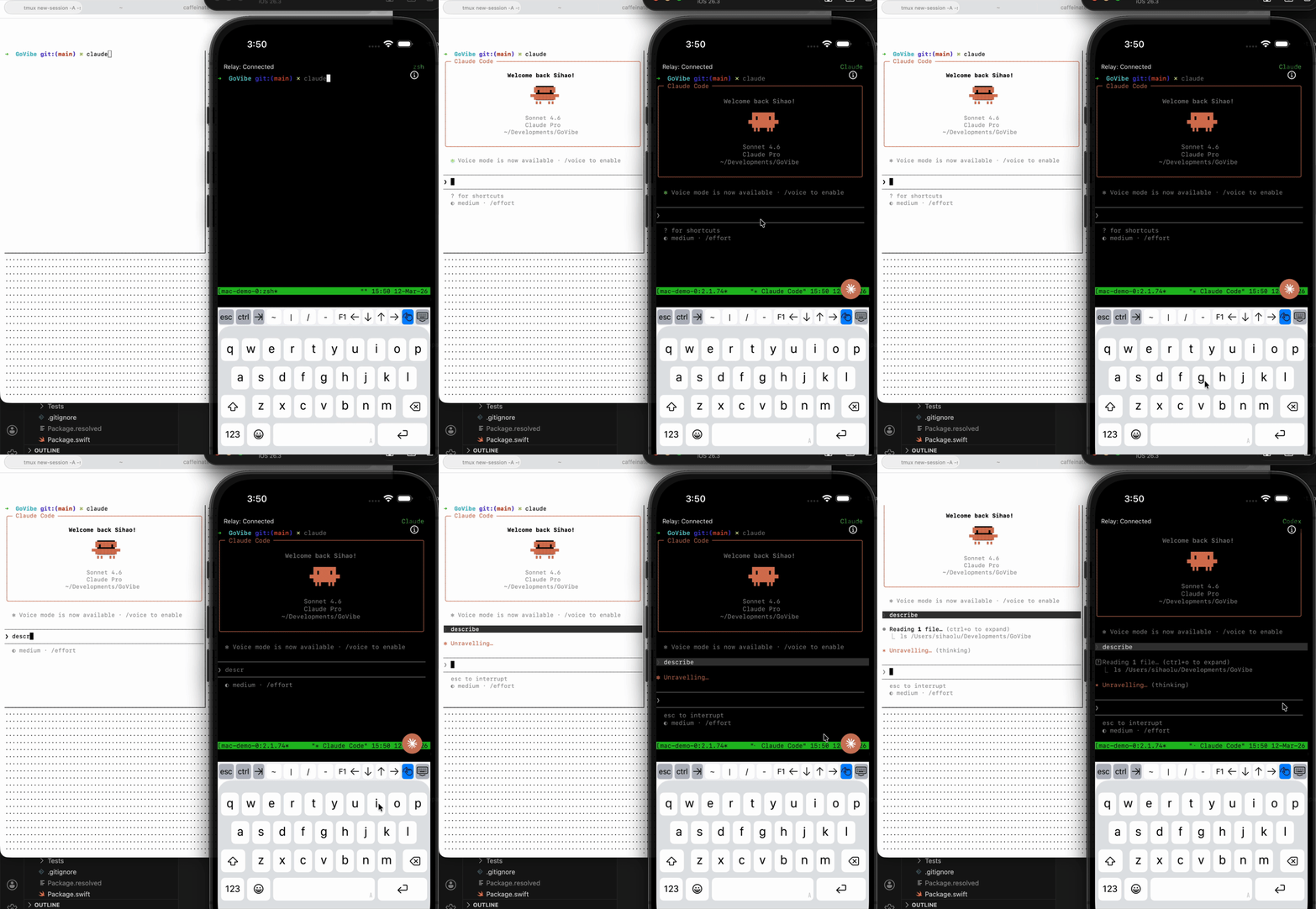
| Claude, Codex and Gemini on the go | View and control Simulator on the go |
|---|---|
 |
 |
iOS App ──WebSocket──▶ Cloud Run Relay ◀──WebSocket── macOS Host App (GoVibeHost)
                              │
                    Firebase Auth + Functions

                          (control plane)
The iOS app connects to a WebSocket relay hosted on Google Cloud Run. The macOS host app connects to the same relay service and exposes hosted terminal and simulator sessions. Firebase provides anonymous auth and a lightweight session-management API. No credentials are stored in the repo.
GoVibe/
├── ios/
│   ├── GoVibe.xcworkspace         # Open this in Xcode
│   ├── GoVibe/                    # iOS app target (thin wrapper)
│   ├── GoVibeFeaturePackage/      # All shared Swift feature code
│   ├── GoVibeHostApp/             # macOS host app target
│   ├── GoVibeHostCorePackage/     # Shared host/runtime code
│   ├── Config/
│       ├── Debug.xcconfig
│       └── Release.xcconfig
│   ├── GoVibe/
│   │   ├── GoogleService-Info.plist.template   # Copy to GoogleService-Info.plist locally
│   │   └── GoogleService-Info.plist            # iOS Firebase config (gitignored)
│   └── GoVibeHostApp/
│       ├── GoogleService-Info.plist.template   # Copy to GoogleService-Info.plist locally
│       └── GoogleService-Info.plist            # macOS Firebase config (gitignored)
├── backend/
│   └── functions/                 # Firebase Functions (Node.js / TypeScript)
├── infra/
│   └── cloud-run-relay/           # WebSocket relay service (Node.js)
├── shared/
│   └── protocol/                  # Canonical message schemas
├── firestore.rules
└── firebase.json
| Tool | Version |
|---|---|
| Xcode | 16+ |
| Swift | 5.9+ |
| Node.js | 22+ |
| Firebase CLI | npm install -g firebase-tools |
| Google Cloud CLI | install guide |
This path lets you run everything locally without a live Google Cloud account.
cd backend/functions
npm install
npm run build
cd ../..
firebase emulators:start --only functions,firestore
The Functions emulator starts on http://127.0.0.1:5001 and Firestore on port 8080.
cd infra/cloud-run-relay
npm install
node index.js
# Relay listens on ws://localhost:8080 by default; check index.js for the PORT env var- Copy
ios/GoVibeHostApp/GoogleService-Info.plist.templatetoios/GoVibeHostApp/GoogleService-Info.plist, then replace it with the real Firebase file for the macOS host target. - Open
ios/GoVibe.xcodeprojorios/GoVibe.xcworkspacein Xcode. - Build and run the
GoVibeHostmacOS target. - In the host onboarding flow:
- confirm the host appears under your signed-in account
- set the relay WebSocket URL to
ws://localhost:8080/relay - grant Accessibility and Screen Recording
- keep the default shell path unless you need a custom shell
- After onboarding, create or start the terminal/simulator sessions you want to expose from the host dashboard.
- Open
ios/GoVibe.xcworkspacein Xcode. - Edit
ios/Config/Shared.xcconfigand set:GOVIBE_GCP_REGION = us-central1GOVIBE_GCP_PROJECT_ID = <project-id>GOVIBE_GCP_RELAY_HOST = localhost:8080
- Run the iOS app.
- Sign in to the iOS app with the same account; your Mac host should appear automatically.
- Refresh sessions if needed. Available sessions are discovered automatically from the host control channel.
- Go to console.firebase.google.com and create a new project.
- Enable Authentication → Anonymous sign-in.
- Enable Firestore in production mode.
- Enable Functions (requires Blaze pay-as-you-go plan).
- In the Firebase Console, add an iOS app. Use whatever bundle ID you like.
- Copy
ios/GoVibe/GoogleService-Info.plist.templatetoios/GoVibe/GoogleService-Info.plist, then replace it with the real iOSGoogleService-Info.plist:This file is gitignored — never commit it.ios/GoVibe/GoogleService-Info.plist - Copy
ios/GoVibeHostApp/GoogleService-Info.plist.templatetoios/GoVibeHostApp/GoogleService-Info.plist, then replace it with the real macOS hostGoogleService-Info.plist:This file is gitignored — never commit it.ios/GoVibeHostApp/GoogleService-Info.plist
firebase functions:secrets:set SESSION_TOKEN_SECRET
firebase functions:secrets:set TURN_SECRET
firebase functions:secrets:set RELAY_TOKEN_SECRETfirebase use <your-project-id>
firebase deploy --only functions,firestoreYou'll need the Firebase project ID and region for iOS config (GOVIBE_GCP_PROJECT_ID, GOVIBE_GCP_REGION).
cd infra/cloud-run-relay
gcloud run deploy govibe-relay \
  --source . \
  --region us-west1 \
  --allow-unauthenticated \
  --set-env-vars RELAY_TOKEN_SECRET=<same-secret-as-functions> \
  --project <your-project-id>
Note the service URL printed at the end, then copy only its host into GOVIBE_GCP_RELAY_HOST (for example, from https://abc-uw.a.run.app, use abc-uw.a.run.app).
- Open
ios/GoVibe.xcodeprojorios/GoVibe.xcworkspacein Xcode. - Build and run the
GoVibeHostmacOS target. - In the onboarding flow:
- keep the host signed in and online for automatic discovery
- set Relay to
wss://<your-cloud-run-host>/relay - grant Accessibility and Screen Recording
- optionally change the default shell path
- Create the hosted terminal and/or simulator sessions you want this Mac to serve.
Set these in ios/Config/Shared.xcconfig, then build and run on device:
GOVIBE_GCP_REGION = <region>(for example,us-west1)GOVIBE_GCP_PROJECT_ID = <your-project-id>GOVIBE_GCP_RELAY_HOST = <your-cloud-run-host>(no scheme, no path)
The app assembles:
- API base:
https://<region>-<project>.cloudfunctions.net/api - Relay WS base:
wss://<relay-host>/relay
After signing in on both devices with the same account, the app discovers your Mac host automatically and syncs available sessions.
| Variable | Used by | Description |
|---|---|---|
GOVIBE_GCP_REGION |
iOS app | GCP region used to assemble Functions URL, e.g. us-west1. |
GOVIBE_GCP_PROJECT_ID |
iOS app | Firebase/GCP project ID used to assemble Functions URL. |
GOVIBE_GCP_RELAY_HOST |
iOS app | Cloud Run host only (no scheme/path), e.g. govibe-relay-xxxxx-uw.a.run.app. |
| Host ID | macOS Host app | Stable machine identifier used internally for discovery, ownership, and relay room scoping. |
| Relay URL | macOS Host app | Full relay WebSocket URL, e.g. wss://<service>.<region>.run.app/relay, configured in host onboarding. |
| Shell Path | macOS Host app | Default shell launched for new terminal sessions on the host. |
For iOS, config comes from ios/Config/Shared.xcconfig and is embedded into the app Info.plist at build time. For the macOS host app, relay URL and default shell are configured in-app and stored locally on that Mac.
The iOS app intentionally crashes at startup with a descriptive error if any required GOVIBE_GCP_* value is empty or still set to a DUMMY_* placeholder.
All endpoints are served from the Firebase Functions HTTPS app (api export).
| Method | Path | Description |
|---|---|---|
POST |
/session/create |
Create a new terminal session |
POST |
/session/discover |
Discover active sessions for a device |
POST |
/session/resume |
Resume an existing session |
POST |
/session/close |
Close a session |
- Fork the repo and create a branch.
- Follow the local dev setup above.
- Open a pull request with a clear description of the change.
- Never commit
ios/GoVibe/GoogleService-Info.plist,ios/GoVibeHostApp/GoogleService-Info.plist, or any file containing API keys.