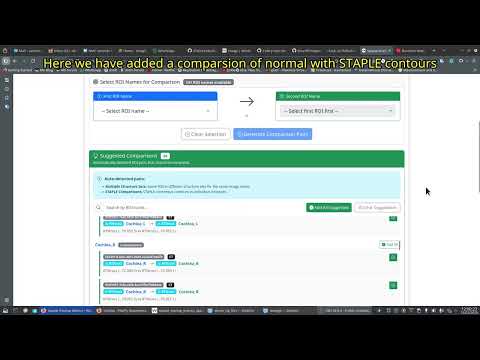

COMET (Contour Metrics) is an open source application designed to provide a graphical user interface for computation of spatial overlap metrics between structures delineated in radiotherapy. This application is built using Django and provides users with a web interface to:
- Upload a set of DICOM files with images and structureset files.
- Automatically processes the DICOM data to extract information on the regions of interest in the structureset files.
- Converts the dicom structureset regions of interest into compressed nifti files.
- Computes STAPLE contours from a set of contours.
- Computes spatial overlap metrics between arbitrary pair of contours as well as between the STAPLE contour.
- Allows users to download the metrics for further downstream analysis.
- Visualize NIfTI images and ROI overlays using two methods:
- WebGL Viewer (niivue): GPU-accelerated, instant loading, interactive navigation
- Matplotlib Viewer: Traditional static image generation
The system allows uses upload DICOM files in a zip archive. It will automatically extract and validate the DICOM files and save them in a structured fashion.
The system will also read all ROI contour information and store this information in the database. This allows us to match ROIs across structuresets for the same patient as well find groups of ROIs in multiple patients.
The system can automatically convert RT Image and associated structureset series into NIFTI files. In order to optimize space, these nifti files are stored in a compressed format.
If a patient has more than one structureset available with the same ROI then a STAPLE contour can be computed for the ROI. This STAPLE contour will be saved as a nifti file and can be visualized as other ROIs.
COMET computes 12 spatial overlap metrics between binary contour pairs. All metrics are computed from NIfTI volumes with proper spacing consideration.
-
DSC (Dice Similarity Coefficient)
- Range: [0, 1], where 1 = perfect overlap
- Formula:
DSC = 2|A ∩ B| / (|A| + |B|) - Measures volumetric overlap between two structures
-
Jaccard Similarity Coefficient
- Range: [0, 1], where 1 = perfect overlap
- Formula:
Jaccard = |A ∩ B| / |A ∪ B| - Alternative overlap metric, more sensitive to size differences than DSC
-
HD95 (Hausdorff Distance 95th Percentile)
- Units: mm
- Computes maximum surface distance per direction, then takes 95th percentile
- Measures worst-case boundary disagreement (excluding outliers)
- Lower values indicate better agreement
-
MSD (Mean Surface Distance)
- Units: mm
- Weighted average of mean distances from each surface to the other
- Weighting based on number of surface points in each direction
- Measures average boundary disagreement
-
APL (Added Path Length)
- Units: mm
- Slice-wise computation of contour length in reference missing from test
- Uses 3mm distance threshold by default
- Measures total missing contour length
-
Surface DSC
- Range: [0, 1], where 1 = perfect surface agreement
- Uses τ = 3mm tolerance by default
- Measures surface overlap within acceptable deviation
- Reference: Nikolov et al., J Med Internet Res 2021;23(7):e26151
-
VOE (Volume Overlap Error)
- Range: [0, 1], where 0 = perfect overlap
- Formula:
VOE = 1 - Jaccard - Inverse of Jaccard coefficient
-
VI (Variation of Information)
- Information-theoretic measure of segmentation disagreement
- Based on mutual information between binary volumes
- Lower values indicate better agreement
-
Cosine Similarity
- Range: [-1, 1], where 1 = identical
- Measures angular similarity between flattened volumes
- Useful for overall shape comparison
-
MDC (Mean Distance to Conformity)
- Units: mm
- Average of OMDC and UMDC
- Measures average distance from symmetric difference to nearest boundary
-
OMDC (Overcontouring Mean Distance to Conformity)
- Units: mm
- Mean distance from overcontoured voxels to reference boundary
- Uses axis-aligned distance calculation
-
UMDC (Undercontouring Mean Distance to Conformity)
- Units: mm
- Mean distance from undercontoured voxels to test boundary
- Uses axis-aligned distance calculation
- Surface Extraction: Binary erosion method for efficient surface voxel identification
- Distance Computation: Euclidean distance transform for accurate distance measurements
- Spacing Awareness: All distance metrics account for voxel spacing (anisotropic support)
- Edge Cases: Handles empty volumes, single-voxel structures, and non-overlapping regions
Metrics have been validated against PlatiPy reference implementation:
- Perfect Match: DSC, Surface DSC, APL (0.0mm difference)
- Minor Differences: HD95 (~2.3mm), MSD (~1.2mm) due to different surface extraction methods
- See
compare_platipy_metrics.pyfor QA validation script
- STAPLE: Warfield et al., IEEE TMI 2004
- Surface DSC: Nikolov et al., J Med Internet Res 2021
- Implementation: Based on draw-client-2.0 spatial overlap module
The easiest way to run COMET is using Docker Compose with the pre-built image from AWS ECR Public.
- Docker and Docker Compose installed
- At least 4GB RAM available for containers
Create an empty folder in a directory where you wish to keep the application.
cp .env.docker .envCreate a secret key for django. To do this, please go to the website https://djecrety.ir/ and generate a secret key. Copy this and paste it in the DJANGO_SECRET_KEY variable.
Edit the env file with your settings and add appropriate passwords etc.
# COMET - Contour Metrics Docker Environment Configuration
# Copy this file to .env and update with your production values
# These variable names match what the application expects per sampleenv.txt

# ============================================
# Django Core Settings
# ============================================
DJANGO_SECRET_KEY=your-secret-key-here-change-in-production
DJANGO_DEBUG=False
DJANGO_ALLOWED_HOSTS=localhost,127.0.0.1,0.0.0.1,your-domain.com

# ============================================
# Database Configuration (PostgreSQL)
# ============================================
DJANGO_DB_ENGINE=django.db.backends.postgresql
DJANGO_DB_NAME=comet_db
DJANGO_DB_USER=comet
DJANGO_DB_PASSWORD=comet_secure_db_password
DJANGO_DB_HOST=comet-db
DJANGO_DB_PORT=5432

# ============================================
# RabbitMQ / Celery Configuration
# ============================================
DJANGO_CELERY_BROKER_URL=amqp://comet:cometpassword@comet-rabbitmq:5672//
DJANGO_CELERY_RESULT_BACKEND=django-db

# RabbitMQ Admin Credentials (for management UI)
RABBITMQ_DEFAULT_USER=comet
RABBITMQ_DEFAULT_PASS=comet_secure_mq_password

# ============================================
# Optional: Port Mappings (for docker-compose overrides)
# ============================================
# WEB_PORT=8000
# RABBITMQ_PORT=5672
# RABBITMQ_MANAGEMENT_PORT=15672
# DB_PORT=5432

# ============================================
# Django Superuser Configuration
# ============================================

DJANGO_SUPERUSER_USERNAME=admin
DJANGO_SUPERUSER_PASSWORD=your-secure-password
DJANGO_SUPERUSER_EMAIL=admin@example.comYou can copy the docker compse.yml file in this repository and use it or copy and paste the following in a new file. Please remeber to save it as a file with the appropriate name (docker compose.yml).
services:
  # PostgreSQL Database
  comet-db:
    image: postgres:17
    container_name: comet-db
    restart: unless-stopped
    environment:
      POSTGRES_DB: ${DJANGO_DB_NAME:-comet_db}
      POSTGRES_USER: ${DJANGO_DB_USER:-comet}
      POSTGRES_PASSWORD: ${DJANGO_DB_PASSWORD:-cometpassword}
    volumes:
      - ./data/postgres:/var/lib/postgresql/data
    ports:
      - "${DB_PORT:-5432}:5432"
    healthcheck:
      test: ["CMD-SHELL", "pg_isready -U ${DJANGO_DB_USER:-comet} -d ${DJANGO_DB_NAME:-comet_db}"]
      interval: 5s
      timeout: 5s
      retries: 5

  # RabbitMQ Message Broker
  comet-rabbitmq:
    image: rabbitmq:4.2-management
    container_name: comet-rabbitmq
    restart: unless-stopped
    environment:
      RABBITMQ_DEFAULT_USER: ${RABBITMQ_DEFAULT_USER:-comet}
      RABBITMQ_DEFAULT_PASS: ${RABBITMQ_DEFAULT_PASS:-cometpassword}
    volumes:
      - comet_rabbitmq_data:/var/lib/rabbitmq
    ports:
      - "${RABBITMQ_PORT:-5672}:5672"      # AMQP port
      - "${RABBITMQ_MANAGEMENT_PORT:-15672}:15672"  # Management UI
    healthcheck:
      test: rabbitmq-diagnostics -q ping
      interval: 5s
      timeout: 5s
      retries: 5

  # Django Web Application
  comet-web:
    image: public.ecr.aws/chavi/comet:latest
    container_name: comet-web
    restart: unless-stopped
    env_file:
      - .env
    environment:
      # Override host settings for Docker network
      DJANGO_DB_HOST: comet-db
      DJANGO_CELERY_BROKER_URL: amqp://${RABBITMQ_DEFAULT_USER:-comet}:${RABBITMQ_DEFAULT_PASS:-cometpassword}@comet-rabbitmq:5672//
    volumes:
      - ./data/media:/app/media
      - comet_static:/app/staticfiles
    ports:
      - "${WEB_PORT:-8000}:8000"
    depends_on:
      comet-db:
        condition: service_healthy
      comet-rabbitmq:
        condition: service_healthy
    healthcheck:
      test: ["CMD", "curl", "-f", "http://localhost:8000/"]
      interval: 30s
      timeout: 10s
      retries: 3

  # Celery Worker
  comet-celery:
    image: public.ecr.aws/chavi/comet:latest
    container_name: comet-celery
    restart: unless-stopped
    command: celery -A spatialmetrics worker -l ${CELERY_WORKER_LOG_LEVEL:-info} --concurrency ${CELERY_WORKER_CONCURRENCY:-4}
    env_file:
      - .env
    environment:
      # Override host settings for Docker network
      DJANGO_DB_HOST: comet-db
      DJANGO_CELERY_BROKER_URL: amqp://${RABBITMQ_DEFAULT_USER:-comet}:${RABBITMQ_DEFAULT_PASS:-cometpassword}@comet-rabbitmq:5672//
    volumes:
      - ./data/media:/app/media
    depends_on:
      comet-db:
        condition: service_healthy
      comet-rabbitmq:
        condition: service_healthy
      comet-web:
        condition: service_healthy

volumes:
  comet_rabbitmq_data:
comet_static:docker-compose up -dThe application will be available at http://localhost:8000
Access the RabbitMQ management interface at http://localhost:15672
Default credentials from .env:
- Username:
comet - Password: (value of
RABBITMQ_DEFAULT_PASS)
# Web application logs
docker-compose logs -f comet-web

# Celery worker logs
docker-compose logs -f comet-celery

# All services
docker-compose logs -fdocker-compose downTo remove all data (volumes):
docker-compose down -vThe Docker deployment is configured with the following settings:
| Service | Workers | Timeout | Description |
|---|---|---|---|
| Gunicorn (Web) | 4 workers | 300s (5 min) | Handles HTTP requests including large DICOM uploads |
| Celery (Tasks) | 4 concurrent | N/A | Background processing for STAPLE, metrics computation |
Why 5-minute timeout?
- DICOM file uploads and conversions can take 30-120 seconds
- STAPLE computation triggers may need time to queue tasks
- The timeout prevents
504 Gateway Timeouterrors during long operations
Note: Heavy computations (STAPLE, spatial metrics) run in Celery workers, so the web server responds quickly. The extended timeout handles edge cases where synchronous processing occurs.
To build locally instead of using the AWS image:
# Clone the repository
git clone <repository-url>
cd comet

# Copy and edit environment file
cp .env.docker .env

# Build and start with local Dockerfile
docker-compose -f docker-compose.yml up --build -dCOMET would not be possible without the hard work of several people who have selflessly contributed open source code for the humankind. While the list of packages are available in the requirements.txt file, we would like to specifically acknowledge the following projects:
| Package | Citation | DOI/URL |
|---|---|---|
| Django | Django Software Foundation. Django Web Framework. https://djangoproject.com | https://djangoproject.com |
| Celery | Ask Solem & contributors. Celery: Distributed Task Queue. https://docs.celeryq.dev | https://github.com/celery/celery |
| RabbitMQ | Pivotal Software, Inc. RabbitMQ: Message Broker. https://www.rabbitmq.com | https://www.rabbitmq.com |
| PostgreSQL | The PostgreSQL Global Development Group. PostgreSQL: The World's Most Advanced Open Source Relational Database. https://www.postgresql.org | https://www.postgresql.org |
| SimpleITK | Lowekamp BC, Chen DT, Ibáñez L, Blezek D. The Design of SimpleITK. Front. Neuroinform. 2013;7:45. | https://doi.org/10.3389/fninf.2013.00045 |
| Platipy | Chlap P, Finnegan RN. PlatiPy: Processing Library and Analysis Toolkit for Medical Imaging in Python. Journal of Open Source Software. 2023;8(86):5374. | https://doi.org/10.21105/joss.05374 |
| scikit-image | van der Walt S, Schönberger JL, Nunez-Iglesias J, et al. scikit-image: image processing in Python. PeerJ. 2014;2:e453. | https://doi.org/10.7717/peerj.453 |
| SciPy | Virtanen P, Gommers R, Oliphant TE, et al. SciPy 1.0: Fundamental Algorithms for Scientific Computing in Python. Nature Methods. 2020;17(3):261-272. | https://doi.org/10.1038/s41592-019-0686-2 |
| NumPy | Harris CR, Millman KJ, van der Walt SJ, et al. Array programming with NumPy. Nature. 2020;585(7825):357-362. | https://doi.org/10.1038/s41586-020-2649-2 |
| pandas | McKinney W. Data Structures for Statistical Computing in Python. Proceedings of the 9th Python in Science Conference. 2010:56-61. | https://doi.org/10.25080/Majora-92bf1922-00a |
| Matplotlib | Hunter JD. Matplotlib: A 2D Graphics Environment. Computing in Science & Engineering. 2007;9(3):90-95. | https://doi.org/10.1109/MCSE.2007.55 |
| NiiVue | NiiVue Contributors. NiiVue: WebGL2-based Medical Image Viewer. https://github.com/niivue/niivue | https://github.com/niivue/niivue |