
This project is a modular interaction system for Unreal Engine. The system includes:
- Doors: Normal and locked, with modular events
- Notes: Modular note system configurable directly in the level
- Item & Inventory: Pickup system including unique items like flashlight
- Chest System: Place and reveal items in-game
- Light Switch System: Fully modular lights
- Highlight & Custom Interaction Text
The system is fully modular and easy to extend. It is also open-source for anyone to use and improve.
You can either download the project from GitHub or use the direct download link provided below.
Option 1 – GitHub:
git clone https://github.com/Batin-dev/ue5-fps-interaction.git
Option 2 – Direct Download: Download the Project
After downloading or cloning, simply open the .uproject file in Unreal Engine 5 or later.
The project will open immediately.
Note: The project might be slightly large because it includes Unreal Engine Starter Content.
You can place blueprints directly into your level. All interactions are managed through base classes, making it easy to customize child actors.
-
Description: Parent class for all interactable objects. This class includes an interface with an
Interactfunction that can be overridden in child blueprints. -
Features:
-
Interaction Text (fully customizable per child using
SetInteractionText) -
Outline / Highlight system
ActivateOutlineandDeactivateOutlinecustom events are available.- No need to manually set up outlines; all meshes without the NoOutline tag automatically get highlighted.
-
Interactfunction (added by double-clicking the Interact interface in the Interfaces section and overridden in child blueprints for custom actions)
-
-
Usage: Create child blueprints and:
- Override the
Interact()function for custom behavior - Use
SetInteractionTextto define child-specific interaction text
- Override the
-
Description: Modular system for normal and locked doors.
-
Customization Functions:
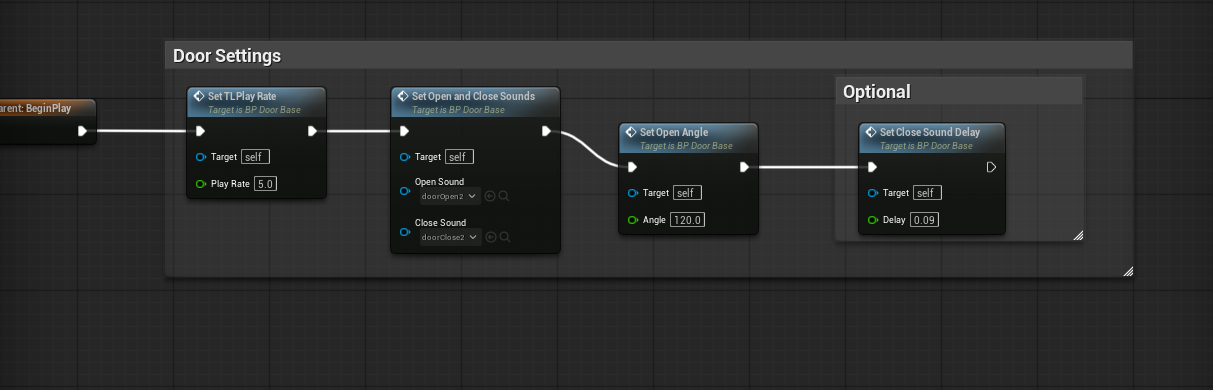
SetTLPlayRate→ Adjusts door opening/closing speedSetOpenAngle→ Sets the door's opening angleSetCloseSoundDelay→ Delay before the closing sound plays (experimental)SetOpenAndCloseSounds→ Sets custom open and close sounds
-
Events:
-
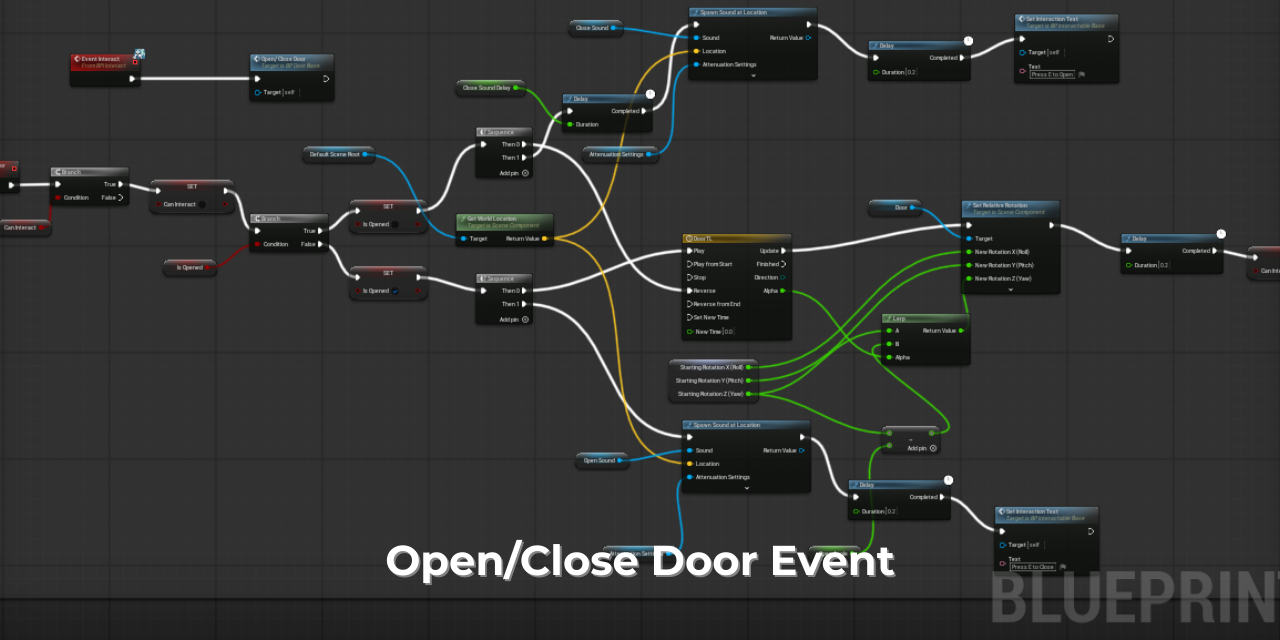
Open/Close Door Events → Handles door opening and closing; already present in BP_Door_Base and linked to the
Interactfunction (BPI), can be overridden in child blueprints for custom behavior -
Child blueprints can leave the functions empty to use default values, or override them for custom behavior
Open/Close Door Event Image:
-
Description: Base class for locked doors, extending BP_Door_Base.
-
Events:
-
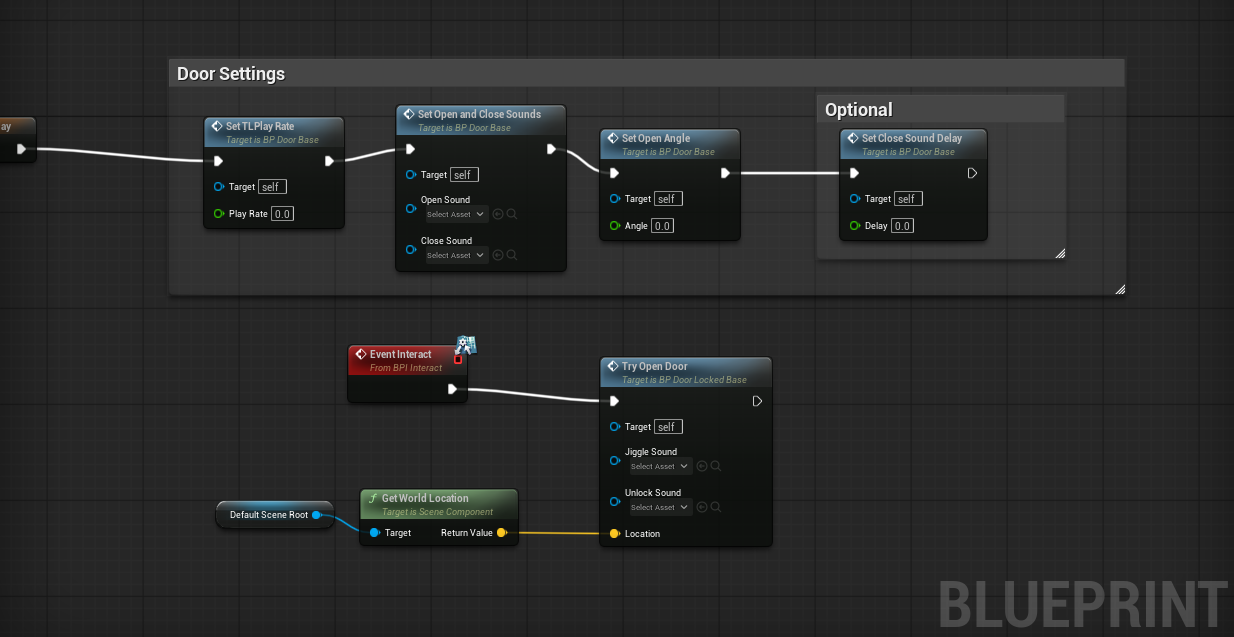
TryOpenDoor→ Attempts to open the door by checking for the correct key.- KeyID can be set directly in the level/map.
- Child blueprints can override this event to customize mesh, sounds, or other behavior.
- Leaving
TryOpenDoorempty in child blueprints will use the default behavior.
-
-
Customization Functions:
- All customization functions from BP_Door_Base (
SetTLPlayRate,SetOpenAngle,SetCloseSoundDelay,SetOpenAndCloseSounds) are also available here.
- All customization functions from BP_Door_Base (
Note: In child blueprints, make sure to call the TryOpenDoor event inside the Interact function (BPI)
Example usage in child class:
-
Description: Base class for notes. This class is simple and not heavily modular.
-
Usage / Customization:
- You can create child blueprints to use different meshes if desired.
- The note's content can be changed by modifying the
Note Textvariable directly in the level/map.
-
Events:
- Optional: You can call custom events inside the
Interactfunction (BPI) in child blueprints if additional interaction logic is needed.
- Optional: You can call custom events inside the
-
Description: Simple light switch system.
-
Usage / Customization:
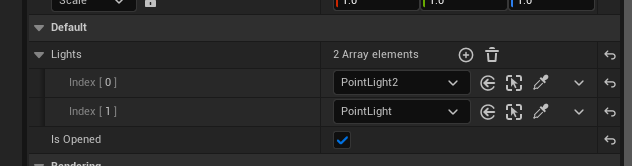
- Place the blueprint in your level and assign lights to the
Lightsarray directly from the map. - You can set the initial state of each light using the
IsOpenedvariable in the map (true = on, false = off).
- Place the blueprint in your level and assign lights to the
-
Notes:
- Very lightweight and straightforward; minimal setup required.
Example usage in level:
-
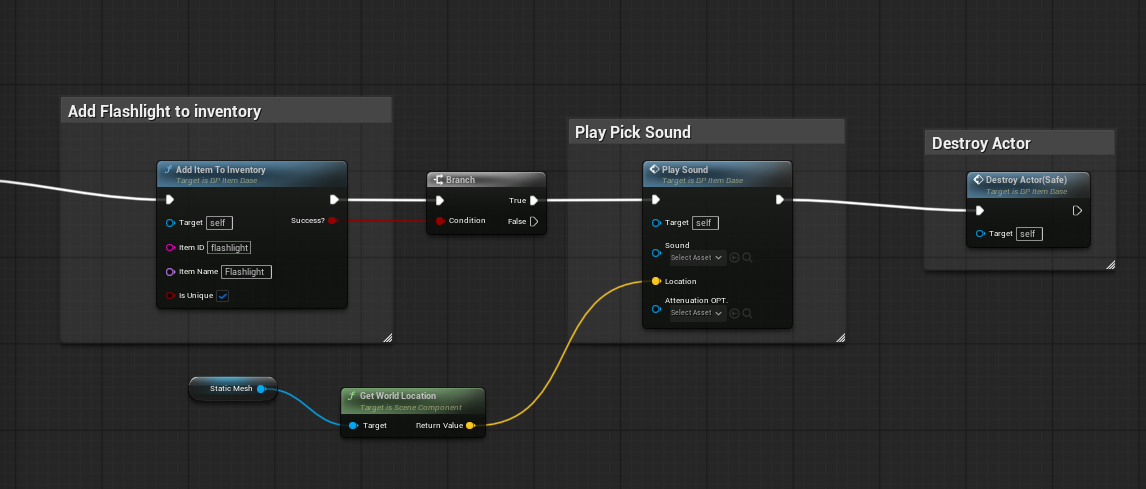
Description: Base class for all pickable items.
-
Usage / Features:
-
AddToInventoryfunction → Adds the item to the inventory.- You can define whether the item is unique (only one can be picked) or stackable.
-
DestroyActor (Safe)→ Removes the item from the world after pickup. -
PlaySoundevent → Plays a pickup sound. If no sound is specified, default values are used. -
The
Interactfunction (BPI) in the base class is empty; child blueprints can call these functions when interacted with.
-
Example usage in flashlight:

This project is open-source! Contributions are welcome:
- Fork the repository
- Create your feature branch (
git checkout -b feature/AmazingFeature) - Commit your changes (
git commit -m "Add some AmazingFeature") - Push to the branch (
git push origin feature/AmazingFeature) - Open a Pull Request
Unlicense – Use however you like, no restrictions!
- For bug reports, feature requests, or questions, contact me on Discord: batin.cpp
Made with ❤️ for the Unreal Engine community. ⭐ If this project helped you, please consider giving it a star! ⭐