Releases: AstroNoob-Tools/SSLM
SSLM v1.0.1-preproduction

What's new in v1.0.1-preproduction
Patch release — import wizard improvements and bug fixes.
Bug fixes
- Import error on drive root destination — Selecting a drive letter root (e.g.
H:\) as the import destination causedEPERM: operation not permitted, mkdir 'H:\'. The folder browser now blocks the selection with a clear message, and the backend has a defensive guard for the same case. - Network source space validation — Validating disk space for a network source (e.g.
H:\seestarNetwork) no longer tries to recursively scan the source; it shows available space only with an explanatory note.
Improvements
- Import scan progress — The progress screen now shows the current folder and file count while scanning the source, instead of a static spinner.
- Refresh button on device detection — A Refresh button lets you re-scan for SeeStar devices without leaving the wizard.
- Manual path entry — The manual path field now expects the full MyWorks path (e.g.
H:\seestarNetwork\MyWorks), consistent with how network paths are entered. - Full import destination warning — If a non-empty folder is selected as destination for a Full import, a warning modal lets you confirm before proceeding.
- Faster scan cancellation — Cancel now interrupts a source scan within ~50 ms instead of waiting up to 30 s for a network timeout.
Network connection note
⚠️ For the network connection to the SeeStar to work, the SeeStar must not be connected to any other computer via USB. If it is, the device enters Charge Mode Only and the network share becomes unavailable.
SHA-256
8D109C380C50DC193AC3495E3CE9550ADC96CE5DE131842CE202B58AB8F96923
SSLM v1.0.0-preproduction
SSLM — SeeStar Library Manager
Release Notes — V1.0.0-Preproduction
Release date: March 2026
Platform: Windows 10 / 11
Previous release: v1.0.0-beta.4 (3 March 2026)
What's New in v1.0.0-Preproduction
v1.0.0-Preproduction is a reliability, quality, and performance release. The main themes are: auto-update, security hardening (CWE-78 + CWE-79 fixes), crash resilience, Socket.IO disconnect recovery, network copy robustness, persistent logging, config validation, merge reliability & UX improvements, and parallel file copying. A Vitest automated test suite is also introduced as a developer-facing quality improvement. There are no breaking changes and no migration steps required.
1 — Auto-Update
SSLM can now detect and install new releases without the user visiting GitHub.
How it works
On every launch (packaged exe only), SSLM silently calls the GitHub Releases API. If a newer version is available:
- An amber "Update available: vX.X.X" badge appears in the header.
- Clicking the badge opens an Update modal showing the version difference and a link to the release notes on GitHub.
- Clicking Download & Install streams the new installer directly to
%TEMP%, showing a real-time download progress bar (speed, MB transferred). - Once the download is complete, clicking Install Now launches the installer and cleanly shuts down the running SSLM instance.
Manual check
The About dialog now includes a Check for Updates button that triggers the same check on demand, with a "You're up to date" confirmation when no update is available.
Security
- The download URL is validated against an allowlist (
https://github.com/andhttps://objects.githubusercontent.com/) before any bytes are transferred. - The installer filename is validated against the pattern
/^SSLM-Setup-[\w.\-]+\.exe$/. - The local file path passed to the install endpoint must reside inside
%TEMP%(path traversal guard). - The install endpoint returns HTTP 403 in development mode (
npm start). - Network calls use
AbortSignal.timeout(8000)to prevent indefinite hangs. - One GitHub API call is made per server lifetime (session-level cache); the result is not persisted to disk.
2 — Security Hardening
CWE-78 Command Injection in disk space check — FIXED
The disk space check in diskSpaceValidator.js previously used wmic logicaldisk via a shell exec() call. The drive letter was user-supplied and insufficiently validated, creating a potential command injection vector (CWE-78).
Fix:
- Drive letters are now validated with a strict regex (
/^[A-Za-z]$/) before any system call. - The call was replaced with
execFile('powershell', [...])using PowerShell's[System.IO.DriveInfo]API, which is not susceptible to shell injection. - The
wmicfallback path has been removed entirely.
Additional benefit: This change also resolves a compatibility issue on Windows 11 24H2, where wmic was deprecated and could fail silently.
CWE-78 Command Injection in shell launch calls — FIXED
Three additional child_process.exec() calls in server.js used template-literal string interpolation to build shell commands, which passes the string through cmd.exe and is susceptible to metacharacter injection (CWE-78):
| Endpoint | Old code |
|---|---|
| Auto browser-open on startup | exec(\start http://${HOST}:${PORT}`)` |
POST /api/open-url |
exec(\start "" "${url}"`)` |
POST /api/update/install |
exec(\start "" "${filePath}"`)` |
Fix: All three replaced with spawn('cmd', ['/c', 'start', '', target], { detached: true, stdio: 'ignore' }).unref(). Arguments are passed as an array so cmd.exe never interprets them as shell text, regardless of their content.
DOM XSS in error messages — FIXED
Four locations in the frontend rendered error text directly into innerHTML without HTML-escaping, creating a potential DOM-based XSS vector (CWE-79) if a server-side error message contained HTML markup:
| File | Location | Source |
|---|---|---|
public/js/importWizard.js |
Device scan error | error.message |
public/js/importWizard.js |
Disk space — API error | data.error |
public/js/importWizard.js |
Disk space — exception | error.message |
public/js/mergeWizard.js |
Analysis failure | error.message |
Fix: Each value is now wrapped with the existing global escapeHtml() function before insertion into the DOM.
Snyk Code audit — false positive summary
A full Snyk Code scan of the source tree produced 63 findings. The 7 genuine issues above were fixed. The remaining 56 are confirmed false positives:
| Category | Count | Why they are not exploitable |
|---|---|---|
| Path Traversal (CWE-22) | 14 | Every user-supplied path in server.js is passed through path.resolve() then isAllowedPath() before reaching any fs call. isAllowedPath() rejects anything that does not resolve to a Windows drive-letter root (X:\) or UNC path (\\server\share). Snyk Code does not model custom validator functions, so it reports these as unsanitised even though the guard is present. |
| No rate limiting | 14 | Every flagged route already has one of the three Express rate-limiter middlewares applied at the route declaration (lightLimiter, analysisLimiter, or heavyOpLimiter). Snyk flags the file-system operation line inside the handler body without correlating it back to the middleware on the route definition. |
| HTTP instead of HTTPS | 1 | server.js creates an HTTP server intentionally. SSLM binds to localhost only and is never exposed to a network — a TLS certificate provides no meaningful security benefit for a local-only process. This is documented in a comment at server.js:57. |
| Unchecked HTTP source type | 4 | The flagged .length accesses use optional chaining (?.length), which safely returns undefined rather than throwing. The flagged .replace() calls are on values already validated by a RegExp.test() guard immediately above, which coerces non-strings via toString() and rejects invalid input before the call is reached. |
DOM XSS on data-path attributes |
~8 | Several folder-browser lists inject Windows filesystem paths into data-path="..." HTML attributes without escapeHtml(). On Windows, path names cannot legally contain ", <, or > (the OS rejects them), so no HTML-breaking payload can exist in a real path. |
| DOM XSS on static templates | ~15 | The flagged innerHTML assignments are static string literals with no user-controlled data. Snyk's taint analysis traces a data flow from an earlier network call to the same code block and conservatively flags the assignment, but the injected string contains no variable interpolation from that source. |
3 — Crash Resilience
Global error handlers
Two Node.js process-level error handlers are now registered in server.js:
unhandledRejection: Logs the error and continues running. Previously an unhandled promise rejection could leave the server in an undefined state.uncaughtException: Logs the error and callsgracefulShutdown(), ensuring open handles (HTTP server, Socket.IO) are closed cleanly before the process exits.
Interrupted operation recovery
When a long-running operation (import, merge, stack export) starts, SSLM writes a small last-operation.json file to %APPDATA%\SSLM\. This file is cleared when the operation finishes or is cancelled normally.
On the next launch, if this file is present, a warning modal is displayed:
"A previous operation was interrupted. It may have left files in an incomplete state. Review your destination folder before starting a new operation."
This ensures users are never left silently with a partial import or merge after a power loss or crash.
4 — Socket.IO Disconnect Recovery
SSLM's long-running operations (import, merge, stack export) communicate progress to the browser via Socket.IO. If the browser loses its WebSocket connection mid-operation, the operation continues on the server but the client risks never seeing the completion event.
Beta 4.1 addresses this with a two-layer approach:
Server-side operation store
Every operation now maintains a snapshot in an in-memory operationStore Map, keyed by operationId. The store captures:
- The last progress event (percentage, files copied, speed, ETA).
- The terminal event (
complete,error, orcancelled) and its payload.
The snapshot is updated transparently via a wrapper on Socket.IO's io.to().emit() — no changes were required to any service file. Entries are automatically removed after 10 minutes.
Polling endpoint
A new endpoint GET /api/operations/:id/status exposes the stored snapshot. It returns either the latest state or { status: "unknown" } if the operation ID is no longer in the store.
Client-side reconnect polling
Socket.IO reconnects automatically after a disconnect. When the connection is restored, app.js detects that this is a reconnect (not the initial connect) and calls wizard.pollStatus() on whichever wizard has an active operation. The wizard fetches the status endpoint and, if the operation has already finished, replays the terminal event handler (completing the UI exactly as if the Socket.IO event had arrived on time).
Result: A user who experiences a brief network hiccup during a 20-minute import will see the completion screen when their browser reconnects — even if the import finished during the gap.
5 — Automated Test Suite (Vitest)
A Vitest test suite has been added as a developer-quality improvement. It is not relevant to end users but ensures future changes do not regress critical behaviour.
Coverage
| File | Type | Tests |
|---|---|---|
tests/unit/importService.test.js |
Unit | 2... |
SSLM v1.0.0-beta.4
SSLM — SeeStar Library Manager
A local desktop web application for managing astrophotography files captured with a SeeStar S50 telescope. SSLM runs entirely on your Windows PC — no internet connection required.
Installation (End Users)
Download the latest installer from the Releases page.
Security Guarantee: SSLM is unsigned freeware. When you run the installer, Windows Defender SmartScreen may show a blue warning saying "Windows protected your PC" because the publisher is unknown. You can safely install it by clicking More info -> Run anyway.
SHA-256:2dab40b285b0de647259a69dd31b67b91dafc72af5aae9434f8d4c88d79e7d14— View the VirusTotal Security Scan (75/76 clean — 1 false positive, 3 Mar 2026) — all major engines (Defender, Kaspersky, ESET, Sophos, CrowdStrike…) are clean. SSLM is strictly offline-only, open-source, and never modifies files on your SeeStar device.
Current release: v1.0.0-beta.4 — public beta
No prerequisites — Node.js is bundled inside the installer.
- Run
SSLM-Setup-v1.0.0-beta.4.exe - Follow the wizard to choose your preferred installation folder (no admin rights needed)
- Launch from the Start Menu or Desktop shortcut
- Your browser opens automatically at
http://localhost:3000
User settings and favourites are stored in
%APPDATA%\SSLM\settings.jsonand survive uninstall/reinstall.
What It Does
- Import files from a connected SeeStar device (USB or Wi-Fi) to local storage
- Analyse your collection: objects, catalogs, integration times, sessions, file sizes
- Browse sessions and files with a rich detail view per celestial object
- Delete specific imaging sessions to reclaim space
- Merge multiple library copies into a single consolidated library
- Export to Stacking — export deduplicated light frames (
.fit) for a single object into a clean folder structure ready for your stacking software - Clean up unnecessary preview files from sub-frame directories to save disk space
- Look up cross-catalog identifiers and J2000 coordinates via the SIMBAD database (optional, Online Mode)
- Re-classify objects by renaming all files and folders to a different catalog designation in one operation (Online Mode)
What It Does NOT Do
- SSLM never writes to, modifies, or deletes files on your SeeStar device
- SSLM does not stack or process images
- SSLM does not control the telescope
Features
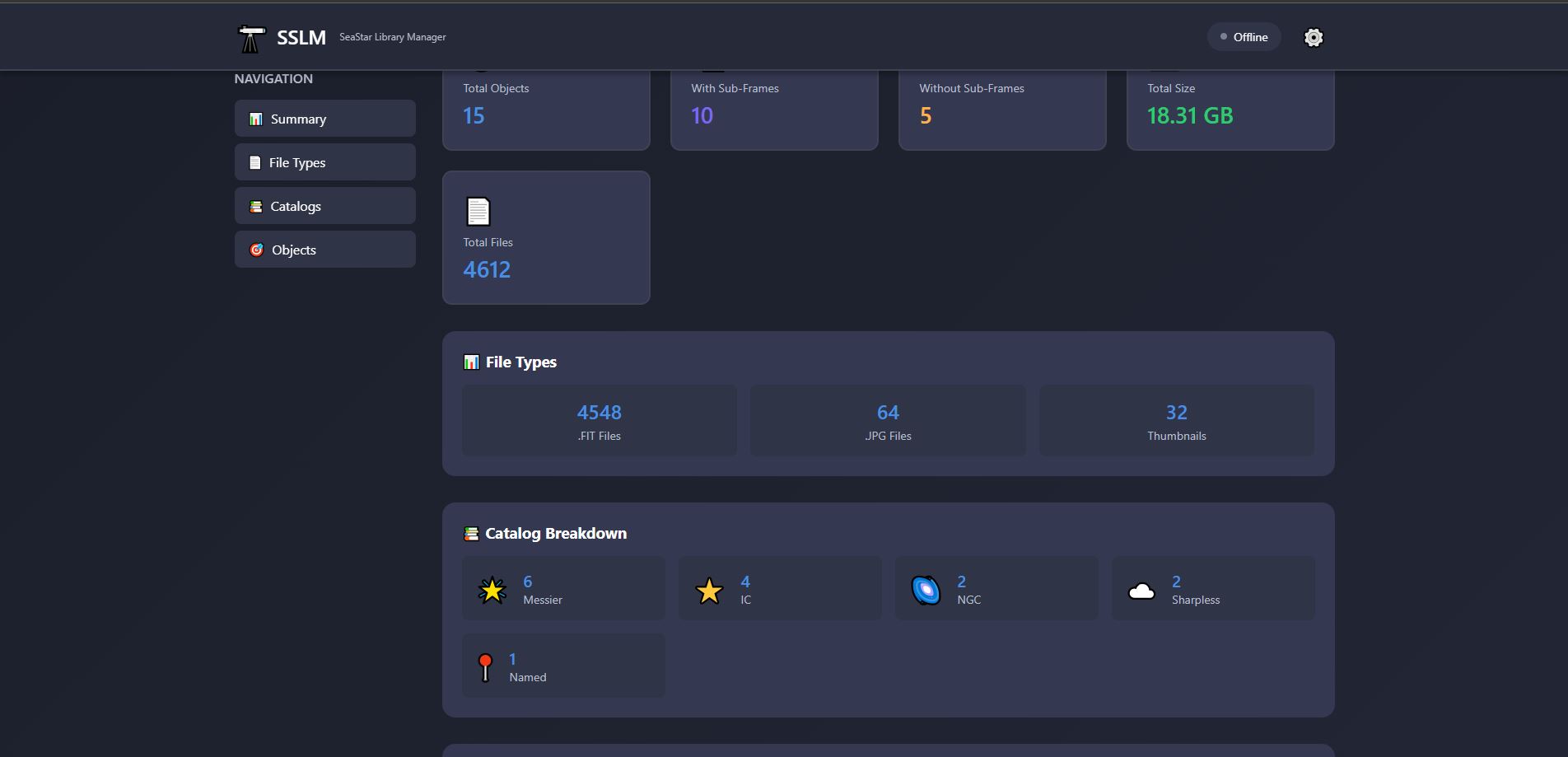
Dashboard
- Summary cards: total objects, sub-frame presence, total size, file counts
- Catalog breakdown (Messier, NGC, IC, Sharpless, Named)
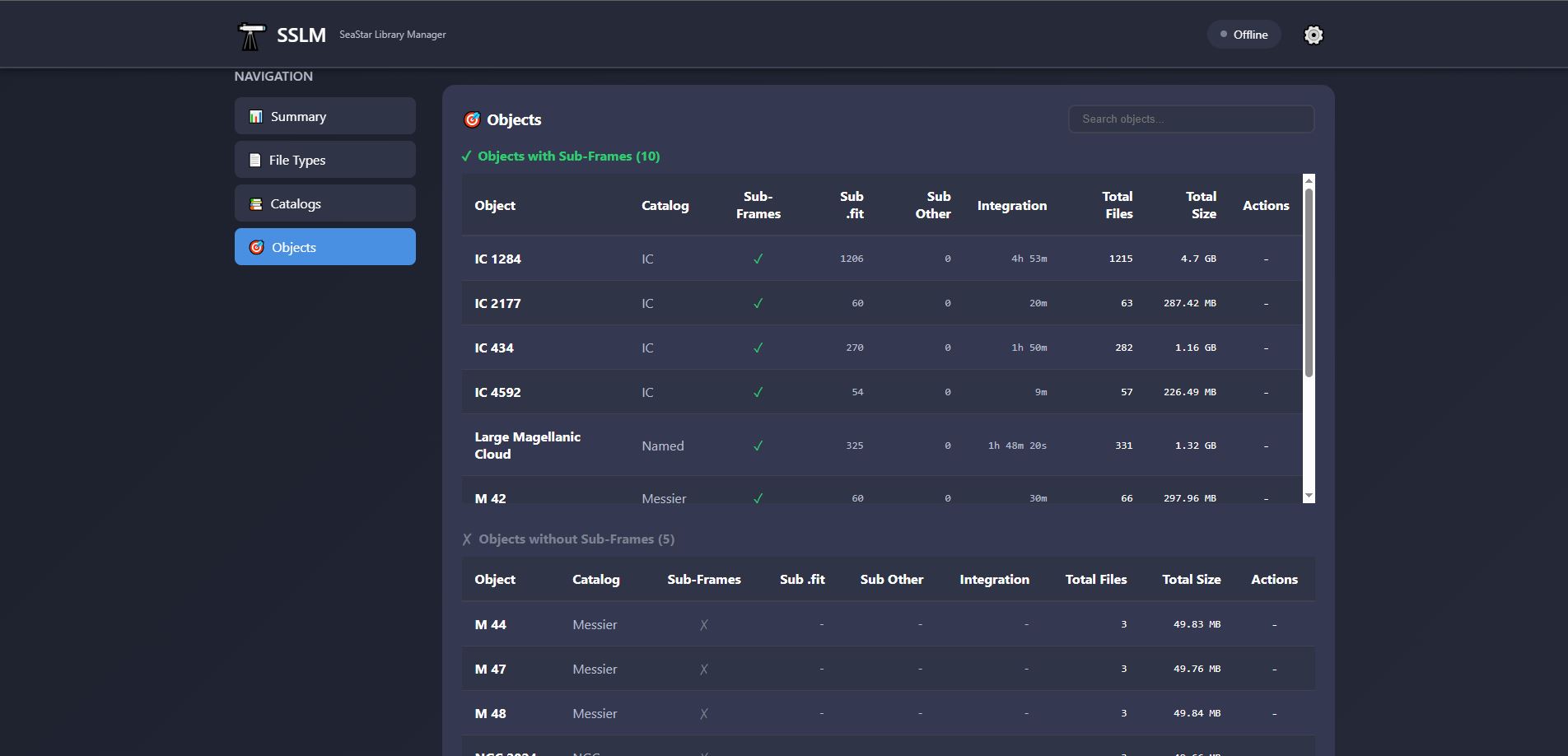
- Objects table with search, integration time, and per-object cleanup
- Empty directory detection and one-click cleanup
Object Detail View
- Stacking counts: total frames + per-session breakdown
- Exposure and filter metadata
- Imaging sessions table with clickable dates and per-session delete
- Expandable file lists (main folder and sub-frames folder)
- Sub-frame cleanup button
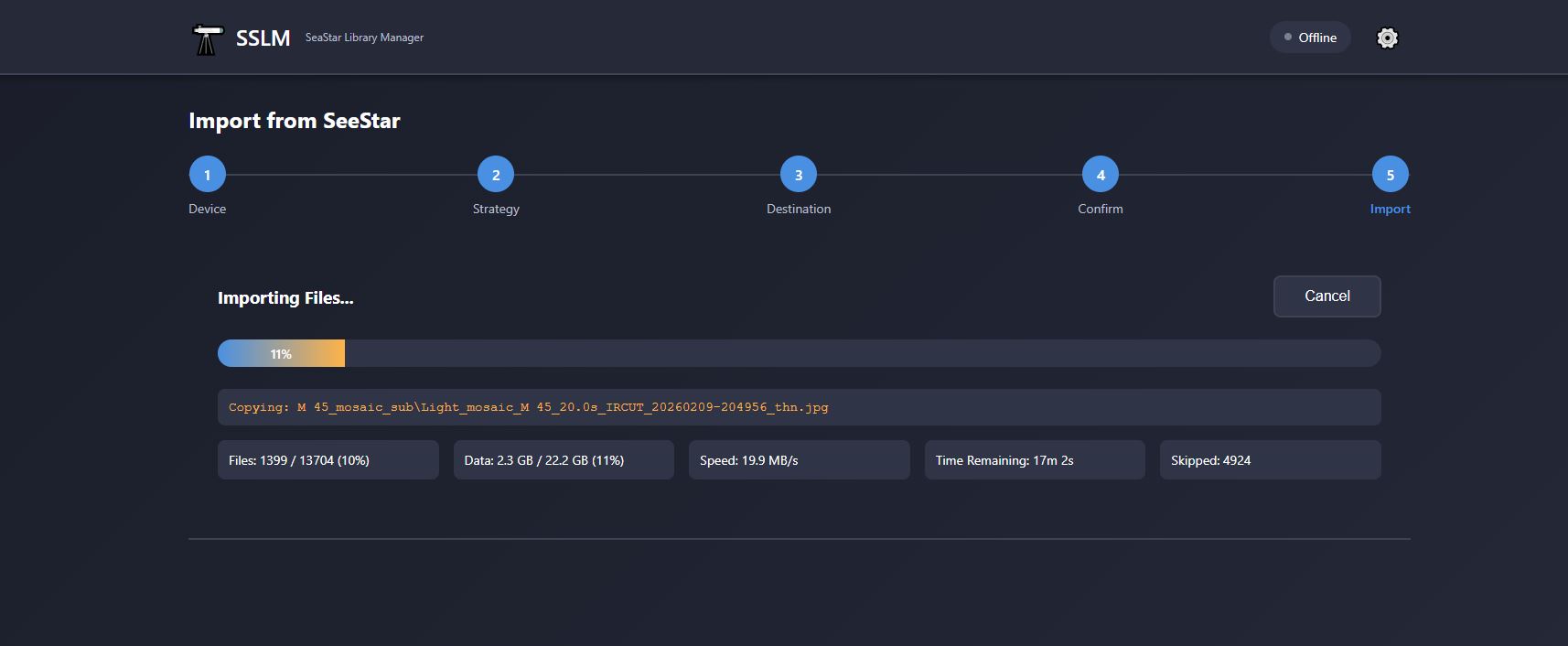
Import Wizard (5 steps)
- Auto-detection of SeeStar on USB drives and network path (
\\seestar) - Full copy or incremental (smart sync) strategies
- Expurged mode: skip non-FITS files from
_subdirectories to save space - Real-time progress: speed, ETA, files/bytes transferred
- Post-import transfer validation
Merge Wizard (6 steps)
- Combine 2 or more library copies
- Intelligent deduplication by relative file path
- Conflict resolution: keep newer version by modification date
- Expurged mode support
- Real-time analysis progress and per-source breakdown
- Post-merge validation
Export to Stacking
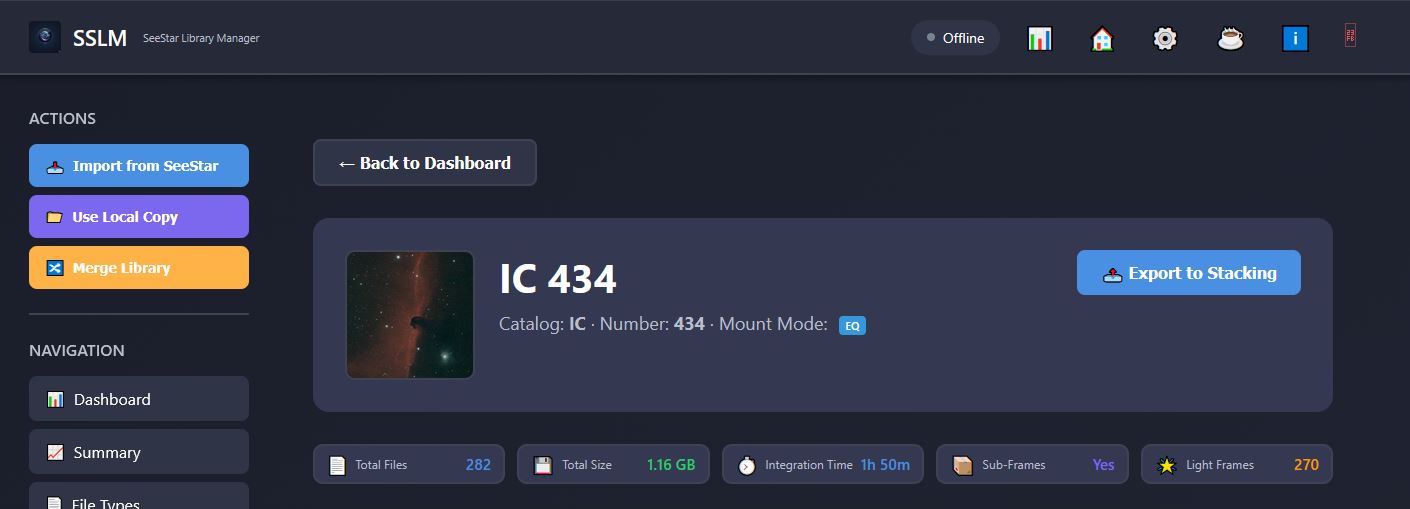
- Available on any object detail page that has sub-frames (EQ
_subor Alt/Az-sub) - Folder picker lets you choose any destination on your PC
- Both EQ and Alt/Az sub-frame folders are merged; duplicates resolved by keeping the newer file (same dedup logic as Merge)
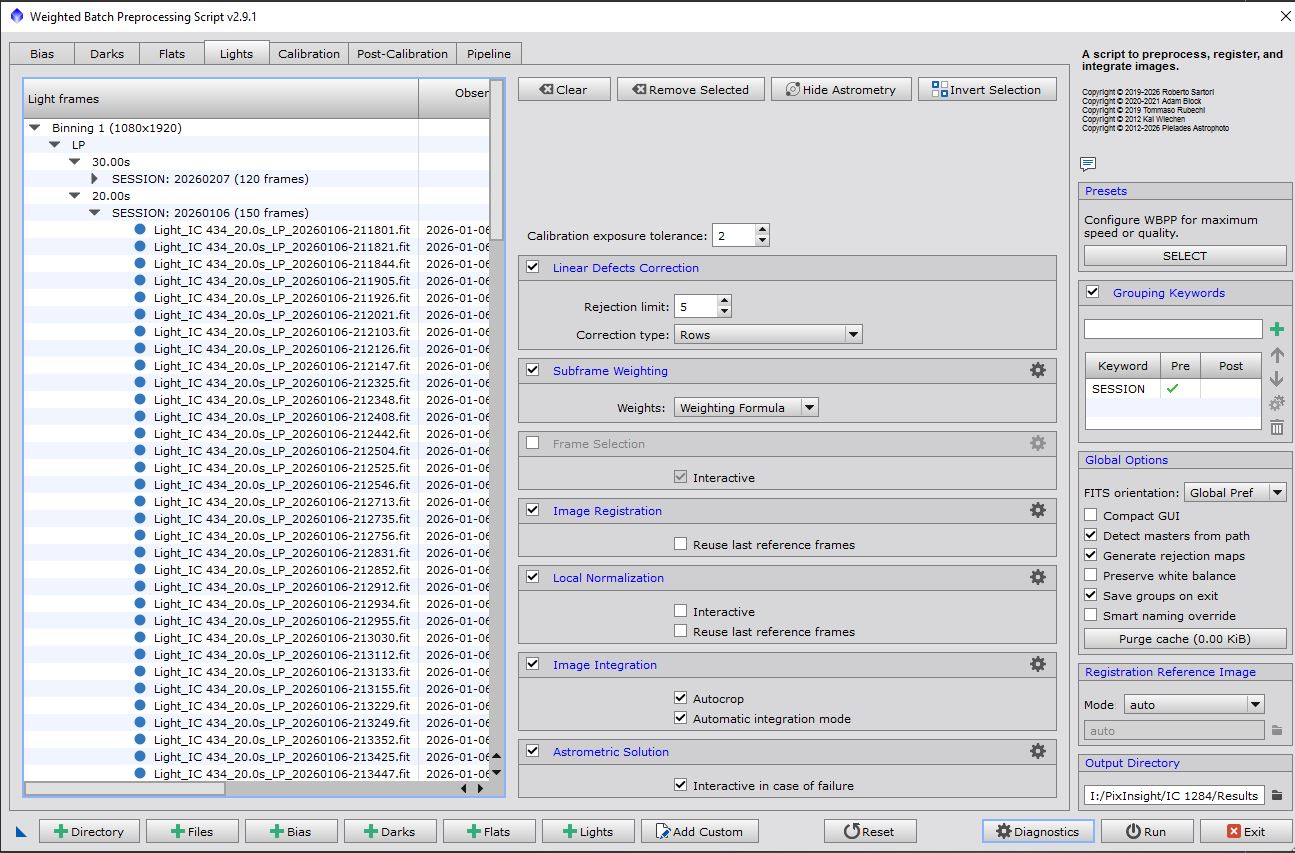
- Exported structure is ready to load straight into your stacking software:
[destination]/Object_Name/ Lights/ Session_YYYYMMDD/ [exposure]s_[FILTER]/ Light_*.fit - Pre-export summary shows file count and total size before copying begins
- Real-time progress display with speed, ETA, and bytes transferred
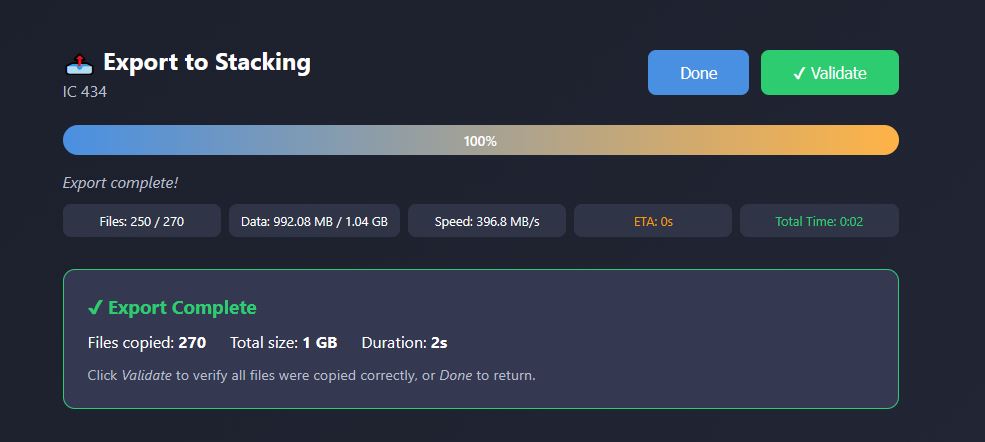
- Post-export validation confirms every file was copied correctly
- Only
.fitlight frames are exported — no stacked images, no JPGs, no thumbnails
Cleanup Operations
- Delete empty directories
- Remove JPG/thumbnail previews from
_subdirectories (.fitfiles always kept) - Delete individual imaging sessions (stacked images + light frames)
Online Mode — SIMBAD Catalog Lookup & Re-Classification
SSLM is fully offline by default. Clicking the Offline / Online badge in the header enables Online Mode.
When Online Mode is active, opening any object's detail page silently queries the SIMBAD Astronomical Database (CDS Strasbourg) and injects:
- Also known as — cross-catalog aliases: Messier, NGC, IC, Caldwell, Sharpless, Abell, Barnard, HD, HIP, and common names
- J2000 coordinates — RA and Dec in sexagesimal format (e.g.
05h 35m 17s / −05° 23′ 28″) - Re Classify button — rename every file and folder for the object to a different catalog designation
Re-Classification renames everything in one operation — main folder, _sub folder, and all files within — after two confirmation dialogs. A pre-flight check ensures the target name does not already exist before anything is touched.
Results are cached in memory so repeated visits cost zero additional network calls. If the object is not found in SIMBAD or you are offline, the page loads exactly as normal — no errors.
Security: Online Mode is strictly outbound-only. SSLM sends a single lookup request to SIMBAD's TAP endpoint — nothing else. No port is opened on your machine, no external party can reach SSLM, and no data about your library or files is ever transmitted.
Application Header
- Offline / Online badge — click to toggle Online Mode; all core features remain available in either state
- ⚙️ Settings — configure port, SeeStar directory name, import strategy
- ℹ️ About — version number and contact details
- ⏻ Quit — gracefully shuts down the server from the browser
Safety
- SSLM never modifies the SeeStar device — all operations are read-only on source
- Cleanup operations require explicit user confirmation before any file is deleted
- Session deletion shows a file count in a confirmation dialog before proceeding
- Sub-frame cleanup only removes JPG/thumbnail files —
.fitdata is always preserved
Development Setup
Requirements
- Windows 10 or later
- Node.js v18 or later
Install & Run
git clone https://github.com/AstroNoob-Tools/SSLM.git
cd SSLM
npm install
npm start
Then open: http://localhost:3000
Auto-reload during development:
npm run devBuild the Windows Installer
Requires Inno Setup 6.x.
# Step 1 — build the self-contained exe (icon embedded)
npm run build

# Step 2 — compile the installer
"C:\Program Files (x86)\Inno Setup 6\ISCC.exe" installer\sslm.iss
Output: installer/output/SSLM-Setup-v1.0.0-beta.4.exe
See documentation/InstallationManual.md for the full release checklist.
Project Structure
SSLM/
├── public/
│   ├── assets/            # Logos and icons (sslm.png, sslmLogo.png, sslm.ico, astroNoobLogo.png)
│   ├── css/styles.css
│   └── js/
│       ├── app.js         # Core app (navigation, modals, About, Quit)
│       ├── dashboard.js   # Dashboard, object/session detail views
│       ├── modeSelection.js
│       ├── importWizard.js
│       ├── mergeWizard.js
│       └── stackExportWizard.js
├── src/
│   └── services/
│       ├── catalogParser.js
│       ├── fileAnalyzer.js
│       ├── fileCleanup.js
│       ├── importService.js
│       ├── mergeService.js
│       └── stackExportService.js
├── installer/
│   └── sslm.iss           # Inno Setup script (source of truth for version)
├── documentation/         # User and installation manuals
├── config/                # settings.json (gitignored)
├── server.js
└── package.json
Documentation
| Document | Description |
|---|---|
| documentation/UserManual.md | Full user guide |
| documentation/InstallationManual.md | Installation & release instructions |
Contact

Astro Noob
Contact: astronoob001@gmail.com
*SSLM — SeeStar Library Manager v1.0.0-...
SSLM v1.0.0-beta.3
SSLM — SeeStar Library Manager
Release Notes — v1.0.0-beta.3
Release date: 27 February 2026
Platform: Windows 10 / 11
Previous release: v1.0.0-beta.2 (February 2026)
What's New in beta.3
Beta 3 has two main themes: dual mount-mode support and security hardening. A handful of cosmetic refinements are also included.
1 — Mount Mode Support
SeeStar names its sub-frame folder differently depending on the mount mode used during capture:
| Mount Mode | Sub-frame folder suffix | Example |
|---|---|---|
| Equatorial (EQ) | _sub |
NGC 6729_sub/ |
| Alt-Azimuth (Alt/Az) | -sub |
NGC 6729-sub/ |
Previous versions of SSLM only recognised the _sub (EQ) suffix. Beta 3 handles both.
Changes
- Catalog parser detects both
-suband_subsuffixes and records amountModefield ('eq','altaz', ornull) on every parsed object. - File analyser exposes two separate sub-folder fields per object —
subFolderEqandsubFolderAltAz— alongside a combinedmountModevalue of'eq','altaz', or'both'when both are present. A backward-compatiblesubFolderalias (prefers EQ) is kept for internal compatibility. - Import, merge, and disk-space validation now correctly classify non-
.fitfiles in both-suband_subdirectories when Expurged mode is active. - Cleanup service iterates both sub-folders per object when scanning for files to clean or delete. The session-delete API now accepts per-file folder references instead of a single
subFolderPath, so files from both sub-folders are removed correctly in one operation. - Dashboard — objects table has a new Mount column with colour-coded badges:
EQ,Alt/Az, orBoth. - Object detail page renders one sub-frames card per sub-folder, each clearly labelled with its mount mode.
- Session file matching searches both sub-folders, and the sub-frame cleanup confirmation message lists the correct suffix(es) for the object being cleaned.
Who is affected
Any user who captures with the SeeStar in Alt/Az mode (the default orientation for many users) will benefit from this update. Libraries that mix EQ and Alt/Az sessions for the same object (captured on different nights) are now fully supported.
2 — Security Hardening
SSLM runs as a local-only web application on localhost and is never exposed to the internet. Beta 3 adds several defensive layers to protect against misuse should the port ever be reachable from other processes on the same machine.
Snyk SAST integration (CI)
A GitHub Actions workflow (.github/workflows/snyk-security.yml) now runs Snyk Static Application Security Testing on every push and pull request. Findings are surfaced as workflow annotations and reported to the Snyk dashboard.
A Snyk ignore policy (.snyk) documents acknowledged findings that are not exploitable in the SSLM threat model, with expiry dates and written rationale for each suppression.
Path traversal protection — CWE-22
All server endpoints that accept a file-system path now resolve the path to an absolute value with path.resolve() and validate it against an allowlist before any file-system operation is performed.
Allowed roots:
- Drive-letter paths:
C:\,D:\, …Z:\ - UNC / network paths:
\\server\share
Any path that resolves outside these roots is rejected with HTTP 400. This prevents a crafted request from reading or operating on files outside the user's intended directories.
Rate limiting — CWE-770
A lightweight in-memory rate limiter (createRateLimiter()) is applied to every API endpoint, grouped by cost:
| Limiter | Endpoints covered | Limit |
|---|---|---|
heavyOpLimiter |
Import start, merge start | 10 requests / minute |
analysisLimiter |
Directory analysis, space validation, config write | 30 requests / minute |
lightLimiter |
Static pages, image serving, browse, favorites | 200 requests / minute |
Requests that exceed the limit receive HTTP 429 with a plain-English error message.
Image-serving endpoint hardened
The /api/image endpoint previously accepted any file path and served it with a permissive application/octet-stream fallback content type. It now:
- Validates the resolved path against the allowlist (see above).
- Only serves files with explicitly recognised image extensions (
.jpg,.jpeg,.png,.tiff). All other extensions are rejected with HTTP 400. - Serves files using the resolved absolute path rather than the raw query string.
Framework fingerprinting disabled
The X-Powered-By: Express response header is removed from all responses. This prevents trivial fingerprinting of the underlying framework and version.
Security documentation
A dedicated SecurityNote_v1.0.0-beta.3.md (attached to this release) contains the SHA-256 hash of the installer, the VirusTotal scan result, and an explanation of any heuristic detections.
A SecurityPosture_v1.0.0-beta.3.md (also attached) provides the full Snyk static analysis findings breakdown with mitigations specific to the SSLM localhost-only architecture.
Both documents are attached as downloadable assets to this GitHub Release. CodeQL static analysis also runs on every push to the main branch via GitHub Actions.
3 — Cosmetic Improvements
- Object detail — summary cards are now rendered in a compact single-row layout (5 columns, icon + label + value inline) instead of wrapping across multiple rows.
- Object detail — sub-frames grid uses a
2fr + 4×1frcolumn layout so the Files / Size / .fit Files / Other Files values stay on a single row. - Integration time fallback — for objects that have no sub-frames folder, integration time in the detail banner and objects table is now computed from
stackCount × exposurevalues parsed from the imaging sessions, matching the calculation used in the Imaging Sessions table.
Known Limitations
- Snyk Code (SAST) ignore rules must be managed via the Snyk web platform; the
.snykfile applies to Snyk Open Source (SCA) only. - The rate limiter is in-memory and resets when the server restarts. It is not shared across multiple server instances.
- DOM-based XSS findings reported by Snyk SAST are acknowledged and suppressed: SSLM only ever renders data from the user's own local file system, and the application is never reachable from the internet.
Upgrading from beta.2
- Download
SSLM-Setup-v1.0.0-beta.3.exefrom the GitHub Releases page. - Run the installer — it will update the application in place.
- Your settings (
%APPDATA%\SSLM\settings.json) and favorites are preserved automatically. - No manual migration steps are required.
Full Changelog
| Commit | Description |
|---|---|
269f346 |
Updated README |
6827a4d |
Merge branch 'main' of https://github.com/AstroNoob-Tools/SSLM |
620c569 |
Security — Snyk SAST hardening (path traversal, rate limiting, ignore policy) |
4f2f6c0 |
Security — Snyk SAST CI workflow added |
cbb3db3 |
Cosmetic — compact object detail cards, sub-frames grid fix, integration time fallback |
69505a4 |
MountMode — support Alt/Az (-sub) and EQ (_sub) mount modes |
SSLM v1.0.0-beta.2
SSLM v1.0.0-beta.2
New in this release
Online Mode — SIMBAD Catalog Lookup
- Toggle Online Mode with a single click on the badge in the header (off by default)
- Opening any object's detail page queries the SIMBAD Astronomical Database (CDS Strasbourg) for cross-catalog identifiers: Messier, NGC, IC, Caldwell, Sharpless, Abell, Barnard, HD, HIP, and common names
- J2000 equatorial coordinates (RA/Dec) displayed in sexagesimal format directly on the detail page
- Results cached in memory — repeated visits to the same object cost zero network calls
- Graceful degradation: if the object is not in SIMBAD or you are offline, the page loads exactly as normal
Object Re-Classification
- When Online Mode returns aliases, a Re Classify button appears on the object detail page
- Pick any alias, confirm twice, and SSLM renames every file and folder in your library to match — automatically and safely
- Pre-flight check confirms the target name does not already exist before anything is touched
- Files are renamed before folders to prevent path conflicts; all errors are reported rather than silently skipped
Security note: Online Mode is strictly outbound-query-only. SSLM sends a single lookup request to the SIMBAD TAP service — nothing else. No port is opened on your machine and no data about your library is ever transmitted.
Distribution security: The GitHub repository runs CodeQL static analysis on every push and dependencies are monitored with Snyk during development. The installer you download has been scanned, not just written.
Also in beta.2
- Session Detail View: click any session date to see all files for that session in one screen
- Delete Session: remove all stacked images and sub-frame light files for a session in one action
- Stacking counts corrected: intermediate snapshots merged; display shows
total (per-session breakdown) - Sub-frame cleanup button disappears immediately after a successful cleanup
- Import and Merge progress screens: indeterminate bar during preparation phase, live elapsed-time counter, single-row stats layout
- Expurged mode transfer validation no longer flags intentionally skipped files as missing
- Various UI and navigation fixes
Installation
Run SSLM-Setup-v1.0.0-beta.2.exe — no admin rights required, no prerequisites.
Node.js is bundled inside the installer.
Default install path: %LOCALAPPDATA%\SSLM\ (customisable during setup)
Settings stored in %APPDATA%\SSLM\settings.json — survive uninstall/reinstall
Feedback and bug reports welcome — open an issue or email astronoob001@gmail.com
Clear skies! 🔭
SSLM v1.0.0-beta.1
First public beta.
Full Changelog: https://github.com/AstroNoob-Tools/SSLM/commits/v1.0.0-beta.1