An experimental sandbox integrating Tldraw and the Model Context Protocol (MCP), enabling AI agents and developers to generate, update, and interact with visual diagrams programmatically — all from natural language or logic-based prompts.
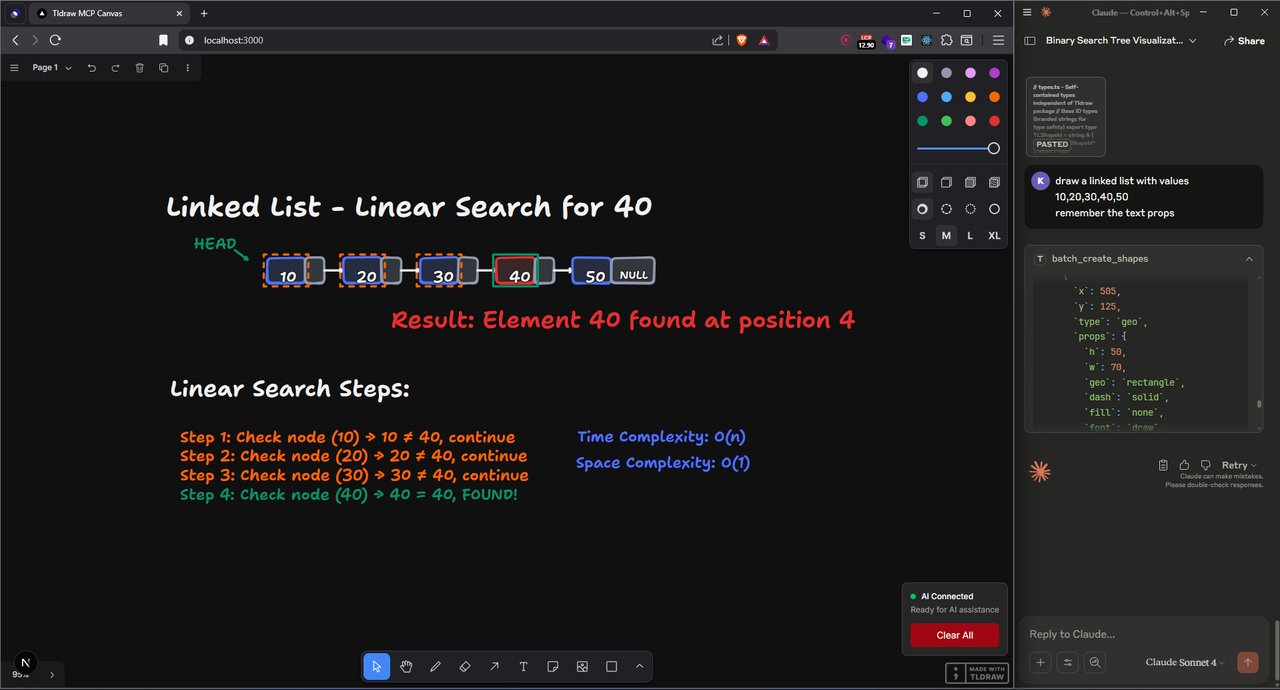
- 🤖 Unrestricted AI Generation: No API limits or quotas — generate infinite diagrams with local agents.
- ✍️ Tldraw Canvas Integration: Beautiful, intuitive canvas backed by a battle-tested open-source drawing library.
- ⚖️ Protocol-Driven: Built on a robust API/WebSocket interface compatible with any MCP-compliant client.
- 📈 Offline-First Architecture: Everything runs locally. Perfect for private setups using Ollama, local LLMs, or experiments.
- ⚖️ Type-Safe from End to End: Zod-based schemas and strict TypeScript tooling make development smooth.
- 🧰 Built for Exploration: Easily extend with new shapes, tools, and AI workflows. Ideal for R&D, agent devs, and tinkerers.
Prompt2Sketch is a developer-first playground for experimenting with AI-enhanced diagramming. It combines the flexibility of Tldraw with the power of MCP to enable real-time, programmable, and text-controlled diagram generation.
Think of it as Excalidraw without limits — no paywalls, no request caps, and full control over how your diagrams are generated. Build flows from prompts, code, or AI agents. Ideal for tinkering, building dev tools, or LLM integrations.
⚠️ Real-time multi-user collaboration is not supported yet. Local-first only.
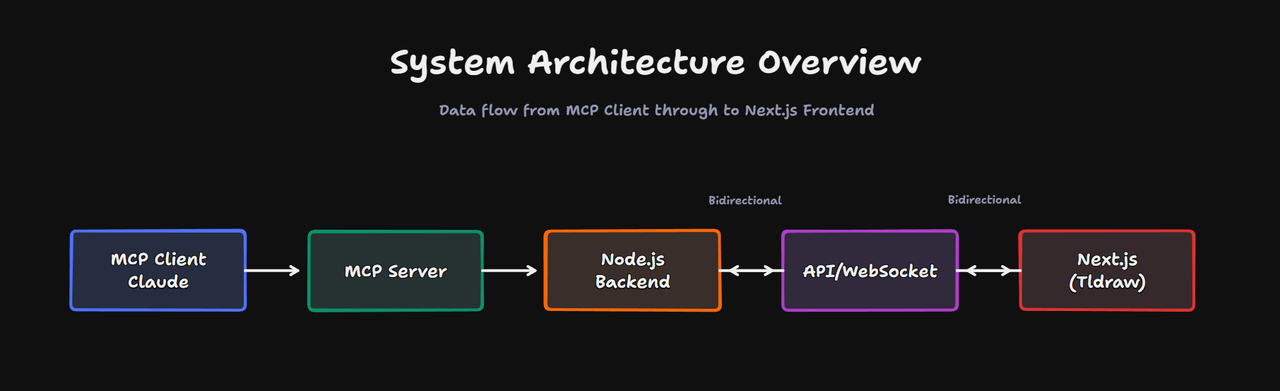
- Frontend: Next.js 15 with App Router and Tldraw canvas
- Backend: Node.js MCP server using WebSockets and HTTP
- Typing: End-to-end with Zod + TypeScript
- Sync: Real-time (local), single-user only
- Node.js >= 18
- npm (or yarn/pnpm/bun)
git clone https://github.com/Arsenic-01/mcp_tldraw.git
cd mcp_tldraw
npm install# Next.js Application Configuration
NEXTJS_SERVER_URL=http://localhost:3000
PORT=3000
# MCP Server Configuration
ENABLE_CANVAS_SYNC=true
MCP_TRANSPORT_MODE=stdio
# Development Configuration
NODE_ENV=development
DEBUG=false
NEXT_PUBLIC_WS_URL=ws://localhost:4000
WS_PORT=4000
WS_SERVER_URL=http://localhost:4000{
"mcpServers": {
"tldraw-canvas": {
"command": "tsx",
"args": ["/absolute/path/to/mcp_tldraw/src/mcp-server.ts"],
"env": {
"NEXTJS_SERVER_URL": "http://localhost:3000",
"ENABLE_CANVAS_SYNC": "true"
}
}
}
}npm run canvas- Frontend: http://localhost:3000
- MCP Server: ws://localhost:4000
| Script | Description |
|---|---|
npm run dev |
Start Next.js frontend |
npm run dev:ws |
Start MCP WebSocket server |
npm run mcp-server |
Run MCP server standalone |
- Launch the frontend and draw manually using Tldraw
- Connect an MCP client (e.g. LLM or CLI) to generate or edit shapes
- Hit broadcast/status endpoints to simulate interactions
- Extend to new workflows with custom shapes, commands, or drawing logic
Contributions are welcome! Please open issues or submit PRs.
- Fork the repo
- Create a branch (
git checkout -b feature/your-feature) - Commit (
git commit -m 'Add feature') - Push (
git push origin feature/your-feature) - Open a PR
- Name: Vedant Bhor
- Email: vedbhor25@gmail.com
- GitHub: Arsenic-01
- LinkedIn: Vedant Bhor
- Twitter (X): @arsenic_dev
- Discord: @itsmehomie
This is an experimental, local-first project. Multi-user collaboration and production readiness are not supported (yet).
Let your AI draw. Let your code paint. Welcome to Prompt2Sketch.