Detection and Recognition of human Iris using YOLOv8 and Siamese Network
In this project, we propose a system for human iris detection and recognition using YOLOv8 object detection and Siamese neural network. We obtained a dataset of human eyes from Roboflow, which includes positive and negative samples. We train a YOLOv8 model on this dataset to detect human irises in images and extract the coordinates of the bounding boxes as outputs. We then use OpenCV to crop the iris regions from the original images based on the obtained bounding box coordinates. Further, we apply image sharpening, brightness enhancement, and noise removal techniques to the cropped iris images. The preprocessed iris images are saved and used as inputs for a Siamese neural network. The Siamese network is trained on this dataset to learn a similarity metric for iris recognition, using the cropped iris images from the positive and negative samples. The proposed system aims to achieve accurate human iris detection and recognition for various applications, such as biometric authentication and surveillance.
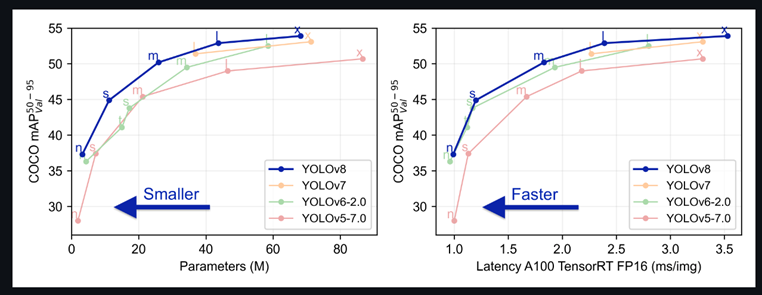
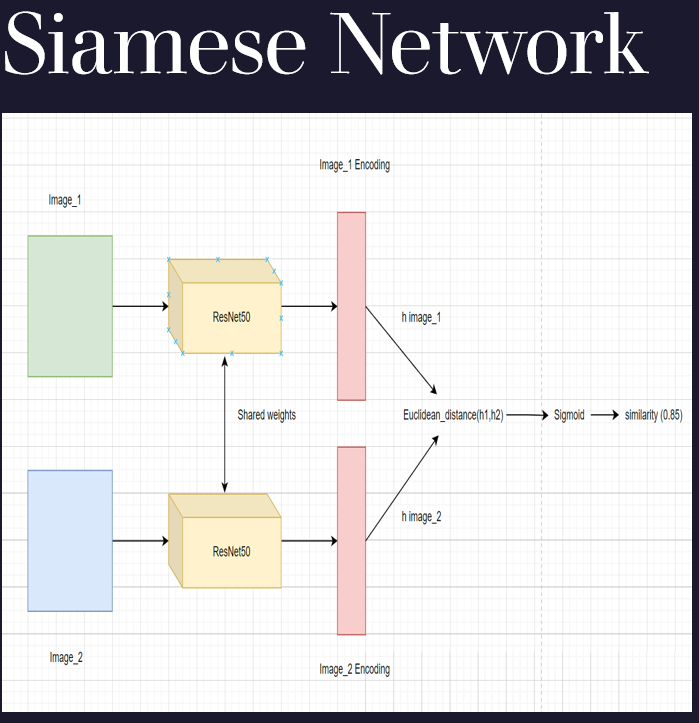
- Built With The project is built on the hypergator platforms ineractive app's jupyter notebook For the File" Dtetcion.ipynb" YOLOv8 and for "Iris_Recogniton.ipynb" ,file tensorflow 2.6.0 platform available on the hypergator interactive apps were used.
- Dependencies Here, list all libraries, packages and other dependencies that need to be installed to run your project. Include library versions and how they should be installed if a special requirement is needed.
- Tensorflow
pip install tensorflow- Opencv
pip install opencv-python- RoboFlow
pip install roboflow- Ultralytics
pip install ultralyticsPip install the ultralytics package including all requirements in a Python>=3.7 environment with PyTorch>=1.7.
- Alternative: Export your Environment
Alternatively, you can export your Python working environment, push it to your project's repository and allow users to clone it locally. This way, anyone can install it and they will have all dependencies needed. Here is how you export a copy of your Python environment:
conda env export > requirements.ymlThe user will be able to recreate it using:
conda env create -f requirements.yml- Clone the repo
git clone https://github.com/uf-eel6825-sp23/final-project-code-kumaramit41.git
- Setup (and activate) your environment
conda env create -f requirements.ymlThe project contains three .ipynb files namely "Detection" for detection of Iris, "Iris_Recognition" for recognition task and "unzip" file to unzip the downloaded data.
- Dataset download
- The Custom Dataset for the detection task will be downloaded automatically in the current directory when running the "download the dataset from roboflow" section of Detection file with the name "Iris_detection-2" for training the YOLOv8 model "Iris_detection-2/data.yaml" is given as input path to "model.train()" in Training the yolov8 model section.
- The dataste for recognition was creted by recording video of eye using mobile phone. The images were obtained by dividing image frame wise. The file "Convert_videos_to_images.ipynb" to do this task were video path is input.
- The dataset for recognition task is availabel at following link="https://drive.google.com/file/d/1qWguEe_glfjCESZkuytzggLKjG4bwPrI/view?usp=share_link" in a .zip file format with name "data.zip". This data should be in the current working directory. The zip file can be unzipped using the "unzip" file.
- Model Implementation

- First run the "Detecion" file after training the model.
- Give the path of "data" file downloaded in the "Creating directiory for preparing data for iris recogniton task" section to root_folder = (path_of_datafile_for_recognition).
- Running the "Creating directiory for preparing data for iris recogniton task" Section comletetly will create a directory "data_crop" in the current directory, which will be used as training and test data for recognition task.
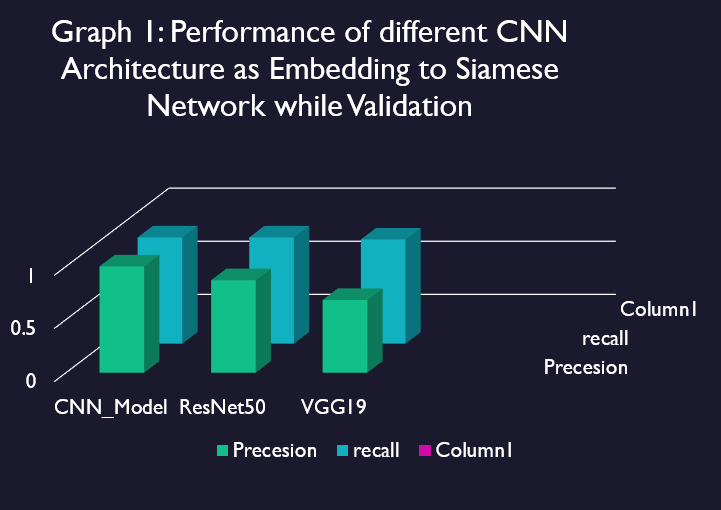
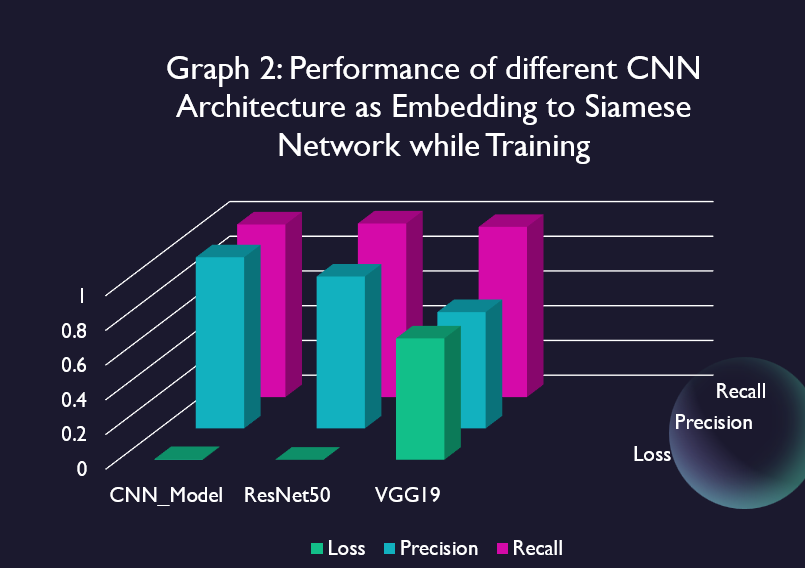
- After this if all the python files and data folders are in same "current directory" running the "Iris_Recognition","Iris_Recognition_ResNet50"and"Iris_Recogniton-VGG19" pyhton file cell-by-cell will give the ouput of precision, recall in the "Comparison Matrix section" and results of the recognition model in the "Result" section of the pyhton file.
- The number of epoches can be accessed in Train the model section for each .ipynb file
- Results
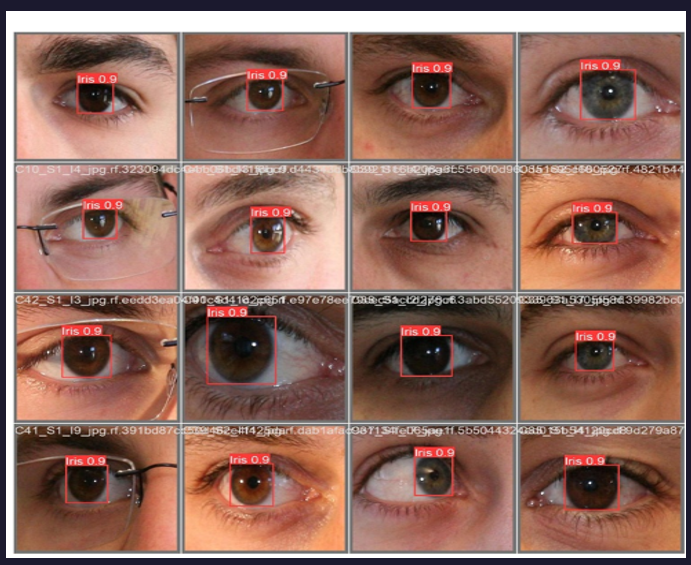
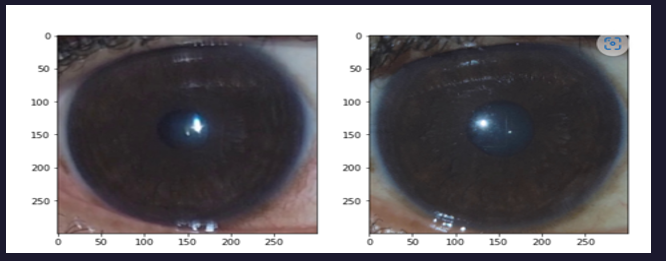
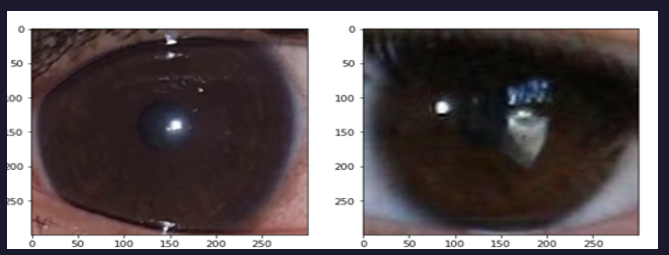
- Detection model information
- The results of training and validation are stored in the "runs" folder the "train" subfolder contain the "runs\detect\train10\weights\best.pt" and information about how model performed while training.
- The best.pt file is used for reloading the model for detection task.
- The validation results are saved in "runs\detect\val".
Amit Kumar -kumar.amit1@ufl.edu
project link :https://github.com/uf-eel6825-sp23/final-project-code-kumaramit41.git
*Catia Silva *[Chaoyue Sun] - chaoyue.sun@ufl.edu *[ University of Florida]
- GitHub Emoji Cheat Sheet
- Img Shields
- Choose an Open Source License
- GitHub Pages
- Animate.css
- Loaders.css
- Slick Carousel
Maintain all Python code that you develop for your project in this repository.
You can use any packages that come as default option with Anaconda, TensorFlow or PyTorch. We need to be able to run your implementation on our machines. So, be sure to get approval from us for any special packages! It we cannot run the code, you will lose a significant number of points.
Your final code submission should include:
-
README.md - follow the template available here.This file should include information about library requirements and instructions for running your code.
-
Python scripts - python script/s or Jupyter Notebook/s to implement your experiments and ideas. Code should be running (free of errors or bugs), well documented, clean of clutter (remove anything not needed).
- If you are training and testing a model, create two files: a training file and a test file.
Submit the URL of this repository to the Canvas assignment.