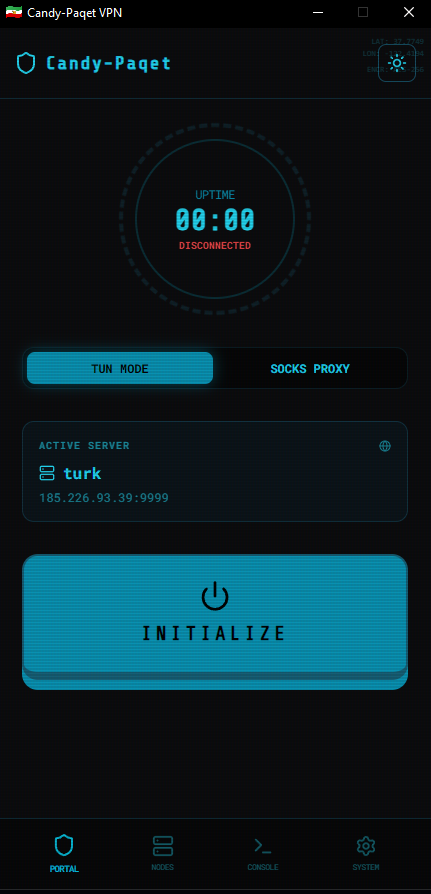



A high-performance, cyberpunk-infused VPN client for Windows.
Bridging the gap between raw power and neon aesthetics.
Candy-Paqet is a professional-grade VPN client focused on speed, security, and a premium user experience. Built on top of the powerful paqet engine and sing-box tunneling service, it provides a seamless interface for managing complex network connections with a stylish "Cyber HUD" interface.
- 🛠️ Dual Connection Modes:
- TUN Mode: Global system-level tunneling using
sing-boxfor full device protection. - SOCKS5 Proxy: Lightweight application-level proxying for specific workflows.
- TUN Mode: Global system-level tunneling using
- ⚡ Turbo-Charged Engine: Leverages
paqet(KCP/TCP) for low-latency connections even in unstable network environments. - 💾 Portable & Lightweight: Distributed as a single, zero-install executable. Just download and run.
- 🎨 Rich Cyberpunk UI:
- Retro-futuristic HUD with scanline effects and neon glow.
- Real-time terminal logs and connection analytics.
- Interactive Dashboard with uptime tracking.
- 🔧 Zero-Config Setup: Automatically detects, downloads, and initializes pre-compiled
paqetandsing-boxbinaries on the first run. - 📥 Background Ready: Seamlessly minimizes to the System Tray to keep your connection alive without cluttering your workspace.
- 🔐 Privacy First: Built-in support for encrypted DNS (DoH) via customizable DNS servers.
- Download: Grab the latest
Candy-Paqet.exefrom the Releases page. - Launch: Run the executable. It will automatically download the necessary core binaries and drivers (like Npcap) on first start.
- Configure: Add your server details (IP, Port, and Secret).
- Advanced Settings:
- The client includes Automatic Interface Detection, which auto-detects your primary network interface, GUID, and Local IP.
- You can manually override these in the Advanced Settings tab for custom configurations.
- Connect: Choose between TUN or SOCKS mode and hit INITIALIZE.
- Note: TUN mode requires Administrative privileges to modify network routing.
To create your own high-performance Paqet server, check out the CandyHole project. It's built to work seamlessly with this client for a complete VPN solution.
# Clone the repository
git clone https://github.com/AmiRCandy/Candy-Paqet.git
cd Candy-Paqet

# Install dependencies
npm install

# Run in Development mode (Vite + Electron)
npm run electron-dev# Generate Portable Windows EXE
npm run electron-pack-win- Core Engine: paqet
- Tunneling: sing-box
- Frontend: React 19 + TypeScript + Lucide Icons
- Desktop Wrapper: Electron 32
- Styling: Vanilla CSS with Cyber-Themes
- CI/CD: GitHub Actions
This project is licensed under the MIT License - see the LICENSE file for details.
Developed with ❤️ by AmiRCandy
