This repository utilizes DynamoRIO to collect assembly instructions from running programs on ARM64 architectures. Through filtering, deduplication, and summarization, it provides concise basic block information.
Warning
This English README has been translated from the Chinese Version 中文版本 by GPT-4 and has not yet been reviewed for accuracy.
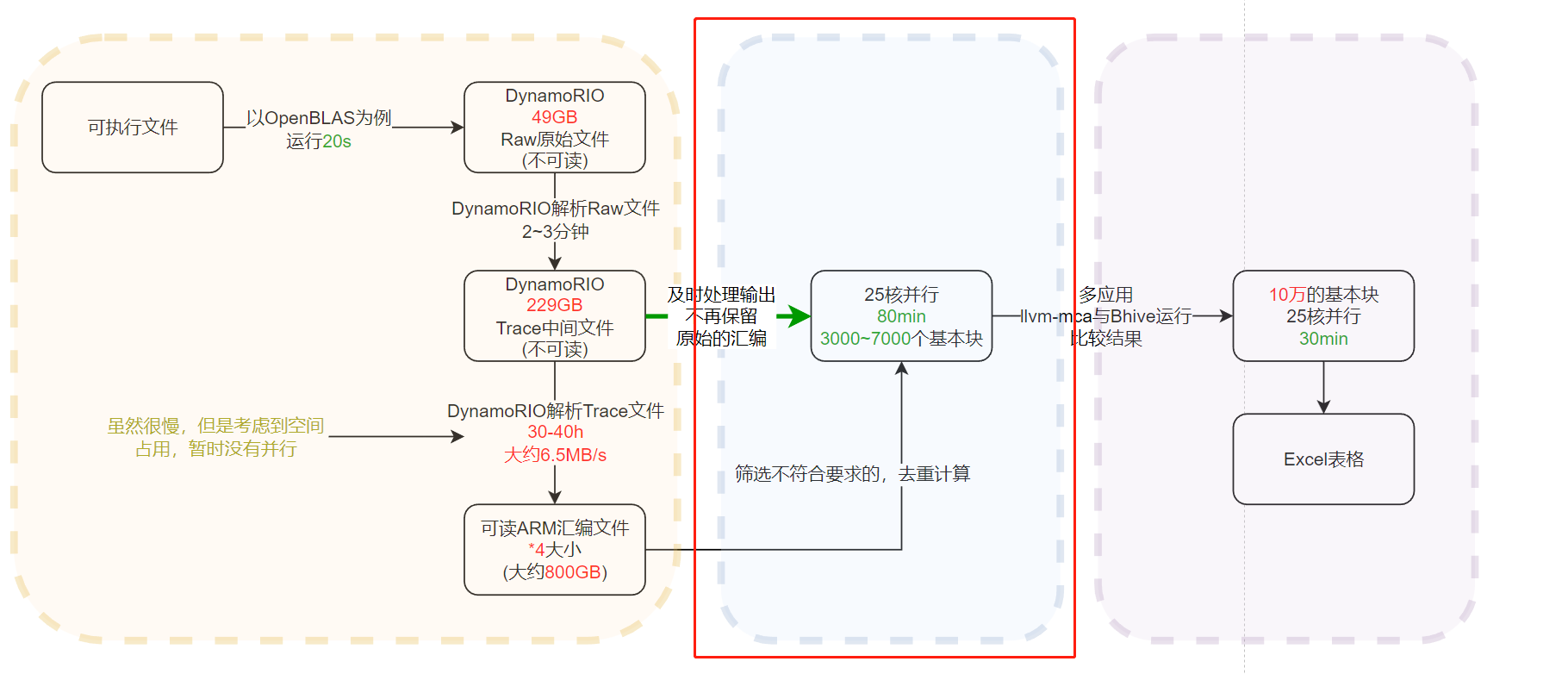
The code in this repository is designed to filter, deduplicate, and summarize the assembly generated by DynamoRIO, resulting in streamlined basic block information. This corresponds to the part outlined in red on the diagram.
Download the appropriate version of DynamoRIO for AArch64 Linux from https://dynamorio.org/page_releases.html (DynamoRIO-AArch64-Linux-9.0.1.tar.gz), and extract to run. The executable needed for later steps is ./DynamoRIO-AArch64-Linux-9.0.1/bin64/drrun.
tar -xvf DynamoRIO-AArch64-Linux-9.0.1.tar.gzpip install -r requirements.txt
Collecting the underlying binary instructions (assembly) of a machine is intricate. The time required for DynamoRIO to collect and analyze assembly is on the order of days, and the assembly can occupy space in the terabytes (specific space and time requirements can be seen in the diagram above).
Collecting assembly with DynamoRIO involves two steps:
~/Download/DynamoRIO-AArch64-Linux-8.0.18895/bin64/drrun -t drcachesim -jobs 10 -outdir /addDisk/DiskNo3 -offline -- ./exe
Running this command in parallel across 10 cores will generate directories like drmemtrace.exe.24491.9635.dir under the path /addDisk/DiskNo3, preserving the raw files. The time taken is 2-3 times that of executing the program alone.
~/Download/DynamoRIO-AArch64-Linux-8.0.18895/bin64/drrun -t drcachesim -simulator_type view -indir /addDisk/DiskNo3/drmemtrace.exe.24491.9635.dir 2>&1 > result.log
This command parses the raw files in the directory /addDisk/DiskNo3/drmemtrace.exe.24491.9635.dir and outputs the results to the terminal (or redirects them to a result.log file).
Depending on the size of the original drmemtrace.exe.24491.9635.dir directory, the parsing can take 10-40 hours. (For an original folder of 50GB, after parsing, the folder size increases to about 250GB, generating 800GB of raw assembly, with a total processing time of 35 hours.)
The original assembly collected by DynamoRIO is of terabyte scale, but the result files after processing are no more than 10MB.
This running method is recommended, as it does not require retaining the assembly files.
Example (note that this example is serial; the output from the second DynamoRIO command is redirected to the program):
~/Download/DynamoRIO-AArch64-Linux-8.0.18895/bin64/drrun -t drcachesim -simulator_type view -indir drmemtrace.fftw_dft_r2c_1d_c_example.exe.987366.7729.dir 2>&1|python ./src/main.py -o ~/fftw.log -d no
Or:
cat small_assembly.log |python ./src/main.py -o ~/test.result -d no
| Parameter | Description |
|---|---|
| -o | Output file path |
| -d | Whether to print debug information (default: no) |
If assembly files are already available, they can be processed in parallel.
You need to modify the configuration in ./src/config.py as explained below:
| Parameter | Description |
|---|---|
| inputFilePath | Input assembly file directory |
| useAllFileInDirectory | Whether to use all files in the input assembly file directory; default is not to use all. Specify useAllFileListInDirectory if necessary (considering the need to summarize multiple assembly files in the folder) |
| useAllFileListInDirectory | Effective when glv._get("useAllFileInDirectory")=="no", specifies the assembly files to use in the directory |
| outputTaskName | Output file name. The actual save file will have a suffix. For example, if outputTaskName is ffmpeg, the save file name might be ffmpeg_useFileNum_1_skipNum_0.log |
| outputFilePath | Output file directory |
| ProcessNum | Number of parallel cores |
| findTimeout | Timeout for sub-processes to be killed |
| skip_num | Minimum number of instructions in a basic block to be output. For example, 0 means there must be at least 1 instruction in the basic block. |
Example:
python ./src/main.py -p 25 -d no
Processing 300GB of logs with 25 cores takes about 30 minutes.