Drive
The Drive subsystem is responsible for moving the robot on the field. It is arguably the most important subsystem, as even a robot with no scoring capability can play good defense if it can maneuver well. Well-tuned and calibrated drive systems can make matches; poorly-designed ones can break seasons. If possible, test the chassis and ensure you can drive straight before assembling the rest of the robot. It makes troubleshooting (especially mechanically) much easier.
That being said, let's go through how our drivetrain works.
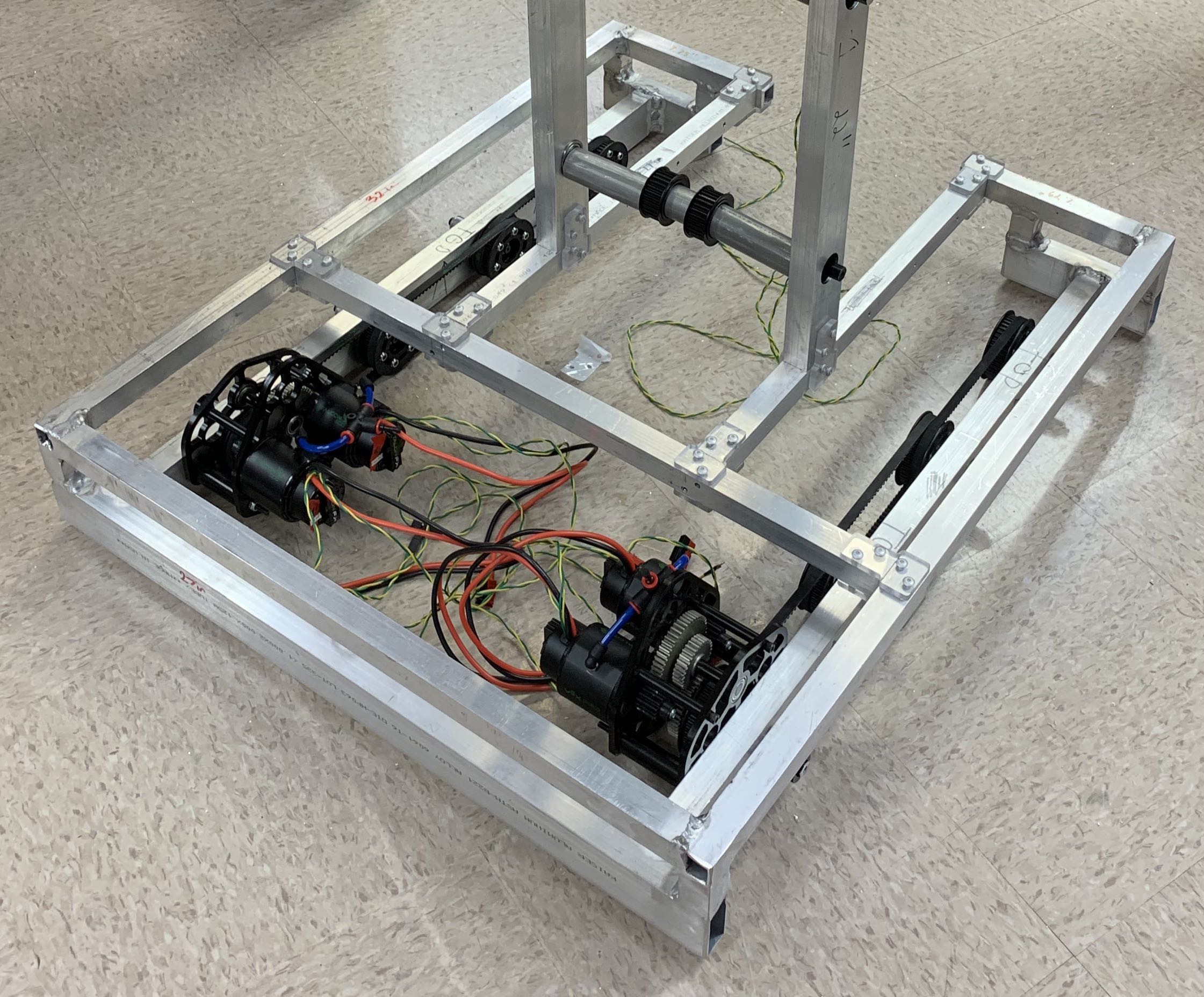
You can see in the back there are 4 Falcon500 motors in two gearboxes, one for each side. While the motors in a particular side must have the same velocity because they drive the same axle, the two sides are independent and can each move at different velocities.
Our drive is what is referred to as a Differential Drive. It uses the difference (or lack thereof) in velocities between the sides to move the robot. There are other more exotic drivetrains, but ours is simple and has been proven to work well.
| Side | Right | ||
|---|---|---|---|
| Direction | Forward | Backward | |
| Left | Forward | Forward | Turn Clockwise |
| Backward | Turn Counter Clockwise | Backward |
This table shows the different directions each side of the drive have to spin in order to get desired motion.
In addition, our drivetrain features a NavX IMU (Inertial Magnetic Unit) to give more information about how the drive train is moving (e.g. acceleration and rotation in all 3 axes).
Lets go through a line-by-line explanation of Drive.java.
package frc.robot.subsystems;

import edu.wpi.first.wpilibj.SPI;
import edu.wpi.first.wpilibj.smartdashboard.SmartDashboard;
import edu.wpi.first.wpilibj2.command.SubsystemBase;
import edu.wpi.first.wpilibj.kinematics;
import edu.wpi.first.wpilibj.geometry;

import frc.robot.Constants;
import com.ctre.phoenix.motorcontrol.FeedbackDevice;
import com.ctre.phoenix.motorcontrol.TalonFXControlMode;
import com.ctre.phoenix.motorcontrol.can.TalonFX;
import com.kauailabs.navx.frc.AHRS;
Nothing super notable in these import statements; we do have to import special libraries for the NavX and TalonFXs (the motor controller built-in to the Falcon500 motors), though.
// Create variables
private static Constants consts = new Constants();
public static TalonFX FrontRight = new TalonFX(consts.FrontRight);
public static TalonFX FrontLeft = new TalonFX(consts.FrontLeft);
public static TalonFX BackRight = new TalonFX(consts.BackRight);
public static TalonFX BackLeft = new TalonFX(consts.BackLeft);

// Create NavX
public static AHRS navx = new AHRS(SPI.Port.kMXP);

// Create Differential Drive Odometry Object and pose
DifferentialDriveOdometry m_odometry;
Pose2d m_pose = new Pose2d(consts.InitalX, consts.InitialY, new Rotation2d());
We define the devices that make up the drivetrain, namely the TalonFXs and the NavX. Notice how the port numbers for the TalonFXs are not hardcoded numbers(i.e. not new TalonFX(4)), but rather values defined in Constants.java.
Generally, port numbers should be kept as entries in Constants.java so they can be updated very quickly without having to manually update every file.
The m_odometry object is something supplied by WPI to determine where the robot is on the field. It takes in encoder values on each of the sides and gyroscope values to determine the pose, or location on the field, of the robot.
// Set Speeds on Drive Train (Tank Drive)
  public void setSpeed(double speed, double speed1) {
    // Ensures speed and speed1 are within range [-1,1]
		if(speed<-1) speed =-1;
    if(speed>1) speed=1;
    if(speed1<-1) speed1 =-1;
    if(speed1>1) speed1=1;

    SmartDashboard.putNumber("ROLL: ", navx.getRoll());
    if(navx.getRoll() <= -10){
      BackLeft.set(TalonFXControlMode.PercentOutput,-0.15);
      FrontLeft.set(TalonFXControlMode.PercentOutput,-0.15);
      BackRight.set(TalonFXControlMode.PercentOutput,0.15);
		  FrontRight.set(TalonFXControlMode.PercentOutput,0.15);
    }
    else if(navx.getRoll() >= 10){
      BackLeft.set(TalonFXControlMode.PercentOutput,0.15);
      FrontLeft.set(TalonFXControlMode.PercentOutput,0.15);
      BackRight.set(TalonFXControlMode.PercentOutput,-0.15);
		  FrontRight.set(TalonFXControlMode.PercentOutput,-0.15);
    }
    else{
      BackLeft.set(TalonFXControlMode.PercentOutput,speed);
      FrontLeft.set(TalonFXControlMode.PercentOutput,speed);
      BackRight.set(TalonFXControlMode.PercentOutput,speed1);
		  FrontRight.set(TalonFXControlMode.PercentOutput,speed1);
    }
  }
This is the real meat of the Drive, it's where the speed is set. Commands can call this method to set the speeds of both the left and right side of the chassis. It begins by checking to ensure the speeds are within a valid range. Our tip detection system, affectionately named T I L T S H I F T, then checks the NavX to determine if robot is tipping too far in one direction. If so, it drives the motors in the opposite direction to hopefully bring the robot down before it falls completely over. Not entirely necessary in this game as our robot is pretty short, but it allows the driver to worry less about tipping the robot and more about moving across the field quickly. If there is no tilt, we set all the motors to their desired percent outputs and return.
@Override
  public void periodic() {
    // This method will be called once per scheduler run

    // Don't exactly know if it's Yaw or Pitch
    SmartDashboard.putNumber("YAW: ", navx.getYaw());
    Rotation2d gyroAngle = Rotation2d.fromDegrees(-navx.getYaw());

    //Average position of the two encoders on each side
    double right_position = ((FrontRight.getSelectedSensorPosition(0)*64.0/4096.0) + (BackRight.getSelectedSensorPosition(0)*64.0/4096.0))/2;
    double left_position = ((FrontLeft.getSelectedSensorPosition(0)*64.0/4096.0) + (BackLeft.getSelectedSensorPosition(0)*64.0/4096.0))/2;

    // Update Odometry
    m_pose = m_odometry.update(gyroAngle, left_position, right_position);

	  SmartDashboard.putNumber("Drive X", m_pose.getTranslation().getX());
    SmartDashboard.putNumber("Drive Y", m_pose.getTranslation().getY());
    SmartDashboard.putNumber("Drive Angle", m_pose.getRotation().getDegrees());
  }
Here we override the periodic function of the subsystem, which is called consistency throughout the match. Currently it is only being used to update the odometry of the robot. The angle of the robot(looking down on the field from above) is given by the NavX. The right and left positions are averaged values of the two encoders on their respective sides. The *64.0/4096.0 converts the sensor units to actual rotations. Those data are given to the m_odometry object, which in turn updates the pose variable. We then display those predicted values on the Smartdashboard for driver reference.
As it currently stands, this data is just nice to see. In the future we are planning on adding trajectory following so we can make much more advanced autonomous routines.