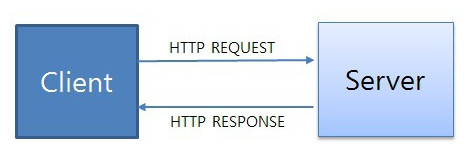
클라이언트 -> 웹서버 -> 데이터베이스 서버

1. 안드로이드 설치 .
2. 디자이너와 개발자의 차이
디자이너는 화면에 보여지는 부분을 짜는 것.
개발자는 이 레이아웃을 개발함.
**
**

항상 레이아웃은 박스들을 배치 한다는 생각으로 하면 쉬움
HTML XML -> 태그로 시작해서 태그로 끝남
초기 액티비티 화면
<?xml version="1.0" encoding="utf-8"?>
<androidx.constraintlayout.widget.ConstraintLayout xmlns:android="http://schemas.android.com/apk/res/android"
    xmlns:app="http://schemas.android.com/apk/res-auto"
    xmlns:tools="http://schemas.android.com/tools"
    android:layout_width="match_parent"
    android:layout_height="match_parent"
    tools:context=".MainActivity">


</androidx.constraintlayout.widget.ConstraintLayout>
내가 설정한 액티비티 화면
<?xml version="1.0" encoding="utf-8"?>
<LinearLayout xmlns:android="http://schemas.android.com/apk/res/android"
    xmlns:app="http://schemas.android.com/apk/res-auto"
    xmlns:tools="http://schemas.android.com/tools"
    android:layout_width="match_parent"
    android:orientation="vertical"
    android:layout_height="match_parent"
    tools:context=".sample1">    // 내가 설정한 코틀린 파일임. 하나의 액티비티란 레이아웃과 코틀린파일로 이루어져 있다
    <LinearLayout
        android:layout_width="match_parent"
        android:layout_height="wrap_content">
        <TextView
            android:id="@+id/text_header" // 코틀린 파일에서 이 아이템에 대한 접근을 하기위해 id를 부여해줌 예를 들어서 이 text를 사용자가 바꾸고 싶다면 이 아이템에 대한 접근을 해야하기 때문.
            android:layout_width="wrap_content"
            android:layout_height="wrap_content"
            android:text="Sample1"
            android:textSize="32dp"
            android:textColor="#000" //구글에 opencolor 쳐서 따오자

            />
    </LinearLayout>
    <LinearLayout
        android:layout_width="match_parent"
        android:weightSum="4" // 부모요소에 쓸 수 있음.
        android:orientation="vertical"
        android:layout_height="match_parent">
        <LinearLayout
            android:layout_width="match_parent"
            android:layout_weight="1"
            android:layout_height="0dp">
            <LinearLayout
                android:layout_width="match_parent"
                android:layout_height="match_parent"
                android:weightSum="2">
                <TextView
                    android:layout_width="0dp"
                    android:layout_height="match_parent"
                    android:gravity="center"
                    android:text="11"
                    android:layout_weight="1"/>
                <TextView
                    android:layout_width="0dp"
                    android:layout_height="match_parent"
                    android:text="11"
                    android:layout_weight="1"/>

            </LinearLayout>
        </LinearLayout>
        <LinearLayout
            android:layout_width="match_parent"
            android:layout_weight="1"
            android:layout_height="0dp"><LinearLayout
            android:layout_width="match_parent"
            android:layout_height="match_parent"
            android:weightSum="2">
            <TextView
                android:layout_width="0dp"
                android:layout_height="match_parent"
                android:text="11"
                android:layout_weight="1"/>
            <TextView
                android:layout_width="0dp"
                android:layout_height="match_parent"
                android:text="11"
                android:layout_weight="1"/>

        </LinearLayout>

        </LinearLayout>
        <LinearLayout
            android:layout_width="match_parent"
            android:layout_weight="1"
            android:layout_height="0dp">
            <LinearLayout
                android:layout_width="match_parent"
                android:layout_height="match_parent"
                android:weightSum="2">
                <TextView
                    android:layout_width="0dp"
                    android:layout_height="match_parent"
                    android:text="11"
                    android:layout_weight="1"/>
                <TextView
                    android:layout_width="0dp"
                    android:layout_height="match_parent"
                    android:text="11"
                    android:layout_weight="1"/>

            </LinearLayout>

        </LinearLayout>
        <LinearLayout
            android:layout_width="match_parent"
            android:layout_weight="1"
            android:layout_height="0dp">
            <LinearLayout
                android:layout_width="match_parent"
                android:layout_height="match_parent"
                android:weightSum="2">
                <TextView
                    android:layout_width="0dp"
                    android:layout_height="match_parent"
                    android:text="11"
                    android:layout_weight="1"/>
                <TextView
                    android:layout_width="0dp"
                    android:layout_height="match_parent"
                    android:text="11"
                    android:layout_weight="1"/>

            </LinearLayout>

        </LinearLayout>
    </LinearLayout>

</LinearLayout>


클라이언트 -> 웹서버 -> 데이터베이스 서버
1. 안드로이드 설치 .
2. 디자이너와 개발자의 차이
**

항상 레이아웃은 박스들을 배치 한다는 생각으로 하면 쉬움
HTML XML -> 태그로 시작해서 태그로 끝남
초기 액티비티 화면
내가 설정한 액티비티 화면