Our main goal is consistency, scalability, portability, readability and simplicity.
- Correctness
- Naming
- Spacing and Indentation
- Classes and Structs
- Function Declarations
- Functions vs Methods
- Closure Expressions
- Types
- Control Flow
- Golden Path
- Semicolons
- Parentheses
- Memory Management
- Resource code
- Attribution
Strive to make your code compile without warnings. This rule informs many style decisions such as using #selector types instead of string literals or usage of any deprecated methods.
Use descriptive names with camel case for classes, methods, variables, etc. Class names and constants in module scope should be capitalized, while method names and variables should start with a lower case letter.
Preferred:
let MaximumWidgetCount = 100

class WidgetContainer {
  var widgetButton: UIButton
  let widgetHeightPercentage = 0.85
}
Not Preferred:
let MAX_WIDGET_COUNT = 100

class app_widgetContainer {
  var wBut: UIButton
  let wHeightPct = 0.85
}
For functions and init methods, prefer named parameters for all arguments unless the context is very clear. Include external parameter names if it makes function calls more readable.
func dateFromString(dateString: String) -> NSDate { ... }
func convertPointAt(#column: Int, #row: Int) -> CGPoint { ... }
func timedAction(#delay: NSTimeInterval, perform action: SKAction) -> SKAction! { ... }

// would be called like this:
dateFromString("2014-03-14")
convertPointAt(column: 42, row: 13)
timedAction(delay: 1.0, perform: someOtherAction)
For methods, follow the standard Apple convention of referring to the first parameter in the method name:
class Guideline {
  func combineWithString(incoming: String, options: Dictionary?) { ... }
  func upvoteBy(amount: Int) { ... }
}
When referring to functions in prose include the required parameter names from the caller's perspective. If the context is clear and the exact signature is not important, you can use just the method name.
Call
convertPointAt(column:row:)from your owninitimplementation.If you implement
timedAction, remember to provide an appropriate delay value.You shouldn't call the data source method
tableView(_:cellForRowAtIndexPath:)directly.
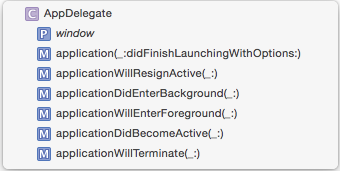
When in doubt, look at how Xcode lists the method in the jump bar – our style here matches that.
Swift types are all automatically namespaced by the module that contains them. As a result, prefixes are not required in order to minimize naming collisions. If two names from different modules collide you can disambiguate by prefixing the type name with the module name:
import MyModule

var myClass = MyModule.MyClass()
You should not add prefixes to your Swift types.
If you need to expose a Swift type for use within Objective-C you can provide a suitable prefix (following our Objective-C style guide) as follows:
@objc (RWTChicken) class Chicken {
   ...
}When creating custom delegate methods, an unnamed first parameter should be the delegate source. (UIKit contains numerous examples of this.)
Preferred:
func namePickerView(_ namePickerView: NamePickerView, didSelectName name: String)
func namePickerViewShouldReload(_ namePickerView: NamePickerView) -> Bool
Not Preferred:
func didSelectName(namePicker: NamePickerViewController, name: String)
func namePickerShouldReload() -> Bool
-
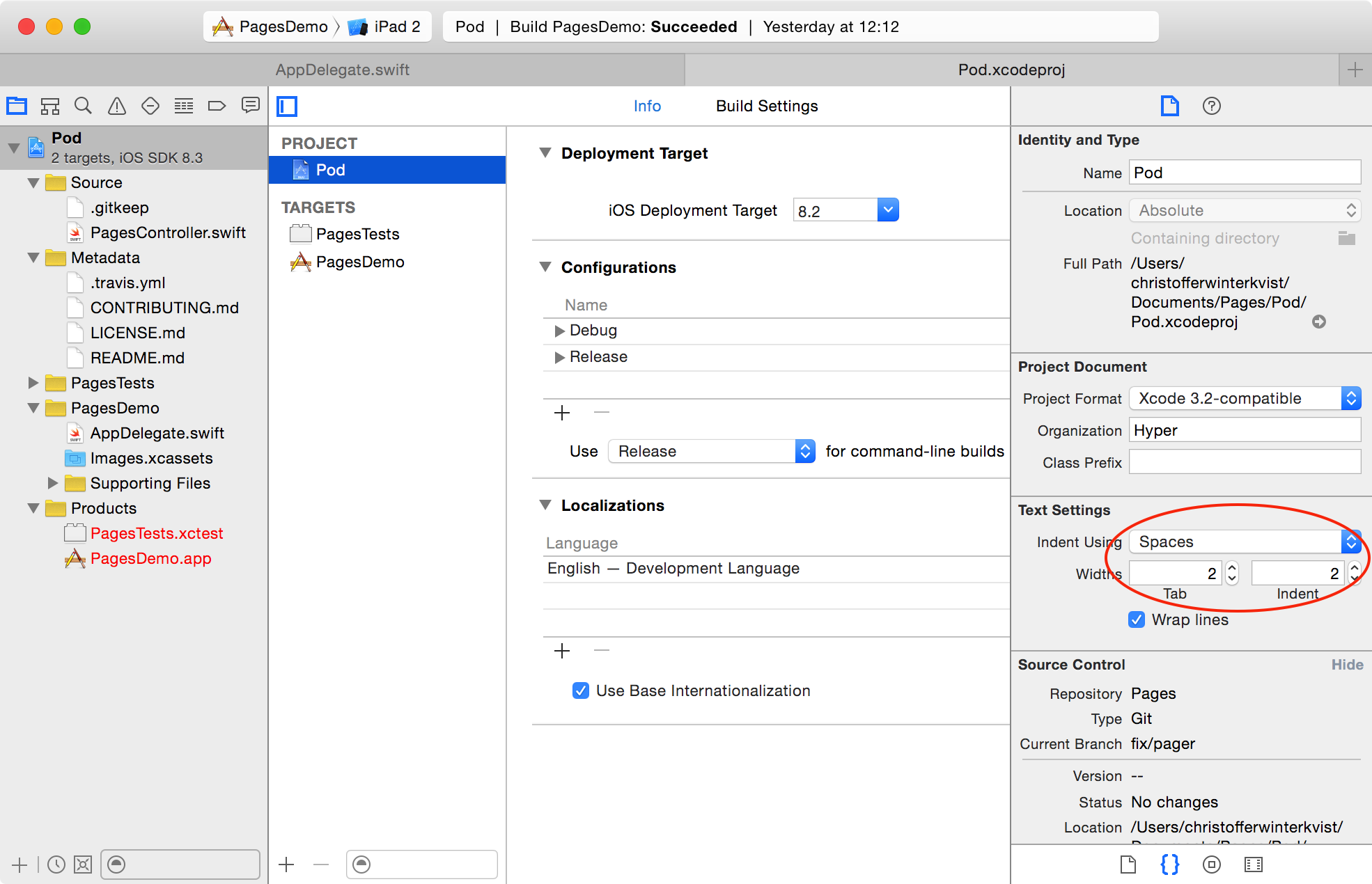
Indent using 2 spaces rather than tabs to conserve space and help prevent line wrapping. This should be configured on the project.
-
Method braces and other braces (
if/else/switch/whileetc.) always open on the same line as the statement but close on a new line. -
Tip: You can re-indent by selecting some code (or ⌘A to select all) and then Control-I (or Editor\Structure\Re-Indent in the menu). Some of the Xcode template code will have 4-space tabs hard coded, so this is a good way to fix that.
Preferred:
if user.isHappy {
  // Do something
} else {
  // Do something else
}
Not Preferred:
if user.isHappy
{
    // Do something
}
else {
    // Do something else
}- There should be exactly one blank line between methods to aid in visual clarity and organization. Whitespace within methods should separate functionality, but having too many sections in a method often means you should refactor into several methods.
Unless you require functionality that can only be provided by a class, implement a struct instead.
Additional capabilities of classes:
- Inheritance: Enables one class to inherit the characteristics of another
- Type casting: Enables you to check and interpret the type of a class instance at runtime
- Deinitializers: Enable an instance of a class to free up any resources it has assigned
- Reference counting: Allows more than one reference to a class instance
- Compatibility: Classes are available from Objetive-C
Use self only when required, for example:
- When using optional binding with optional properties
Preferred:
if let textContainer = textContainer {
  // do many things with textContainer
}
Not Preferred:
if let textContainer = self.textContainer {
  // do many things with textContainer
}
if let maybeThisCouldBeTextContainer = textContainer {
// do many things with maybeThisCouldBeTextContainer
}- To differentiate between property names and arguments in initializers
- When referencing properties in closure expressions
init(row: Int, column: Int) {
  self.row = row
  self.column = column

  let closure = {
    println(self.row)
  }
}
tl;dr
Only use self when the language requires it.
When adding protocol conformance to a class, prefer adding a separate class extension for the protocol methods. This keeps the related methods grouped together with the protocol and can simplify instructions to add a protocol to a class with its associated methods.
Also, don't forget the // MARK: - comment to keep things well-organized!
Preferred:
class MyViewcontroller: UIViewController {
  // class stuff here
}

// MARK: - UITableViewDataSource

extension MyViewcontroller: UITableViewDataSource {
  // table view data source methods
}

// MARK: - UIScrollViewDelegate

extension MyViewcontroller: UIScrollViewDelegate {
  // scroll view delegate methods
}
Not Preferred:
class MyViewcontroller: UIViewController, UITableViewDataSource, UIScrollViewDelegate {
  // all methods
}For conciseness, if a computed property is read-only, omit the get clause. The get clause is required only when a set clause is provided.
Preferred:
var diameter: Double {
  return radius * 2.0
}
Not Preferred:
var diameter: Double {
  get {
    return radius * 2.0
  }
}Here's an example of a well-styled class definition:
class Circle: Shape {
  var x: Int, y: Int
  var radius: Double

  var diameter: Double {
    get {
      return radius * 2.0
    }
    set {
      radius = newValue / 2.0
    }
  }

  init(x: Int, y: Int, radius: Double) {
    self.x = x
    self.y = y
    self.radius = radius
  }

  convenience init(x: Int, y: Int, diameter: Double) {
    self.init(x: x, y: y, radius: diameter / 2.0)
  }

  func describe() -> String {
    return "I am a circle at \(centerString()) with an area of \(computeArea())"
  }

  override func computeArea() -> Double {
    return M_PI * radius * radius
  }

  private func centerString() -> String {
    return "(\(x),\(y))"
  }
}
The example above demonstrates the following style guidelines:
- The correct spacing for variable assignations is with a space after and before the equals mark
=, e.g.x = 3 - Attributes in method signature have the
:next to the name, e.ginit(x: Int, y: Int)same with class inheritance and when using type inference - Define multiple variables and structures on a single line if they share a common purpose/context
- Indent getter and setter definitions and property observers
- Don't add modifiers such as
internalwhen they're already the default. Similarly, don't repeat the access modifier when overriding a method
Keep short function declarations on one line including the opening brace:
func reticulateSplines(spline: [Double]) -> Bool {
  // reticulate code goes here
}
For functions with long signatures, add line breaks at appropriate points and add an extra indent on subsequent lines:
func reticulateSplines(spline: [Double], adjustmentFactor: Double,
    translateConstant: Int, comment: String) -> Bool {
  // reticulate code goes here
}Free functions, which aren't attached to a class or type, should be used sparingly. When possible, prefer to use a method instead of a free function. This aids in readability and discoverability.
Free functions are most appropriate when they aren't associated with any particular type or instance.
Preferred
let sorted = items.mergeSorted()  // easily discoverable
rocket.launch()  // acts on the model
Not Preferred
let sorted = mergeSort(items)  // hard to discover
launch(&rocket)
Free Function Exceptions
let tuples = zip(a, b)  // feels natural as a free function (symmetry)
let value = max(x, y, z)  // another free function that feels natural
Use trailing closure syntax wherever possible. In all cases, give the closure parameters descriptive names:
return SKAction.customActionWithDuration(effect.duration) { node, elapsedTime in
  // more code goes here
}
For single-expression closures where the context is clear, use implicit returns:
attendeeList.sort { a, b in
  a > b
}Always use Swift's native types when available. Swift offers bridging to Objective-C so you can still use the full set of methods as needed.
Preferred:
let width = 120.0                                    // Double
let widthString = (width as NSNumber).stringValue    // String
Not Preferred:
let width: NSNumber = 120.0                                 // NSNumber
let widthString: NSString = width.stringValue               // NSString
In Sprite Kit code, use CGFloat if it makes the code more succinct by avoiding too many conversions.
Constants are defined using the let keyword, and variables with the var keyword. Always use let instead of var if the value of the variable will not change.
Tip: A good technique is to define everything using let and only change it to var if the compiler complains!
You can define constants on a type rather than on an instance of that type using type properties. To declare a type property as a constant simply use static let. Type properties declared in this way are generally preferred over global constants because they are easier to distinguish from instance properties. Example:
Preferred:
enum Math {
  static let e = 2.718281828459045235360287
  static let root2 = 1.41421356237309504880168872
}

let hypotenuse = side * Math.root2
Note: The advantage of using a case-less enumeration is that it can't accidentally be instantiated and works as a pure namespace.
Not Preferred:
let e = 2.718281828459045235360287  // pollutes global namespace
let root2 = 1.41421356237309504880168872

let hypotenuse = side * root2 // what is root2?
Declare variables and function return types as optional with ? where a nil value is acceptable.
Use implicitly unwrapped types declared with ! only for instance variables that you know will be initialized later before use, such as subviews that will be set up in viewDidLoad.
When accessing an optional value, use optional chaining if the value is only accessed once or if there are many optionals in the chain:
textContainer?.textLabel?.setNeedsDisplay()Use optional binding when it's more convenient to unwrap once and perform multiple operations:
if let textContainer = textContainer {
  // do many things with textContainer
}
Use guard unwrapping if the object is required for continuing the operation.
guard is prefered when doing early returns inside of a function.
guard let requiredObject = object else { return }
When naming optional variables and properties, avoid naming them like optionalString or maybeView since their optional-ness is already in the type declaration.
For optional binding, shadow the original name when appropriate rather than using names like unwrappedView or actualLabel.
Preferred:
var subview: UIView?

// later on...
if let subview = subview {
  // do something with unwrapped subview
}
Not Preferred:
var optionalSubview: UIView?

if let unwrappedSubview = optionalSubview {
  // do something with unwrappedSubview
}Use the native Swift struct initializers rather than the legacy CGGeometry constructors.
Preferred:
let bounds = CGRect(x: 40.0, y: 20.0, width: 120.0, height: 80.0)
var centerPoint = CGPoint(x: 96.0, y: 42.0)
Not Preferred:
let bounds = CGRectMake(40.0, 20.0, 120.0, 80.0)
var centerPoint = CGPointMake(96.0, 42.0)
Prefer the struct-scope constants CGRect.infiniteRect, CGRect.nullRect, etc. over global constants CGRectInfinite, CGRectNull, etc. For existing variables, you can use the shorter .zeroRect.
The Swift compiler is able to infer the type of variables and constants. You can provide an explicit type via a type alias (which is indicated by the type after the colon), but in the majority of cases this is not necessary.
Prefer compact code and let the compiler infer the type for a constant or variable.
Preferred:
let message = "Click the button"
var currentBounds = computeViewBounds()
Not Preferred:
let message: String = "Click the button"
var currentBounds: CGRect = computeViewBounds()NOTE: Following this guideline means picking descriptive names is even more important than before.
Consider using lazy initialization for finer grain control over object lifetime. This is especially true for UIViewController that loads views lazily. You can either use a closure that is immediately called { }() or call a private factory method. Example:
lazy var locationManager: CLLocationManager = self.makeLocationManager()

private func makeLocationManager() -> CLLocationManager {
  let manager = CLLocationManager()
  manager.desiredAccuracy = kCLLocationAccuracyBest
  manager.delegate = self
  manager.requestAlwaysAuthorization()
  return manager
}
Notes:
[unowned self]is not required here. A retain cycle is not created.- Location manager has a side-effect for popping up UI to ask the user for permission so fine grain control makes sense here.
Prefer the shortcut versions of type declarations over the full generics syntax.
Preferred:
var deviceModels: [String]
var employees: [Int: String]
var faxNumber: Int?
Not Preferred:
var deviceModels: Array<String>
var employees: Dictionary<Int, String>
var faxNumber: Optional<Int>Prefer forEach over for-in when applicable.
Preferred:
Use named parameters when the object is being referenced more than once.
attendeeList.forEach { attendee in
  print("\(attendee.name) is attending with \(attendee.guests.count) guests.")
}
Anonymous parameters
[subview, anotherSubview].forEach { view.addSubview($0) }There are some disadvantages to using forEach over for-in which you should probably be
aware of.
/// - Note: You cannot use the `break` or `continue` statement to exit the
///   current call of the `body` closure or skip subsequent calls.
/// - Note: Using the `return` statement in the `body` closure will only
///   exit from the current call to `body`, not any outer scope, and won't
///   skip subsequent calls.
Reference: apple/swift/stdlib/public/core/Sequence.swift
So if the operation demands more control, then use for-in.
Prefer the for-in style of for loop over the for-condition-increment style.
Preferred:
for _ in 0..<3 {
  println("Hello three times")
}

for (index, person) in enumerate(attendeeList) {
  println("\(person) is at position #\(index)")
}
Not Preferred:
for var i = 0; i < 3; i++ {
  println("Hello three times")
}

for var i = 0; i < attendeeList.count; i++ {
  let person = attendeeList[i]
  println("\(person) is at position #\(i)")
}When coding with conditionals, the left-hand margin of the code should be the "golden" or "happy" path. That is, don't nest if statements. Multiple return statements are OK. The guard statement is built for this.
Preferred:
func computeFFT(context: Context?, inputData: InputData?) throws -> Frequencies {

  guard let context = context else {
    throw FFTError.noContext
  }
  guard let inputData = inputData else {
    throw FFTError.noInputData
  }

  // use context and input to compute the frequencies
  return frequencies
}
Not Preferred:
func computeFFT(context: Context?, inputData: InputData?) throws -> Frequencies {

  if let context = context {
    if let inputData = inputData {
      // use context and input to compute the frequencies

      return frequencies
    } else {
      throw FFTError.noInputData
    }
  } else {
    throw FFTError.noContext
  }
}
When multiple optionals are unwrapped either with guard or if let, minimize nesting by using the compound version when possible. Example:
Preferred:
guard let number1 = number1,
      let number2 = number2,
      let number3 = number3 else {
  fatalError("impossible")
}
// do something with numbers
Not Preferred:
if let number1 = number1 {
  if let number2 = number2 {
    if let number3 = number3 {
      // do something with numbers
    } else {
      fatalError("impossible")
    }
  } else {
    fatalError("impossible")
  }
} else {
  fatalError("impossible")
}
Guard statements are required to exit in some way. Generally, this should be simple one line statement such as return, throw, break, continue, and fatalError(). Large code blocks should be avoided. If cleanup code is required for multiple exit points, consider using a defer` block to avoid cleanup code duplication.
Swift does not require a semicolon after each statement in your code. They are only required if you wish to combine multiple statements on a single line.
Do not write multiple statements on a single line separated with semicolons.
Preferred:
let swift = "not a scripting language"
Not Preferred:
let swift = "not a scripting language";
NOTE: Swift is very different from JavaScript, where omitting semicolons is generally considered unsafe
Parentheses around conditionals are not required and should be omitted.
Preferred:
if name == "Hello" {
  print("World")
}
Not Preferred:
if (name == "Hello") {
  print("World")
}
In larger expressions, optional parentheses can sometimes make code read more clearly.
Preferred:
let playerMark = (player == current ? "X" : "O")
Code (even non-production, tutorial demo code) should not create reference cycles. Analyze your object graph and prevent strong cycles with weak and unowned references. Alternatively, use value types (struct, enum) to prevent cycles altogether.
Extending object lifetime
Extend object lifetime using the [weak self] and guard let strongSelf = self else { return } idiom. [weak self] is preferred to [unowned self] where it is not immediately obvious that self outlives the closure. Explicitly extending lifetime is preferred to optional unwrapping.
Preferred
resource.request().onComplete { [weak self] response in
  guard let strongSelf = self else {
    return
  }
  let model = strongSelf.updateModel(response)
  strongSelf.updateUI(model)
}
Not Preferred
// might crash if self is released before response returns
resource.request().onComplete { [unowned self] response in
  let model = self.updateModel(response)
  self.updateUI(model)
}
Not Preferred
// deallocate could happen between updating the model and updating UI
resource.request().onComplete { [weak self] response in
  let model = self?.updateModel(response)
  self?.updateUI(model)
}
In Swift it's a good practice to use struct for accessing elements of asset catalogs, storyboards, custom colors and fonts. It helps to avoid the error-prone practice of hardcoding strings into your code.
struct ColorList {
  static let someColor = UIColor(red: 0.0, green: 0.0, blue: 1.0, alpha: 0.8)
}