$ cd your project iOS path
$ pod installAdd "URL Scheme" as your wechat appId for "URL type" in Targets > info, See the following screenshot for the view on your XCode:
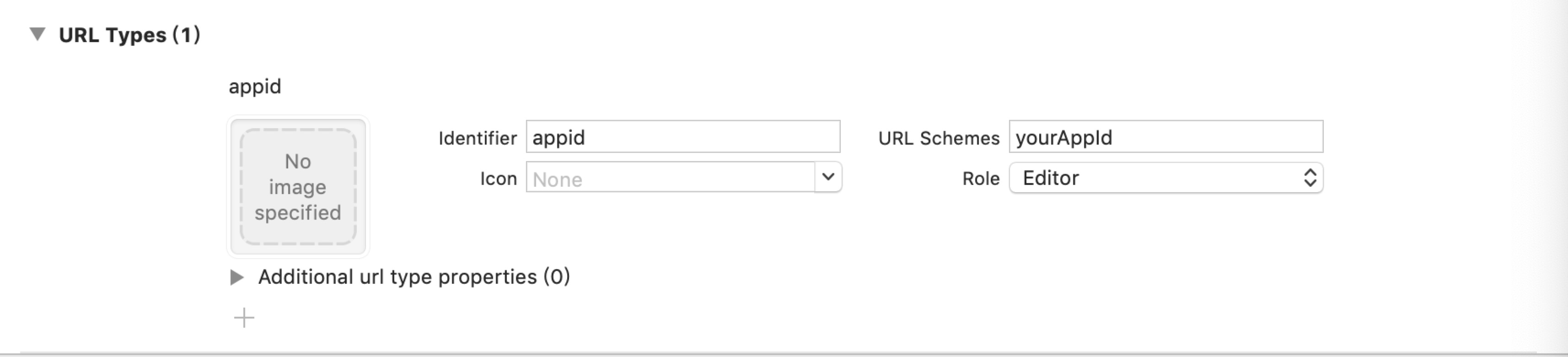
Cannot go back to APP from WeChat without configuration.
如果不配置,就无法从微信重新回到APP。
On iOS 9+, add wechat、 weixin and weixinULAPI into LSApplicationQueriesSchemes in
Targets > info > Custom iOS Target Properties. Or edit Info.plist
then add:
<key>LSApplicationQueriesSchemes</key>
<array>
  <string>weixin</string>
  <string>wechat</string>
  <string>weixinULAPI</string>
</array>
If not configured, apple will prevent you from jumping to WeChat due to security permissions.
如果不配置,因为安全权限问题,苹果会阻止你跳转到微信。
copy the following in AppDelegate.m:
Wechat callback function, If not configured, When sharing is called, it appears "connecting" and then bounces back.
微信回调方法,如果不配置,分享的时候微信会出现"正在连接",然后直接弹回APP。
- (BOOL)application:(UIApplication *)application openURL:(NSURL *)url
            options:(NSDictionary<NSString*, id> *)options
{
    BOOL handled = [RCTWechat handleOpenURL:url];
    if (handled) {
        return handled;
    }
    return [RCTLinkingManager application:application openURL:url options:options];
}

- (BOOL)application:(UIApplication *)application continueUserActivity:(NSUserActivity *)userActivity restorationHandler:(void (^)(NSArray<id<UIUserActivityRestoring>> * _Nullable))restorationHandler {
    BOOL handled = [RCTWechat handleOpenUniversalLink:userActivity];
    if (handled) {
        return handled;
    }
    return [RCTLinkingManager application:application continueUserActivity:userActivity restorationHandler:restorationHandler];
}
Universal Links 如果不配置,就无法从微信重新回到APP。
在选中project -> TARGETS -> Signing&Capabilities 然后点击+添加一个Associated Domains, 在里面填写Universal Links配置的网址
Apple Universal Link: https://developer.apple.com/library/archive/documentation/General/Conceptual/AppSearch/UniversalLinks.html#//apple_ref/doc/uid/TP40016308-CH12-SW1