Hi,
I encounter a problem with Firefox on Windows10.
On the one hand BrowserCooser fails on detecting Firefox. The binary is located in
C:\Program Files\Mozilla Firefox\firefox.exe
so the pattern for detection
Dim firefox As String = Path.Combine(programFiles, "Mozilla Firefox\firefox.exe")
should be able to find it.
For Chrome for example this is working fine, even though I discovered that Chrome is in the x86 folder
Binary:
C:\Program Files (x86)\Google\Chrome\Application\chrome.exe
Pattern:
Dim chrome As String = Path.Combine(programFiles, "Google\Chrome\Application\chrome.exe")
Anyhow .. would be nice to have but is not crucial as there is the "Custom" Option. But not even that is working.
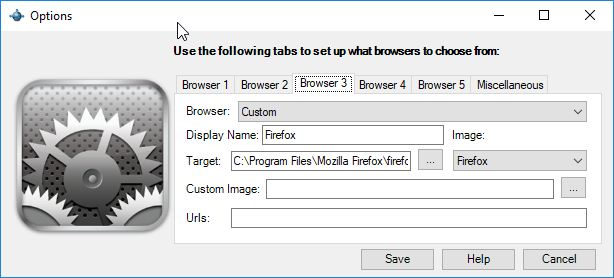
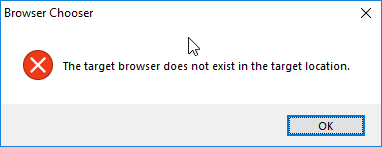
Specifying Firefox as Custom, browsing to the binary with the proper message box "..." it displays an error that the target browser does not exist in the target location.
Any ideas?
BR
Sebastian

Hi,
I encounter a problem with Firefox on Windows10.
On the one hand BrowserCooser fails on detecting Firefox. The binary is located in
C:\Program Files\Mozilla Firefox\firefox.exeso the pattern for detection
Dim firefox As String = Path.Combine(programFiles, "Mozilla Firefox\firefox.exe")should be able to find it.
For Chrome for example this is working fine, even though I discovered that Chrome is in the x86 folder
Binary:
C:\Program Files (x86)\Google\Chrome\Application\chrome.exePattern:
Dim chrome As String = Path.Combine(programFiles, "Google\Chrome\Application\chrome.exe")Anyhow .. would be nice to have but is not crucial as there is the "Custom" Option. But not even that is working.
Specifying Firefox as Custom, browsing to the binary with the proper message box "..." it displays an error that the target browser does not exist in the target location.
Any ideas?
BR
Sebastian