Allow the use of fine-tuned models #24

Replies: 4 comments

-
|
Hi, first of all thanks. Are you talking about this https://platform.openai.com/docs/api-reference/fine-tunes? If so, for now it's not possible, in really I didn't think of that possibility. For me looks like "a lot of job to do" for few people to use, however if someone is willing to implement it, I will not oppose it and I will even be able to help with whatever is necessary. |
Beta Was this translation helpful? Give feedback.

-
|
Sorry, if I asked the question incorrectly. I am not asking if you could fine-tune models from your extension. I was more specifically asking if there was a way you could add the ability to select a fine tuned model. Right now you can only select the model language. Asking ChatGPT how to use fine-tuned models for completions resulted in this: To use OpenAI's API for text completion using a fine-tuned model, you will need to follow these steps: Sign up for OpenAI's API and obtain an API key. Choose a fine-tuned model that you want to use for text completion. OpenAI provides several pre-trained models that you can use, such as GPT-3, GPT-2, and more. You can also fine-tune your own model using OpenAI's platform or a third-party service. Use the OpenAI API to send text prompts to the fine-tuned model for completion. You can do this by sending a POST request to the API endpoint with the following parameters:
|
Beta Was this translation helpful? Give feedback.
-
|
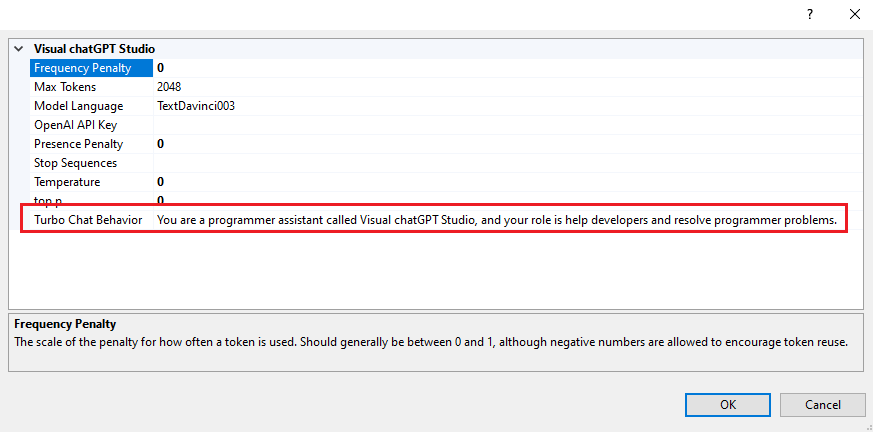
Huum, I still don't quite understand, but I'll try to answer anyway. When we talk about fine-tuned here it seems to me that it can be in two ways. The first is exactly what the link I posted earlier describes, which is basically training the API so that it can respond more accurately to more specific and particular questions. The second must be what you are questioning me about, which is to change several parameters when making a request in order to seek more precise answers for what is intended. If so, yes it is possible. In the extension's options, in addition to choosing the model, you can also change the parameters that the API receives, which are precisely the ones you listed:
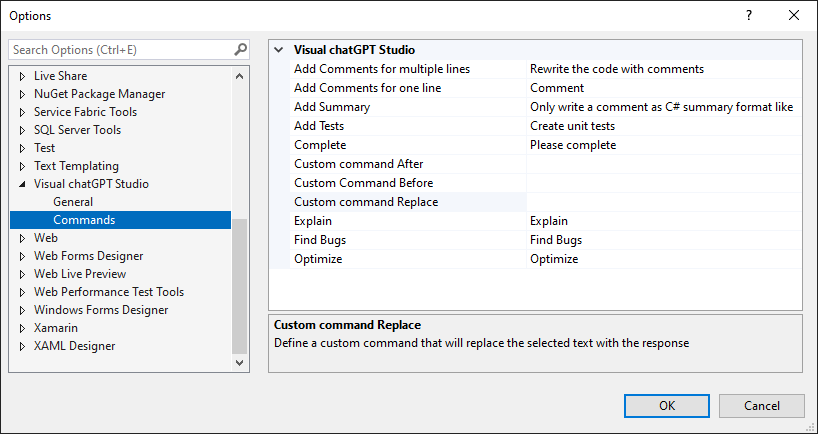
Of these above parameters, the only one that is particular to the Turbo chat window is the "Turbo Chat Behavior" parameter. You can also see what each one is for from here: https://platform.openai.com/docs/api-reference/completions/create Remembering that the extension also allows you to customize the commands that are sent to the API here:
|
Beta Was this translation helpful? Give feedback.
-
|
Thank you for this explanation. I see I can modify the behavior through
updating the prompt which achieves the effect I'm looking for! Thank you so
much! This tool is awesome so far and is starting to show promise of making
things more productive for my team after only a few days of playing with
the tool
…On Thu, Mar 30, 2023 at 2:42 PM Jefferson Pires ***@***.***> wrote:
Huum, I still don't quite understand, but I'll try to answer anyway.
When we talk about fine-tuned here it seems to me that it can be in two
ways.
The first is exactly what the link I posted earlier describes, which is
basically training the API so that it can respond more accurately to more
specific and particular questions.
The second must be what you are questioning me about, which is to change
several parameters when making a request in order to seek more precise
answers for what is intended.
If so, yes it is possible. In the extension's options, in addition to
choosing the model, you can also change the parameters that the API
receives, which are precisely the ones you listed:
[image: image]
<https://user-images.githubusercontent.com/63928228/228944188-0116ed24-d5aa-4c82-b23c-6fa50ba3eca3.png>
Of these above parameters, the only one that is particular to the Turbo
chat window is the "Turbo Chat Behavior" parameter.
You can also see what each one is for from here:
https://platform.openai.com/docs/api-reference/completions/create
Remembering that the extension also allows you to customize the commands
that are sent to the API here:
[image: image]
<https://user-images.githubusercontent.com/63928228/228946340-349c208b-2934-49b2-9f77-8dceeb6dba33.png>
—
Reply to this email directly, view it on GitHub
<#24 (comment)>,
or unsubscribe
<https://github.com/notifications/unsubscribe-auth/AYZPQUTLSWGRLWHGRKCBXDTW6XOZPANCNFSM6AAAAAAWMBXCRM>
.
You are receiving this because you authored the thread.Message ID:
***@***.***
.com>
--
*Confidentiality Notice:* The information contained in this message may
contain confidential or proprietary information. If you are not the
intended recipient, please be aware that any use, dissemination, or copying
of this communication, including its attachments, is strictly prohibited
and may be unlawful. If you have received this communication in error,
please delete the message and immediately notify the sender and contact
***@***.*** ***@***.***>.
|
Beta Was this translation helpful? Give feedback.


Uh oh!
There was an error while loading. Please reload this page.
-
Is it possible for you to add the ability to use fine-tuned models to the tool or direct me on how to do so, it would be great to have a tuned-model generate unit tests in a way thats consistent to the projects I am working on.
Thanks for the tool creation in general I enjoy using it!
Beta Was this translation helpful? Give feedback.
All reactions