-
Notifications
You must be signed in to change notification settings - Fork 2.3k
Expand file tree
/
Copy pathhutool.md
More file actions
566 lines (395 loc) · 19.3 KB
/
hutool.md
File metadata and controls
566 lines (395 loc) · 19.3 KB
1
2
3
4
5
6
7
8
9
10
11
12
13
14
15
16
17
18
19
20
21
22
23
24
25
26
27
28
29
30
31
32
33
34
35
36
37
38
39
40
41
42
43
44
45
46
47
48
49
50
51
52
53
54
55
56
57
58
59
60
61
62
63
64
65
66
67
68
69
70
71
72
73
74
75
76
77
78
79
80
81
82
83
84
85
86
87
88
89
90
91
92
93
94
95
96
97
98
99
100
101
102
103
104
105
106
107
108
109
110
111
112
113
114
115
116
117
118
119
120
121
122
123
124
125
126
127
128
129
130
131
132
133
134
135
136
137
138
139
140
141
142
143
144
145
146
147
148
149
150
151
152
153
154
155
156
157
158
159
160
161
162
163
164
165
166
167
168
169
170
171
172
173
174
175
176
177
178
179
180
181
182
183
184
185
186
187
188
189
190
191
192
193
194
195
196
197
198
199
200
201
202
203
204
205
206
207
208
209
210
211
212
213
214
215
216
217
218
219
220
221
222
223
224
225
226
227
228
229
230
231
232
233
234
235
236
237
238
239
240
241
242
243
244
245
246
247
248
249
250
251
252
253
254
255
256
257
258
259
260
261
262
263
264
265
266
267
268
269
270
271
272
273
274
275
276
277
278
279
280
281
282
283
284
285
286
287
288
289
290
291
292
293
294
295
296
297
298
299
300
301
302
303
304
305
306
307
308
309
310
311
312
313
314
315
316
317
318
319
320
321
322
323
324
325
326
327
328
329
330
331
332
333
334
335
336
337
338
339
340
341
342
343
344
345
346
347
348
349
350
351
352
353
354
355
356
357
358
359
360
361
362
363
364
365
366
367
368
369
370
371
372
373
374
375
376
377
378
379
380
381
382
383
384
385
386
387
388
389
390
391
392
393
394
395
396
397
398
399
400
401
402
403
404
405
406
407
408
409
410
411
412
413
414
415
416
417
418
419
420
421
422
423
424
425
426
427
428
429
430
431
432
433
434
435
436
437
438
439
440
441
442
443
444
445
446
447
448
449
450
451
452
453
454
455
456
457
458
459
460
461
462
463
464
465
466
467
468
469
470
471
472
473
474
475
476
477
478
479
480
481
482
483
484
485
486
487
488
489
490
491
492
493
494
495
496
497
498
499
500
501
502
503
504
505
506
507
508
509
510
511
512
513
514
515
516
517
518
519
520
521
522
523
524
525
526
527
528
529
530
531
532
533
534
535
536
537
538
539
540
541
542
543
544
545
546
547
548
549
550
551
552
553
554
555
556
557
558
559
560
561
562
563
564
---
title: Hutool:国产良心工具包,让你的Java变得更甜
shortTitle: Hutool工具类库
category:
- Java核心
tag:
- 常用工具类
description: 本文详细介绍了国产Java工具包Hutool,阐述了它在简化Java编程中的实际应用和优势。通过具体的代码示例,展示了如何使用Hutool解决字符串处理、集合操作、日期时间处理等常见问题。学习Hutool的技巧,让您在Java编程中更加轻松、高效,享受编程的乐趣。
head:
- - meta
- name: keywords
content: Java,Java SE,Java基础,Java教程,二哥的Java进阶之路,Java进阶之路,Java入门,教程,java,Hutool,java hutool
---
读者群里有个小伙伴感慨说,“Hutool 这款开源类库太厉害了,基本上该有该的工具类,它里面都有。”讲真的,我平常工作中也经常用 Hutool,它确实可以帮助我们简化每一行代码,使 Java 拥有函数式语言般的优雅,让 Java 语言变得“甜甜的”。
Hutool 的作者在[官网](https://hutool.cn/)上说,Hutool 是 Hu+tool 的自造词(好像不用说,我们也能猜得到),“Hu”用来致敬他的“前任”公司,“tool”就是工具的意思,谐音就有意思了,“糊涂”,寓意追求“万事都作糊涂观,无所谓失,无所谓得”(一个开源类库,上升到了哲学的高度,作者厉害了)。
看了一下开发团队的一个成员介绍,一个 Java 后端工具的作者竟然爱前端、爱数码,爱美女,嗯嗯嗯,确实“难得糊涂”(手动狗头)。

废话就说到这,来吧,实操走起!
### 01、引入 Hutool
Maven 项目只需要在 pom.xml 文件中添加以下依赖即可。
```
<dependency>
<groupId>cn.hutool</groupId>
<artifactId>hutool-all</artifactId>
<version>5.4.3</version>
</dependency>
```
Hutool 的设计思想是尽量减少重复的定义,让项目中的 util 包尽量少。一个好的轮子可以在很大程度上避免“复制粘贴”,从而节省我们开发人员对项目中公用类库和公用工具方法的封装时间。同时呢,成熟的开源库也可以最大限度的避免封装不完善带来的 bug。
就像作者在官网上说的那样:
- 以前,我们打开搜索引擎 -> 搜“Java MD5 加密” -> 打开某篇博客 -> 复制粘贴 -> 改改,变得好用些
- 有了 Hutool 以后呢,引入 Hutool -> 直接 `SecureUtil.md5()`
Hutool 对不仅对 JDK 底层的文件、流、加密解密、转码、正则、线程、XML等做了封装,还提供了以下这些组件:
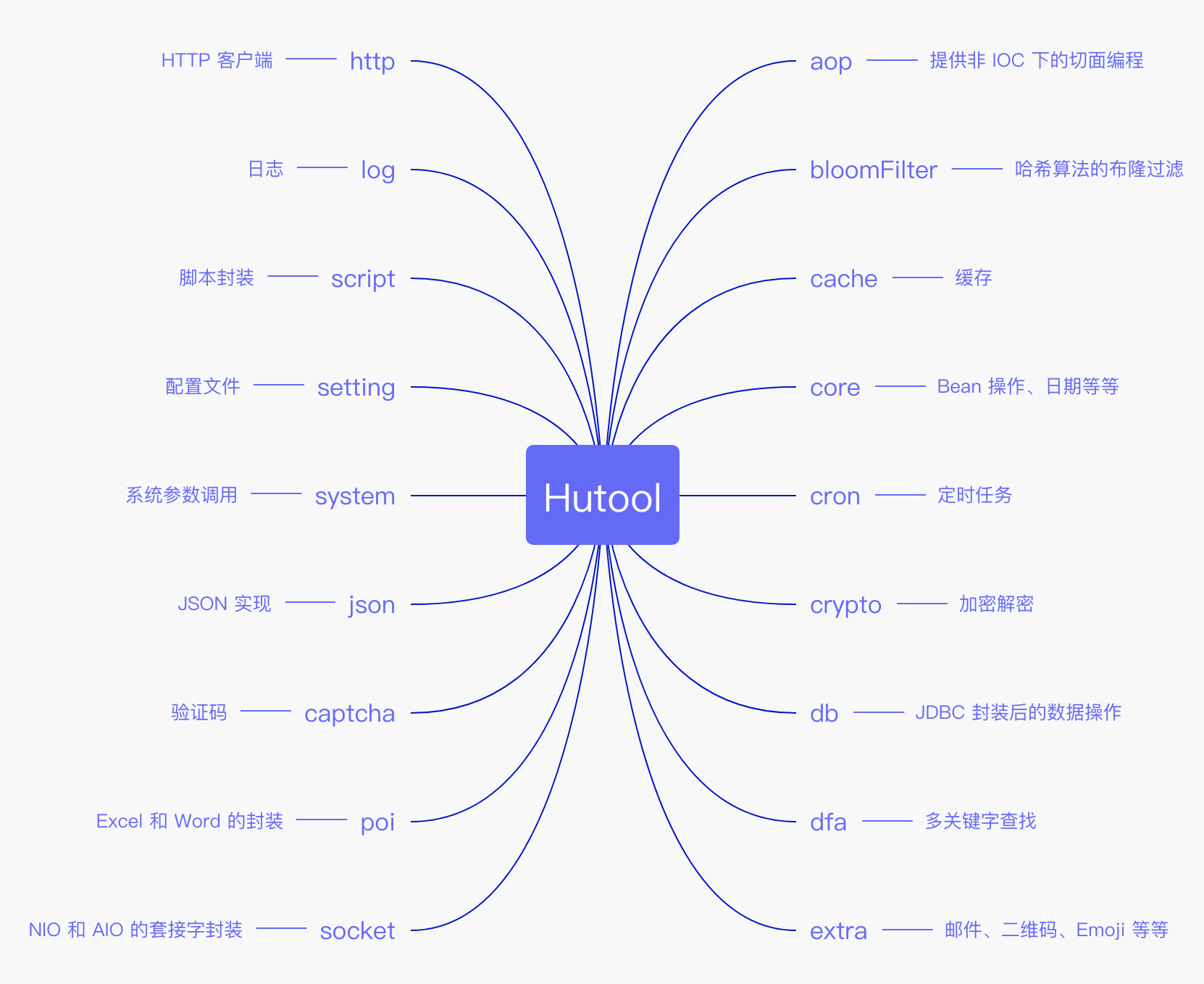
非常多,非常全面,鉴于此,我只挑选一些我喜欢的来介绍下(偷偷地告诉你,我就是想偷懒)。
### 02、类型转换
类型转换在 Java 开发中很常见,尤其是从 HttpRequest 中获取参数的时候,前端传递的是整型,但后端只能先获取到字符串,然后再调用 `parseXXX()` 方法进行转换,还要加上判空,很繁琐。
Hutool 的 Convert 类可以简化这个操作,可以将任意可能的类型转换为指定类型,同时第二个参数 defaultValue 可用于在转换失败时返回一个默认值。
```java
String param = "10";
int paramInt = Convert.toInt(param);
int paramIntDefault = Convert.toInt(param, 0);
```
把字符串转换成日期:
```java
String dateStr = "2020年09月29日";
Date date = Convert.toDate(dateStr);
```
把字符串转成 Unicode:
```java
String unicodeStr = "沉默王二";
String unicode = Convert.strToUnicode(unicodeStr);
```
### 03、日期时间
JDK 自带的 Date 和 Calendar 不太好用,Hutool 封装的 DateUtil 用起来就舒服多了!
获取当前日期:
```java
Date date = DateUtil.date();
```
`DateUtil.date()` 返回的其实是 DateTime,它继承自 Date 对象,重写了 `toString()` 方法,返回 `yyyy-MM-dd HH:mm:ss` 格式的字符串。
有些小伙伴是不是想看看我写这篇文章的时间,输出一下给大家看看:
```
System.out.println(date);// 2020-09-29 04:28:02
```
字符串转日期:
```java
String dateStr = "2020-09-29";
Date date = DateUtil.parse(dateStr);
```
`DateUtil.parse()` 会自动识别一些常用的格式,比如说:
- yyyy-MM-dd HH:mm:ss
- yyyy-MM-dd
- HH:mm:ss
- yyyy-MM-dd HH:mm
- yyyy-MM-dd HH:mm:ss.SSS
还可以识别带中文的:
- 年月日时分秒
格式化时间差:
```java
String dateStr1 = "2020-09-29 22:33:23";
Date date1 = DateUtil.parse(dateStr1);
String dateStr2 = "2020-10-01 23:34:27";
Date date2 = DateUtil.parse(dateStr2);
long betweenDay = DateUtil.between(date1, date2, DateUnit.MS);
// 输出:2天1小时1分4秒
String formatBetween = DateUtil.formatBetween(betweenDay, BetweenFormater.Level.SECOND);
```
星座和属相:
```java
// 射手座
String zodiac = DateUtil.getZodiac(Month.DECEMBER.getValue(), 10);
// 蛇
String chineseZodiac = DateUtil.getChineseZodiac(1989);
```
### 04、IO 流相关
[IO 操作包括读和写](https://javabetter.cn/io/shangtou.html),应用的场景主要包括网络操作和文件操作,原生的 Java 类库区分[字符流](https://javabetter.cn/io/reader-writer.html)和[字节流](https://javabetter.cn/io/stream.html),字节流 InputStream 和 OutputStream 就有很多很多种,使用起来让人头皮发麻。
Hutool 封装了流操作工具类 IoUtil、文件读写操作工具类 FileUtil、文件类型判断工具类 FileTypeUtil 等等。
```java
BufferedInputStream in = FileUtil.getInputStream("hutool/origin.txt");
BufferedOutputStream out = FileUtil.getOutputStream("hutool/to.txt");
long copySize = IoUtil.copy(in, out, IoUtil.DEFAULT_BUFFER_SIZE);
```
在 IO 操作中,文件的操作相对来说是比较复杂的,但使用频率也很高,几乎所有的项目中都躺着一个叫 FileUtil 或者 FileUtils 的工具类。Hutool 的 FileUtil 类包含以下几类操作:
- 文件操作:包括文件目录的新建、删除、复制、移动、改名等
- 文件判断:判断文件或目录是否非空,是否为目录,是否为文件等等
- 绝对路径:针对 ClassPath 中的文件转换为绝对路径文件
- 文件名:主文件名,扩展名的获取
- 读操作:包括 getReader、readXXX 操作
- 写操作:包括 getWriter、writeXXX 操作
顺带说说 classpath。
在实际编码当中,我们通常需要从某些文件里面读取一些数据,比如配置文件、文本文件、图片等等,那这些文件通常放在什么位置呢?
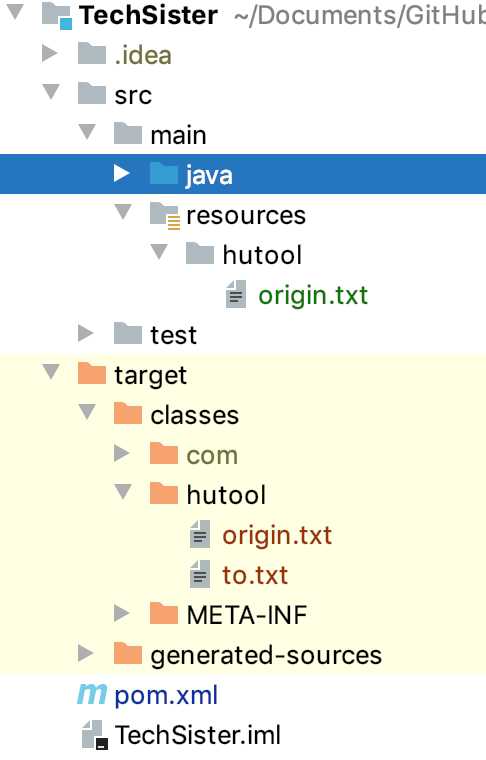
放在项目结构图中的 resources 目录下,当项目编译后,会出现在 classes 目录下。对应磁盘上的目录如下图所示:

当我们要读取文件的时候,我是不建议使用绝对路径的,因为操作系统不一样的话,文件的路径标识符也是不一样的。最好使用相对路径。
假设在 `src/resources` 下放了一个文件 origin.txt,文件的路径参数如下所示:
```java
FileUtil.getInputStream("origin.txt")
```
假设文件放在 `src/resources/hutool` 目录下,则路径参数改为:
```java
FileUtil.getInputStream("hutool/origin.txt")
```
### 05、字符串工具
Hutool 封装的字符串工具类 StrUtil 和 Apache Commons Lang 包中的 StringUtils 类似,作者认为优势在于 Str 比 String 短,尽管我不觉得。不过,我倒是挺喜欢其中的一个方法的:
```java
String template = "{},一枚沉默但有趣的程序员,喜欢他的文章的话,请微信搜索{}";
String str = StrUtil.format(template, "沉默王二", "沉默王二");
// 沉默王二,一枚沉默但有趣的程序员,喜欢他的文章的话,请微信搜索沉默王二
```
### 06、反射工具
反射机制可以让 Java 变得更加灵活,因此在某些情况下,反射可以做到事半功倍的效果。Hutool 封装的反射工具 ReflectUtil 包括:
- 获取构造方法
- 获取字段
- 获取字段值
- 获取方法
- 执行方法(对象方法和静态方法)
```java
package com.itwanger.hutool.reflect;
import cn.hutool.core.util.ReflectUtil;
import java.lang.reflect.Constructor;
import java.lang.reflect.Field;
import java.lang.reflect.Method;
public class ReflectDemo {
private int id;
public ReflectDemo() {
System.out.println("构造方法");
}
public void print() {
System.out.println("我是沉默王二");
}
public static void main(String[] args) throws IllegalAccessException {
// 构建对象
ReflectDemo reflectDemo = ReflectUtil.newInstance(ReflectDemo.class);
// 获取构造方法
Constructor[] constructors = ReflectUtil.getConstructors(ReflectDemo.class);
for (Constructor constructor : constructors) {
System.out.println(constructor.getName());
}
// 获取字段
Field field = ReflectUtil.getField(ReflectDemo.class, "id");
field.setInt(reflectDemo, 10);
// 获取字段值
System.out.println(ReflectUtil.getFieldValue(reflectDemo, field));
// 获取所有方法
Method[] methods = ReflectUtil.getMethods(ReflectDemo.class);
for (Method m : methods) {
System.out.println(m.getName());
}
// 获取指定方法
Method method = ReflectUtil.getMethod(ReflectDemo.class, "print");
System.out.println(method.getName());
// 执行方法
ReflectUtil.invoke(reflectDemo, "print");
}
}
```
### 07、压缩工具
在 Java 中,对文件、文件夹打包压缩是一件很繁琐的事情,Hutool 封装的 ZipUtil 针对 java.util.zip 包做了优化,可以使用一个方法搞定压缩和解压,并且自动处理文件和目录的问题,不再需要用户判断,大大简化的压缩解压的复杂度。
```java
ZipUtil.zip("hutool", "hutool.zip");
File unzip = ZipUtil.unzip("hutool.zip", "hutoolzip");
```
### 08、身份证工具
Hutool 封装的 IdcardUtil 可以用来对身份证进行验证,支持大陆 15 位、18 位身份证,港澳台 10 位身份证。
```java
String ID_18 = "321083197812162119";
String ID_15 = "150102880730303";
boolean valid = IdcardUtil.isValidCard(ID_18);
boolean valid15 = IdcardUtil.isValidCard(ID_15);
```
### 09、扩展 HashMap
Java 中的 HashMap 是强类型的,而 Hutool 封装的 Dict 对键的类型要求没那么严格。
```java
Dict dict = Dict.create()
.set("age", 18)
.set("name", "沉默王二")
.set("birthday", DateTime.now());
int age = dict.getInt("age");
String name = dict.getStr("name");
```
### 10、控制台打印
本地编码的过程中,经常需要使用 `System.out` 打印结果,但是往往一些复杂的对象不支持直接打印,比如说数组,需要调用 `Arrays.toString`。Hutool 封装的 Console 类借鉴了 JavaScript 中的 `console.log()`,使得打印变成了一个非常便捷的方式。
```java
public class ConsoleDemo {
public static void main(String[] args) {
// 打印字符串
Console.log("沉默王二,一枚有趣的程序员");
// 打印字符串模板
Console.log("洛阳是{}朝古都",13);
int [] ints = {1,2,3,4};
// 打印数组
Console.log(ints);
}
}
```
### 11、字段验证器
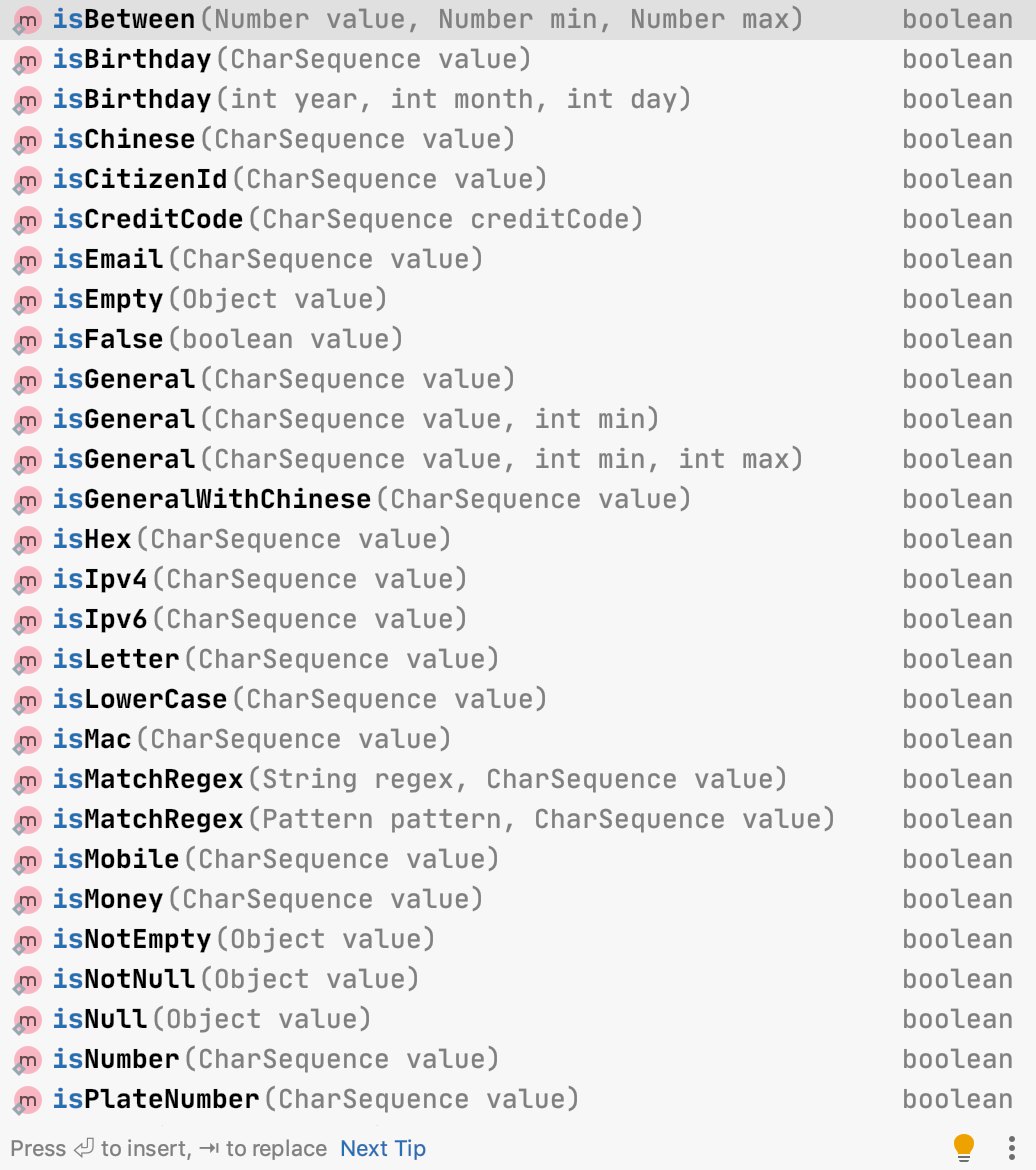
做 Web 开发的时候,后端通常需要对表单提交过来的数据进行验证。Hutool 封装的 Validator 可以进行很多有效的条件验证:
- 是不是邮箱
- 是不是 IP V4、V6
- 是不是电话号码
- 等等
```java
Validator.isEmail("沉默王二");
Validator.isMobile("itwanger.com");
```
### 12、双向查找 Map
[Guava](https://javabetter.cn/common-tool/guava.html) 中提供了一种特殊的 Map 结构,叫做 BiMap,实现了一种双向查找的功能,可以根据 key 查找 value,也可以根据 value 查找 key,Hutool 也提供这种 Map 结构。
```java
BiMap<String, String> biMap = new BiMap<>(new HashMap<>());
biMap.put("wanger", "沉默王二");
biMap.put("wangsan", "沉默王三");
// get value by key
biMap.get("wanger");
biMap.get("wangsan");
// get key by value
biMap.getKey("沉默王二");
biMap.getKey("沉默王三");
```
在实际的开发工作中,其实我更倾向于使用 Guava 的 BiMap,而不是 Hutool 的。这里提一下,主要是我发现了 Hutool 在线文档上的一处错误,提了个 issue(从中可以看出我一颗一丝不苟的心和一双清澈明亮的大眼睛啊)。

### 13、图片工具
Hutool 封装的 ImgUtil 可以对图片进行缩放、裁剪、转为黑白、加水印等操作。
缩放图片:
```java
ImgUtil.scale(
FileUtil.file("hutool/wangsan.jpg"),
FileUtil.file("hutool/wangsan_small.jpg"),
0.5f
);
```
裁剪图片:
```java
ImgUtil.cut(
FileUtil.file("hutool/wangsan.jpg"),
FileUtil.file("hutool/wangsan_cut.jpg"),
new Rectangle(200, 200, 100, 100)
);
```
添加水印:
```java
ImgUtil.pressText(//
FileUtil.file("hutool/wangsan.jpg"),
FileUtil.file("hutool/wangsan_logo.jpg"),
"沉默王二", Color.WHITE,
new Font("黑体", Font.BOLD, 100),
0,
0,
0.8f
);
```
趁机让大家欣赏一下二哥帅气的真容。

### 14、配置文件
>众所周知,Java 中广泛应用的配置文件 Properties 存在一个特别大的诟病:不支持中文。每次使用时,如果想存放中文字符,就必须借助 IDE 相关插件才能转为 Unicode 符号,而这种反人类的符号在命令行下根本没法看。
于是,Hutool 的 Setting 运用而生。Setting 除了兼容 Properties 文件格式外,还提供了一些特有功能,这些功能包括:
- 各种编码方式支持
- 变量支持
- 分组支持
先整个配置文件 example.setting,内容如下:
```
name=沉默王二
age=18
```
再来读取和更新配置文件:
```java
public class SettingDemo {
private final static String SETTING = "hutool/example.setting";
public static void main(String[] args) {
// 初始化 Setting
Setting setting = new Setting(SETTING);
// 读取
setting.getStr("name", "沉默王二");
// 在配置文件变更时自动加载
setting.autoLoad(true);
// 通过代码方式增加键值对
setting.set("birthday", "2020年09月29日");
setting.store(SETTING);
}
}
```
### 15、日志工厂
Hutool 封装的日志工厂 LogFactory 兼容了各大日志框架,使用起来也非常简便。
```java
public class LogDemo {
private static final Log log = LogFactory.get();
public static void main(String[] args) {
log.debug("难得糊涂");
}
}
```
先通过 `LogFactory.get()` 自动识别引入的日志框架,从而创建对应日志框架的门面 Log 对象,然后调用 `debug()`、`info()` 等方法输出日志。
如果不想创建 Log 对象的话,可以使用 StaticLog,顾名思义,一个提供了静态方法的日志类。
```java
StaticLog.info("爽啊 {}.", "沉默王二的文章");
```
### 16、缓存工具
CacheUtil 是 Hutool 封装的创建缓存的快捷工具类,可以创建不同的缓存对象:
- FIFOCache:先入先出,元素不停的加入缓存直到缓存满为止,当缓存满时,清理过期缓存对象,清理后依旧满则删除先入的缓存。
```java
Cache<String, String> fifoCache = CacheUtil.newFIFOCache(3);
fifoCache.put("key1", "沉默王一");
fifoCache.put("key2", "沉默王二");
fifoCache.put("key3", "沉默王三");
fifoCache.put("key4", "沉默王四");
// 大小为 3,所以 key3 放入后 key1 被清除
String value1 = fifoCache.get("key1");
```
- LFUCache,最少使用,根据使用次数来判定对象是否被持续缓存,当缓存满时清理过期对象,清理后依旧满的情况下清除最少访问的对象并将其他对象的访问数减去这个最少访问数,以便新对象进入后可以公平计数。
```java
Cache<String, String> lfuCache = CacheUtil.newLFUCache(3);
lfuCache.put("key1", "沉默王一");
// 使用次数+1
lfuCache.get("key1");
lfuCache.put("key2", "沉默王二");
lfuCache.put("key3", "沉默王三");
lfuCache.put("key4", "沉默王四");
// 由于缓存容量只有 3,当加入第 4 个元素的时候,最少使用的将被移除(2,3被移除)
String value2 = lfuCache.get("key2");
String value3 = lfuCache.get("key3");
```
- LRUCache,最近最久未使用,根据使用时间来判定对象是否被持续缓存,当对象被访问时放入缓存,当缓存满了,最久未被使用的对象将被移除。
```java
Cache<String, String> lruCache = CacheUtil.newLRUCache(3);
lruCache.put("key1", "沉默王一");
lruCache.put("key2", "沉默王二");
lruCache.put("key3", "沉默王三");
// 使用时间近了
lruCache.get("key1");
lruCache.put("key4", "沉默王四");
// 由于缓存容量只有 3,当加入第 4 个元素的时候,最久使用的将被移除(2)
String value2 = lruCache.get("key2");
System.out.println(value2);
```
### 17、加密解密
加密分为三种:
- 对称加密(symmetric),例如:AES、DES 等
- 非对称加密(asymmetric),例如:RSA、DSA 等
- 摘要加密(digest),例如:MD5、SHA-1、SHA-256、HMAC 等
Hutool 针对这三种情况都做了封装:
- 对称加密 SymmetricCrypto
- 非对称加密 AsymmetricCrypto
- 摘要加密 Digester
快速加密工具类 SecureUtil 有以下这些方法:
1)对称加密
- SecureUtil.aes
- SecureUtil.des
2)非对称加密
- SecureUtil.rsa
- SecureUtil.dsa
3)摘要加密
- SecureUtil.md5
- SecureUtil.sha1
- SecureUtil.hmac
- SecureUtil.hmacMd5
- SecureUtil.hmacSha1
只写一个简单的例子作为参考:
```java
public class SecureUtilDemo {
static AES aes = SecureUtil.aes();
public static void main(String[] args) {
String encry = aes.encryptHex("沉默王二");
System.out.println(encry);
String oo = aes.decryptStr(encry);
System.out.println(oo);
}
}
```
### 18、其他类库
Hutool 中的类库还有很多,尤其是一些对第三方类库的进一步封装,比如邮件工具 MailUtil,二维码工具 QrCodeUtil,Emoji 工具 EmojiUtil,小伙伴们可以参考 Hutool 的官方文档:https://www.hutool.cn/
项目源码地址:[https://github.com/looly/hutool](https://github.com/looly/hutool)
----
GitHub 上标星 10000+ 的开源知识库《[二哥的 Java 进阶之路](https://github.com/itwanger/toBeBetterJavaer)》第一版 PDF 终于来了!包括Java基础语法、数组&字符串、OOP、集合框架、Java IO、异常处理、Java 新特性、网络编程、NIO、并发编程、JVM等等,共计 32 万余字,500+张手绘图,可以说是通俗易懂、风趣幽默……详情戳:[太赞了,GitHub 上标星 10000+ 的 Java 教程](https://javabetter.cn/overview/)
微信搜 **沉默王二** 或扫描下方二维码关注二哥的原创公众号沉默王二,回复 **222** 即可免费领取。
