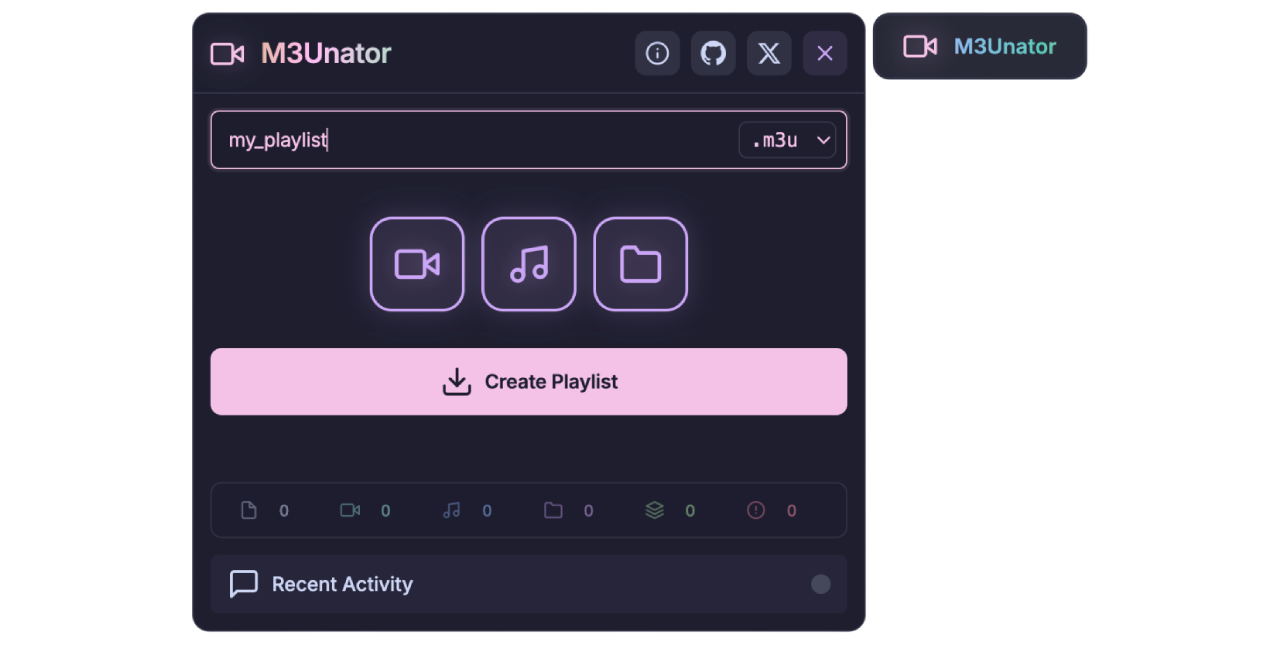




M3Unator is a userscript for turning public web server indexes into playable media playlists. It detects supported directory listing pages, scans video and audio files, follows subdirectories when requested, and exports clean playlist files that work with common media players and IPTV tools.



M3Unator runs in your browser on supported directory listing pages. When a page exposes files through a classic web server index, M3Unator adds a compact launcher button. From there, you can choose what to scan, generate a playlist, monitor progress, and download the result without uploading anything to another service.
It is designed for open directory pages generated by servers such as Apache, Nginx, LiteSpeed, Lighttpd, IIS, and Caddy. It can also handle similar listing layouts when the page structure provides enough directory and file signals.
- Optional IPTV
group-titlemetadata with manual text or first-folder grouping. .m3u8export path with UTF-8 BOM and an HLS-friendly MIME type.- Adaptive parallel scanning in normal and aggressive modes.
- Duplicate playlist entry prevention across large file batches.
- Broader directory listing detection for Apache, Nginx, LiteSpeed, Lighttpd, IIS, and Caddy style pages.
- Improved startup detection that avoids mounting on ordinary non-listing pages.
- Better large-directory responsiveness through batched file processing.
- Updated local logic tests, browser smoke tests, and release QA guidance.
- Exports Extended M3U playlists as
.m3u. - Exports UTF-8
.m3u8playlists for better compatibility with HLS/IPTV-oriented players. - Adds optional
group-title="..."metadata with manual text or automatic first-folder grouping. - Keeps readable nested path labels in playlist titles, and preserves remaining paths when first-folder grouping is enabled.
- Sorts playlist entries by depth and natural title order.
- Prevents duplicate output entries when the same media URL is encountered more than once.
- Detects common video and audio formats from directory links.
- Lets you include video, audio, or both.
- Supports international filenames through URL decoding and UTF-8 playlist output.
- Filters non-media files out of the generated playlist.
- Scans the current directory or recursively scans subdirectories.
- Supports custom scan depth from 1 to 99 levels.
- Uses batched file processing for large directories.
- Tracks visited URLs to avoid repeated work.
- Skips recursive fetches when a linked HTML page is not a directory listing.
- Normal mode starts at 4 concurrent directory requests and adapts up to 12.
- Aggressive mode starts at 6 concurrent directory requests and adapts up to 20 for trusted fast servers.
- Adaptive throttling reacts to request failures, timeouts, rate limiting, and event-loop lag.
- Network requests use timeout and retry handling with exponential backoff.
- Permanent
401,403,404, and410responses are not retried unnecessarily.
- Floating launcher that appears only on supported directory listing pages.
- Dark popup interface with playlist name, format selector, group-title control, media toggles, depth controls, and fast-scan switch.
- Pause, resume, and cancel controls while scanning.
- Live counters for total files, video files, audio files, folders, depth, and errors.
- Recent Activity panel with categorized log entries and status indicator.
- Toast notifications for important scan and export events.
- About dialog with the active userscript version.
- Runs locally in your browser through a userscript manager.
- Does not upload scanned links or playlists to a remote service.
- Uses browser-side URL parsing and validation before scanning links.
- Escapes playlist metadata where needed for safer output.
- Install a userscript manager:
- Tampermonkey is recommended.
- Violentmonkey is also supported.
- Install M3Unator:
For Tampermonkey v5.0 and newer, browser extension developer mode may need to be enabled before userscripts can run.
- Open a supported web directory listing.
- Click the M3Unator launcher in the top-right corner.
- Enter a playlist name.
- Choose
.m3uor.m3u8. - Select Video, Audio, or both.
- Choose current-directory scanning or a recursive depth.
- Click Create Playlist.
- Download the generated playlist when the scan finishes.
Use Current directory when you only want media files linked directly from the current page. Use Custom depth when you want M3Unator to follow subdirectories. A depth of 1 scans one level below the current page; higher values scan deeper trees.
The Video and Audio toggles control what goes into the playlist. Turning off one media type prevents matching files from being added while the scan continues to process supported directories.
| Format | Best For | Behavior |
|---|---|---|
.m3u |
General media players | Extended M3U text playlist |
.m3u8 |
UTF-8, HLS, and IPTV workflows | UTF-8 playlist with BOM and HLS-friendly MIME handling |
Use the tag button beside the format selector to configure optional IPTV group-title metadata.
- Leave Group Title empty to keep the standard output:
#EXTINF:-1,Title. - Type a custom value to export every item with
group-title="Name". - Click the folder button inside the Group Title field to use the first scanned subfolder as the category. The first folder is removed from the visible title so entries do not repeat the category.
In First folder mode, files in the scan root use the playlist name as their group-title; files inside subfolders use the first folder name. Deep paths after that first folder remain in the visible title.
The compact switch beside Create Playlist enables aggressive scanning. Use it for trusted, responsive servers where higher request concurrency is acceptable. Normal mode is the safer default for unknown or slower hosts.
M3Unator is tested against these listing families:
- Apache
mod_autoindex - Nginx autoindex
- LiteSpeed and OpenLiteSpeed listings
- Lighttpd
mod_dirlisting - IIS directory browsing
- Caddy
file_server browse
It also includes heuristics for similar index pages, but it intentionally avoids mounting on ordinary websites that only happen to contain many links.
mp4 mkv avi webm mov flv wmv m4v mpg mpeg 3gp vob ts mts m2ts divx xvid asf ogv rm rmvb wtv qt hevc f4v swf vro ogx drc gifv mxf roq nsv
mp3 m4a wav flac aac ogg wma opus aiff ape mka ac3 dts m4b m4p m4r mid midi mp2 mpa mpc ra tta voc vox amr awb dsf dff alac wv oga sln aif pcm
| Browser | Support | Notes |
|---|---|---|
| Chrome | Supported | Recommended with Tampermonkey |
| Firefox | Supported | Works with Tampermonkey or Violentmonkey |
| Edge | Supported | Chromium-based Edge is supported |
| Opera | Supported | Chromium-based Opera is supported |
| Safari | Limited | Userscript manager support can vary |
Why does the launcher not appear?
M3Unator only mounts on pages that look like supported directory listings. If the page is a normal website, a file browser rendered by JavaScript, or a blocked/private page, the launcher may not appear.
Why are some files skipped?
Files can be skipped when their extensions are unsupported, links are inaccessible, responses fail permanently, or the page is not recognized as a directory listing during recursive scanning.
Should I use normal or aggressive scanning?
Use normal mode for most hosts. Use aggressive mode only when you trust the server and want higher parallel request limits for faster recursive scans.
Does M3Unator download the media files?
No. It reads directory listing pages, collects media URLs, and writes those URLs into a playlist file. Your media player handles playback afterward.
M3Unator is licensed under the GNU General Public License v3.0. See LICENSE for details.
- GitHub: @hasanbeder
- X: @hasanbeder
- Issues: Bug Reports and Feature Requests