Why aren't these mods/plugins being detected? #23

Replies: 18 comments 3 replies

-
|
It does not have anything to do with how the mod names or structures its plugins. Check the name under which you have the mod installed; it needs to match the folder name you use for mugshots, or be one of the redirects specified in your settings. This version added a default redirect from what I originally called the mugshots ("Pride of Skyrim - AIO") to the actual default name of the mod ("Pride of Skyrim - AIO Male High Poly Head Overhaul"). However, you installed it under a different name altogether ("PA44_NPC_AllInOne_BSA"). You need to do any of the following:
Incidentally, and not related to this bug specifically, I can also see that you've got overhaul patches installed while running this (Pandorables with AI Overhaul), and you've selected an overhaul (Northbourne) as the default source. In both cases, you're going to have a bad time. Highly recommend you take another look at the Getting Started guide, fix those problems, and reset your profile from the Maintenance tab, otherwise you won't get very good results. (Note: There was an issue, a few weeks ago, with a version that has now been deprecated, where it would actually pick Northbourne as the primary for some of these male NPCs, for various reasons that I won't get into here, but that was solved some time ago, so the only reason it would look like that in the profile right now is if the first time the app was run used the "bad" version and hasn't been reset since then - or if the default was manually changed.) |
Beta Was this translation helpful? Give feedback.

-
|
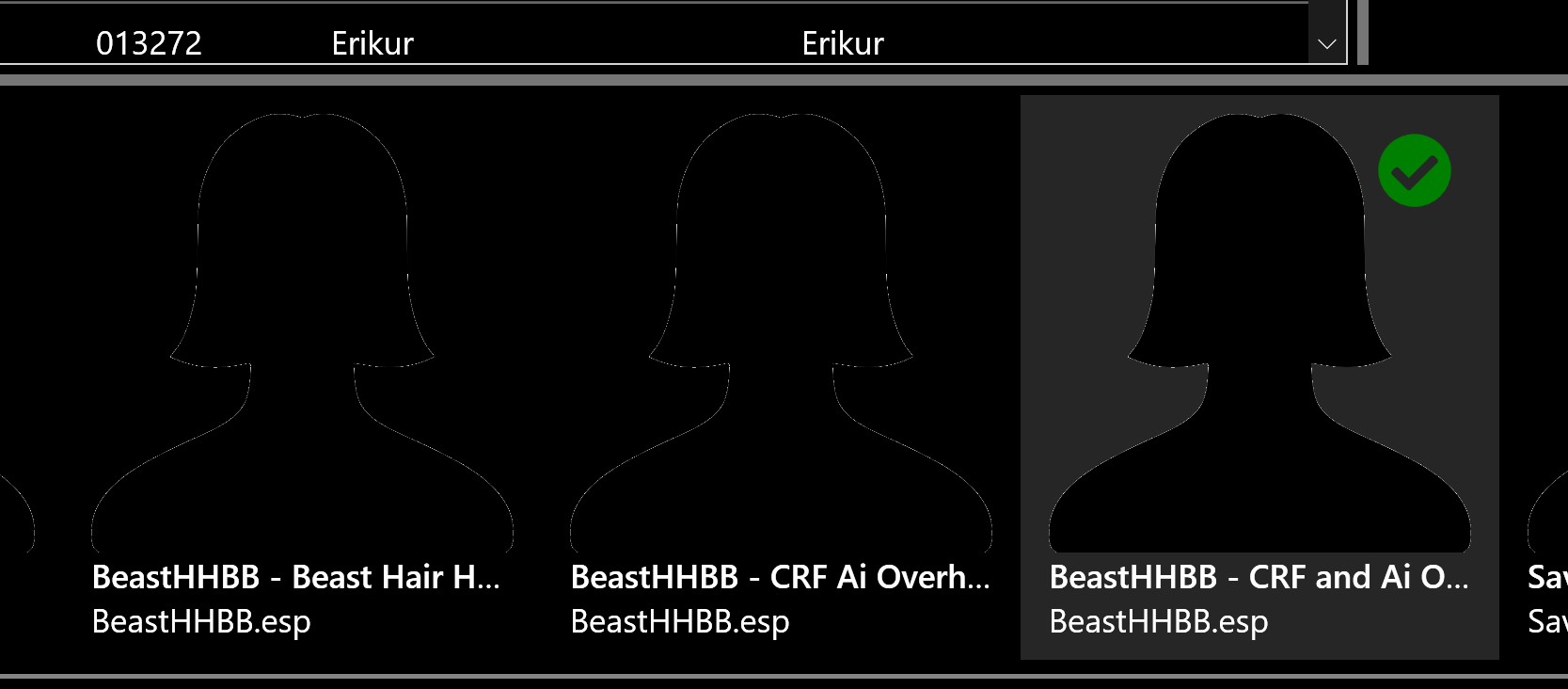
Hi! I encountered another problem, probably just on my end but I was hoping to get some confirmation regarding it. |
Beta Was this translation helpful? Give feedback.
-
|
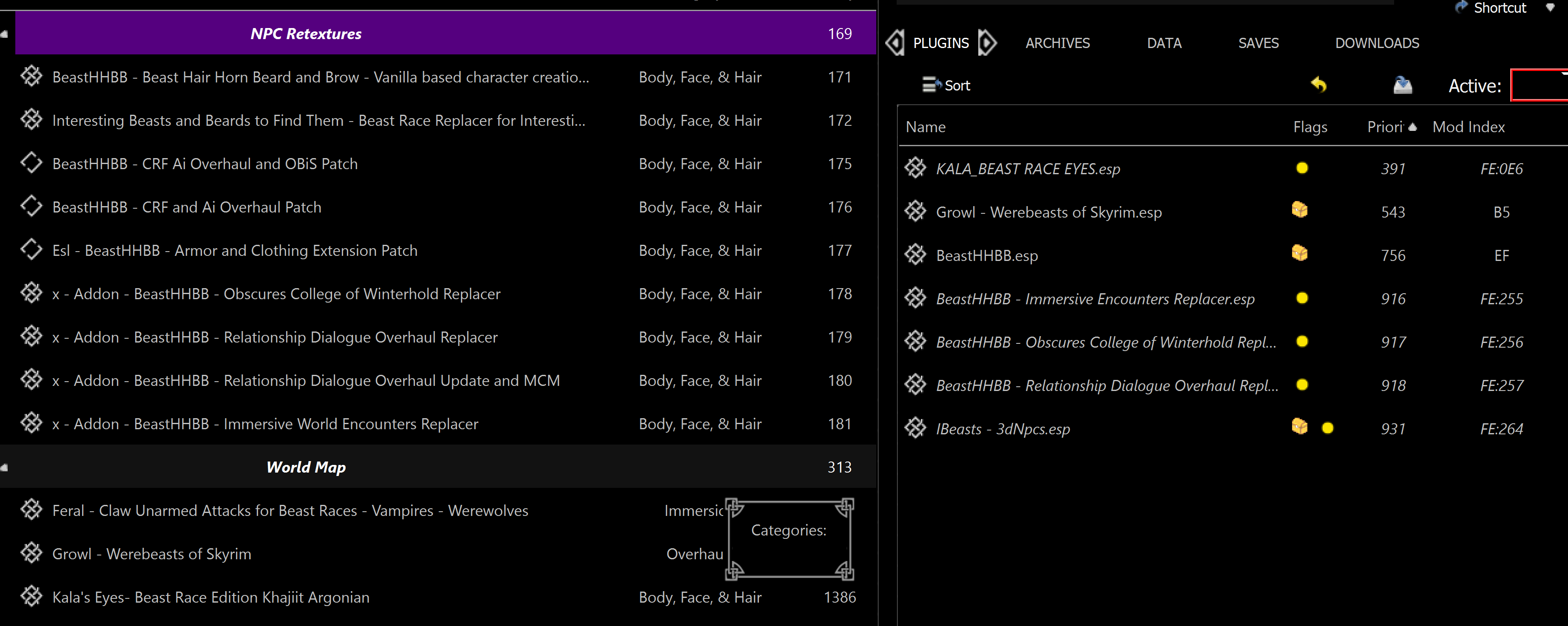
Looks to me like you have two different mods installed with the same plugin. One named "BeastHHBB - CRF Ai Overhaul [something]" and one named "BeastHHBB - CRF and Ai Overhaul [something]". So the plugin might be showing up because you have two copies of the same mod and maybe forgot about one. And both mods show up in the previews section because they both include that plugin which is in your load order. EasyNPC can't actually tell which mods are active in Mod Organizer (at least, not until #10 gets some work), it has to make assumptions based on which plugins are active and where those plugins happen to be found in your mod directory. The app definitely will not find any plugins that are not actually in your load order. I'd check the plugins tab in MO; if you're running a recent version, clicking on the plugin once on the right will highlight the matching mods on the left in purple, and also show lines in the scroll bar to give you a visual indication of where they are. |
Beta Was this translation helpful? Give feedback.
-
|
Neither of those mods show up in my LO :/ that's the weird part. I'm trying a redownload of the original mod and its addons (sans patches for now) to see if it solves the issue. I'll keep you posted. |
Beta Was this translation helpful? Give feedback.
-
|
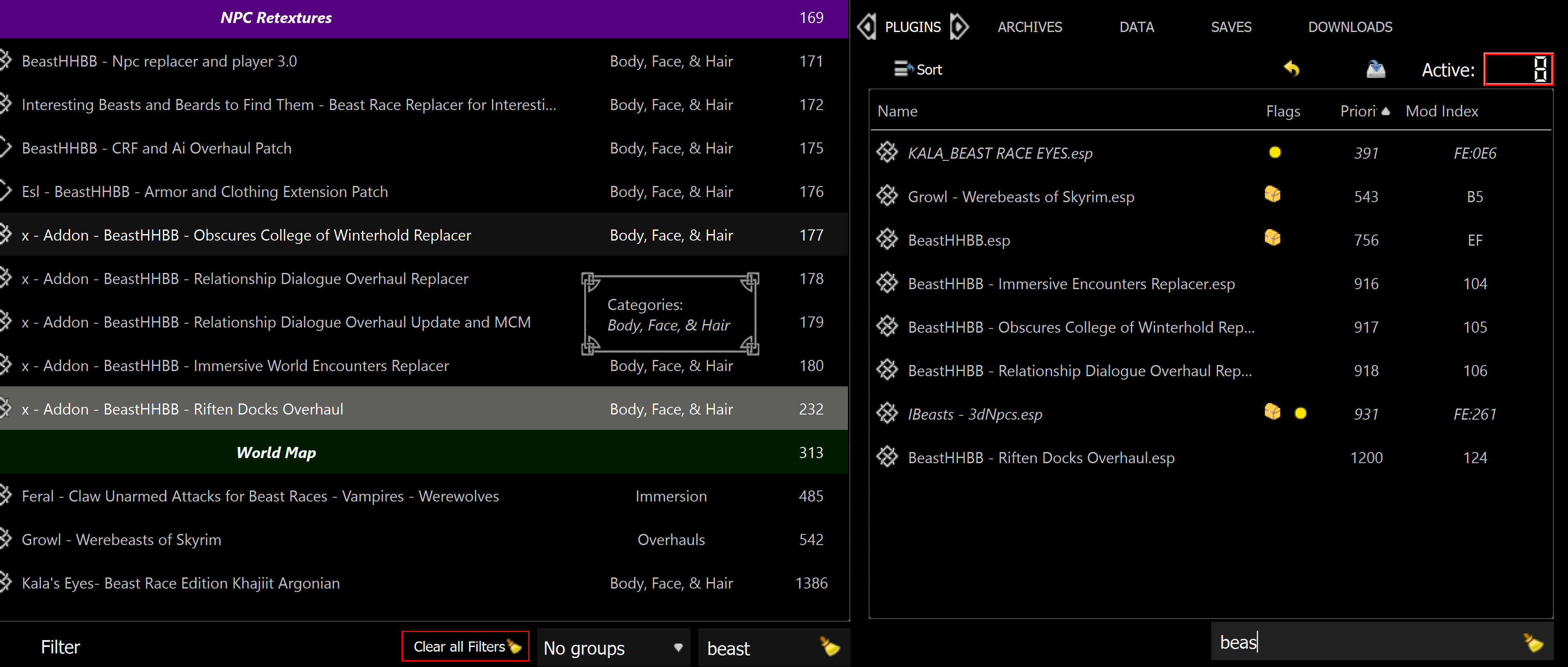
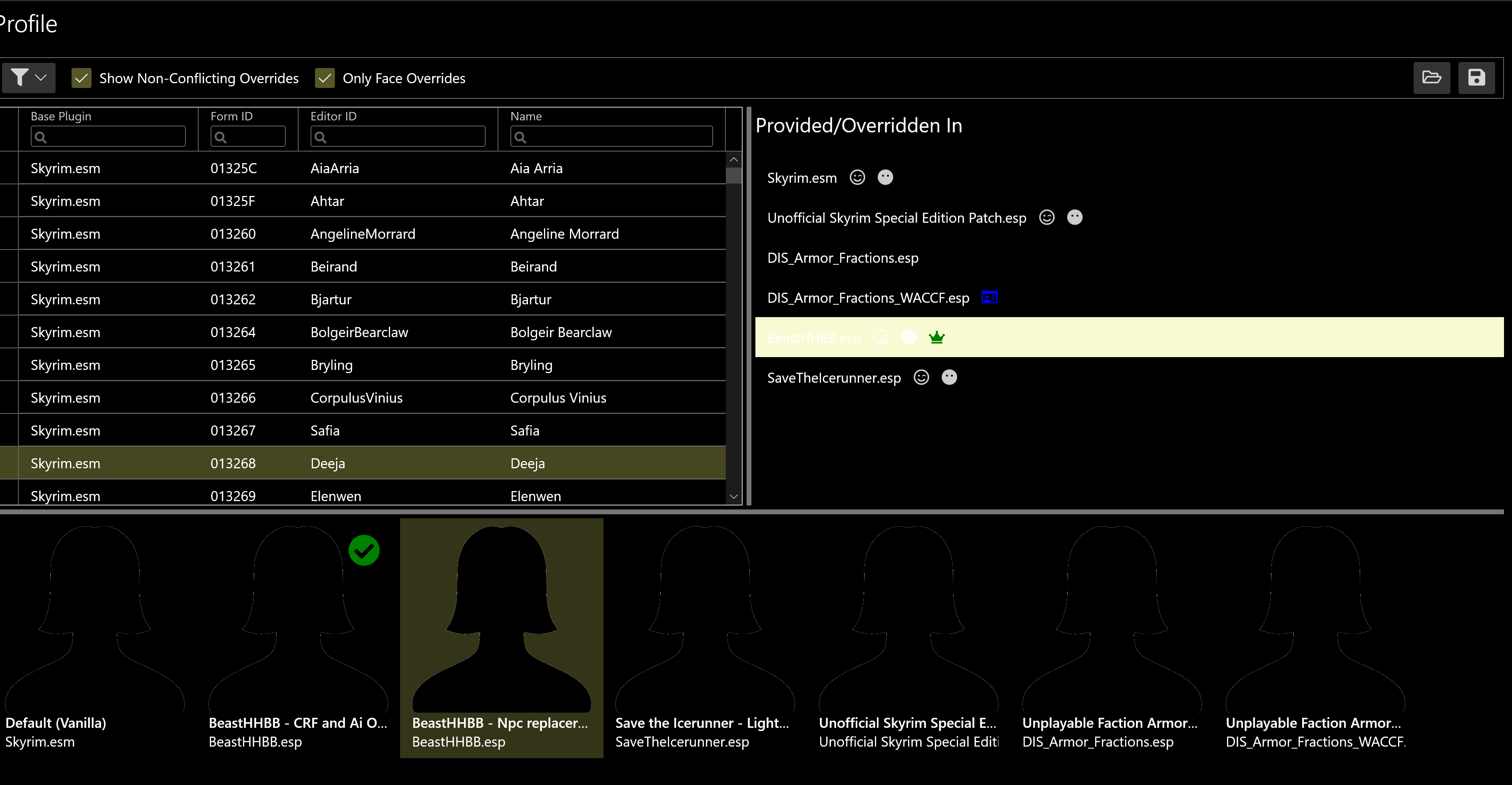
After some reinstallations, I can confirm that I have the same problem even after double checking that I have all the relevant patches disabled. I have also gone into their file structures to ensure there are no plugins that I am missing. |
Beta Was this translation helpful? Give feedback.
-
|
There are a few things going on here, so I'll try to lay it out for you in a logical way.
If the issue is just that you don't like seeing the mods, but you're going to make manual selections for these NPCs anyway, then I would say, don't worry about it. However, if the issue is that you're getting bad default mod selections (e.g. when you reset in the Maintenance tab), then I can suggest two possible workarounds:
I'll reiterate that #10 should alleviate some of this, as once I get EasyNPC reading the Mod Organizer INI files then it should actually know which mods (not plugins) are active. I'll probably still have it show the mod, but greyed out or with warning text or something. However, you'll probably want to try the workaround(s) above rather than waiting, because getting this mostly-working with Vortex is a higher priority than getting super-tight integration with MO, so it'll be at least a few weeks before I add that feature. Let me know if that helps! |
Beta Was this translation helpful? Give feedback.
-
|
Yup! You were exactly right regarding me needing to merge the mods rather than creating new mods and letting them overwrite. After I started to do that for all the instances that I was having problems with previously (had a couple more not related to the ones I shared here) they all went away! I didn't know that was really a thing as I'd never had a problem in game with it. Might actually explain some problems I'd had with my previous attempts at merging npc overhauls w/ sseedit and zmerge. The last question I had was regarding the "overwrite" feature, namely that is it just me going into the load order sync block in the maintenance tab and resetting my face selections? Because there is no other button to really "sync" the LO at least that I am seeing. |

Beta Was this translation helpful? Give feedback.
-
|
I think I need some context for your most recent question. I'm not sure what "overwrite feature" is referring to with regard to EasyNPC, or where I might have written the word "sync" and what it might have meant at the time. Is there some specific post, or something in the guide, that I should be looking at? The reset buttons do essentially what the text above them says: disregard whatever manual selections you have made for specific NPCs, and try to detect the default/face plugins again as if you'd just started the app for the first time. It's useful if you got a lot of bad defaults the first time, and want to start fresh with a new/modified load order. Or if you've removed a big visual overhaul, or added a major functional mod like USSEP or AI Overhaul, etc. |
Beta Was this translation helpful? Give feedback.
-
|
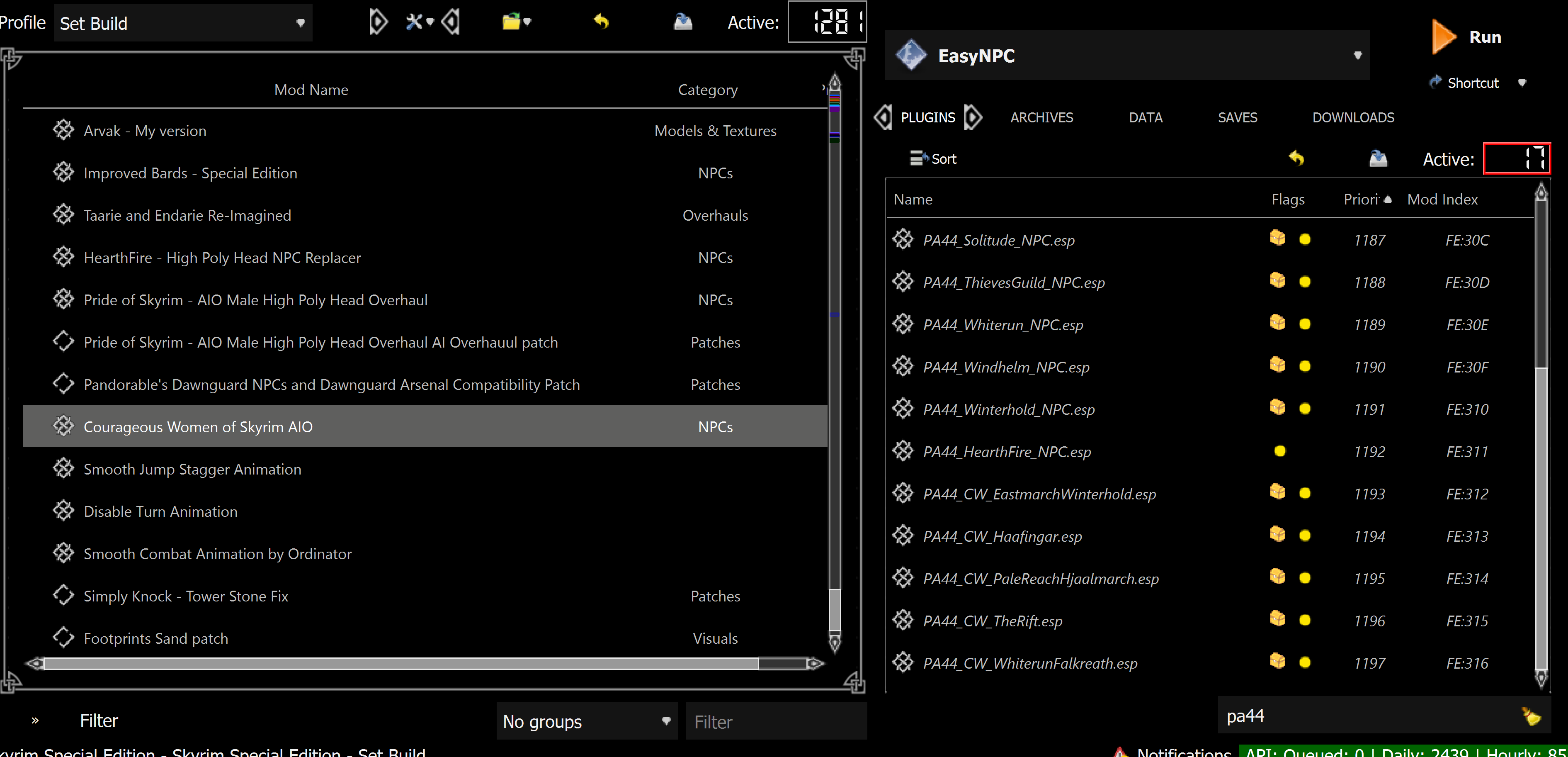
@focustense Ok after some further work, I ran into another problem with a plugin not being identified by EasyNPC (this time Courageous Women of Skyrim). As you can see from the following picture the plugin in question, PA44_CW_PaleReachHjaalmarch.esp, is enabled. |
Beta Was this translation helpful? Give feedback.
-
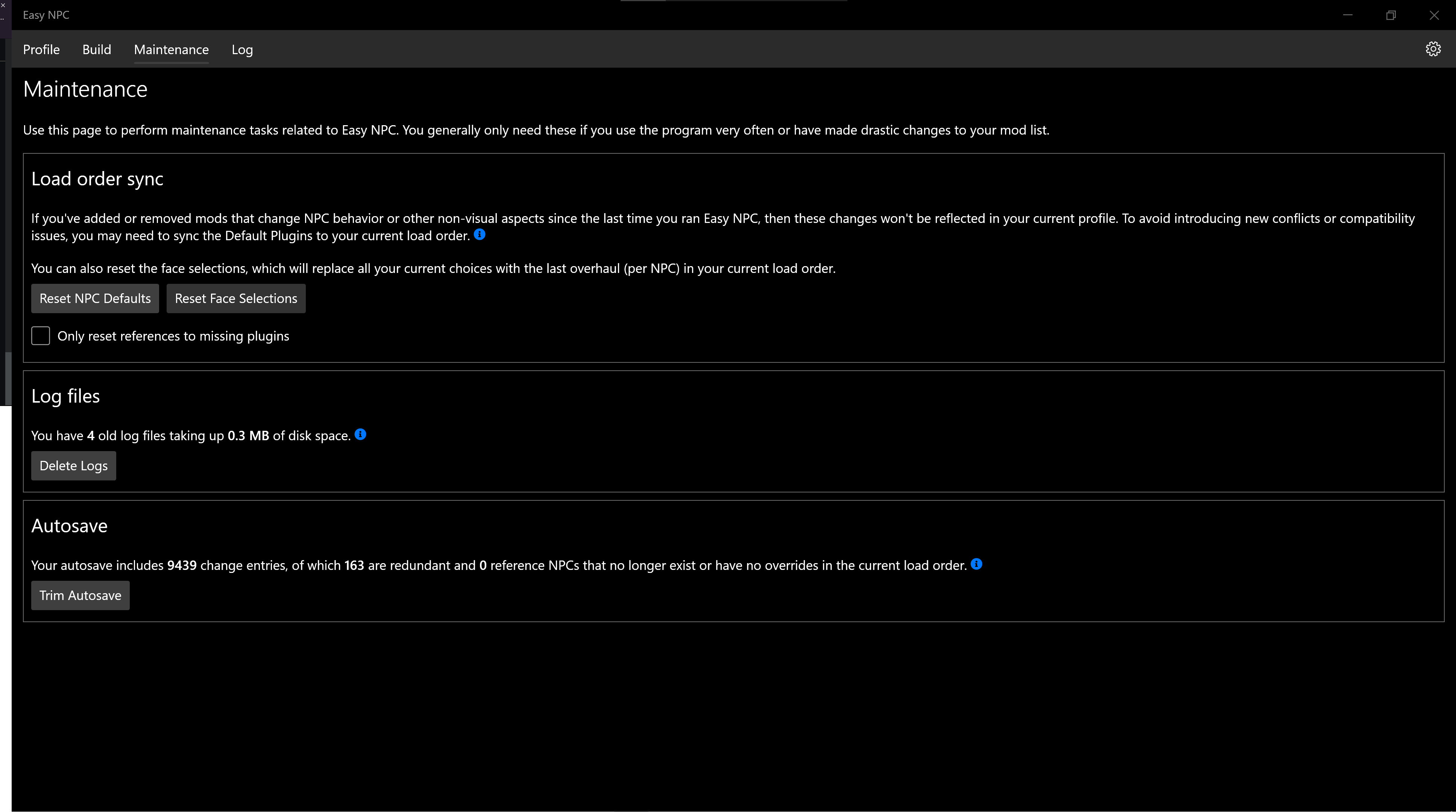
--> Overwrite feature I have no clue either, I must have misspoke so I apologize for that. Regarding the "sync" it is in the maintenance tab for EasyNPC application. I was just wondering if there is an explicit "sync" button I can click that I am missing, =
--> I got you, thanks for the clarification! |
Beta Was this translation helpful? Give feedback.
-
Something wrong with your second image, I can't view it, sorry. Courageous Women is one of my test mods, so I have verified that it works. Please explain in more detail what you mean by "not identified". As with any bug report:
Thanks. Re: the "sync", there is no explicit "sync" button, it's just the title for that group of actions. |
Beta Was this translation helpful? Give feedback.
-
|
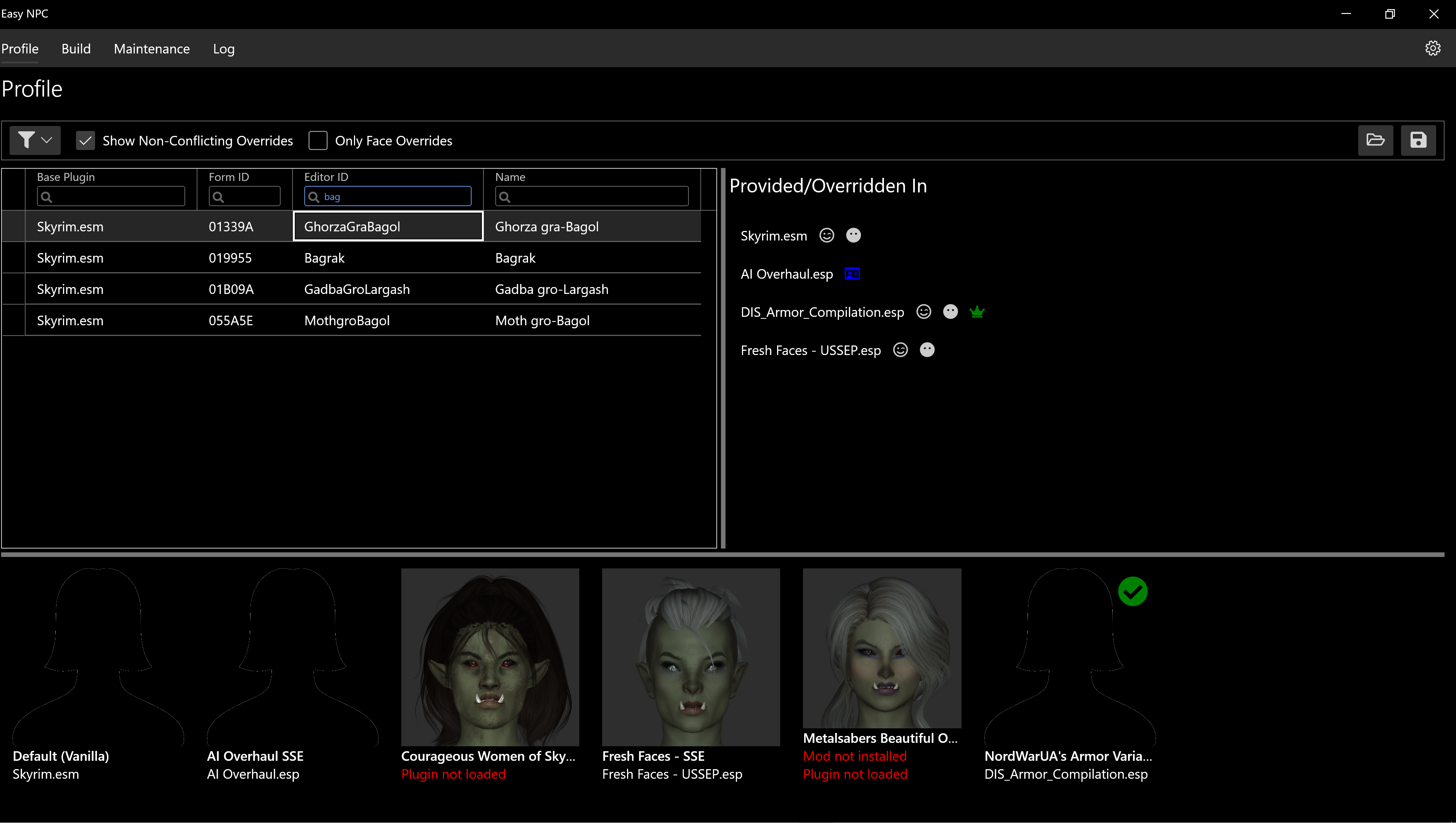
@focustense sorry about the picture, this one should load properly. So, I was going through each of the available NPCS, adjusting both the face and default source as necessary when I came upon this NPC, GhorzaGraBagol. I expected to be able to select CWoS as a choice because as shown in the previous post, I have all the plugins loaded from that (haven't changed the names of them, they are as they were when they were downloaded). However, the picture attached illustrates that while the mod registers as installed, it is not loaded (even though I loaded in the plugin in the opening screen of EasyNPC). As such, I am unable to select it. I am currently going through the list to see if it's a reproducible bug with another NPC or if there is still something wrong with how I am installing + enabling these mods in both Mod Organizer and EasyNPC. EDIT-> I am attaching the log file from my current instance of EasyNPC to show that I have the plugin loaded |
Beta Was this translation helpful? Give feedback.
-
|
Thanks, I can see this as well. The reason this happens is because the plugin does not actually include the NPC. The mod has a facegen file, and that facegen file actually uses non-vanilla head parts, but there are no record edits. This will probably trigger blackface; if it somehow manages to escape blackface, it's still a dangerous edit. The mod author mentions something about this particular NPC in the sticky post, but doesn't go into detail about what that issue is. Maybe the facegen was left in accidentally at one point and could even have been removed from the mod sometime after I created the mugshots. Note that when I create these mugshots, I go by facegen files alone, I'm not paying any attention to whether or not there are accompanying record edits. NifSkope doesn't care what the names of the head parts are, but Skyrim definitely does. I'll think about how to present this a little better, as I agree that displaying "Plugin not loaded" is pretty misleading when the plugins are definitely loaded for that mod. In a technical sense, what the error is really telling you is, "I couldn't find any plugin belonging to this mod that edits this NPC", which is true, but like I said, kind of confusing. The short answer, though, is that this is working as intended. You can't use that particular mod for that particular NPC. You can try, if you want, by choosing a different face plugin and ctrl+double clicking the thumbnail to force it to use that facegen - but you'll probably get blackface if you do. |
Beta Was this translation helpful? Give feedback.
-
|
Thanks for walking through this problem I was having with me, big help. Glad to see its a not a bug! I was getting paranoid about my installations of mods lol. I'll probably let you know if anything else comes up while I go through the rest of these in the same thread to not clutter up your bug report. |
Beta Was this translation helpful? Give feedback.
-
|
Sure thing. I'm actually going to convert this to a discussion topic, since it references several different things, none of which technically are bugs. It's still good for you and everyone else to bring them up, as anything that's confusing or complicated enough to make early adopters file a bug is probably pointing to some potential usability improvements. |
Beta Was this translation helpful? Give feedback.
-
|
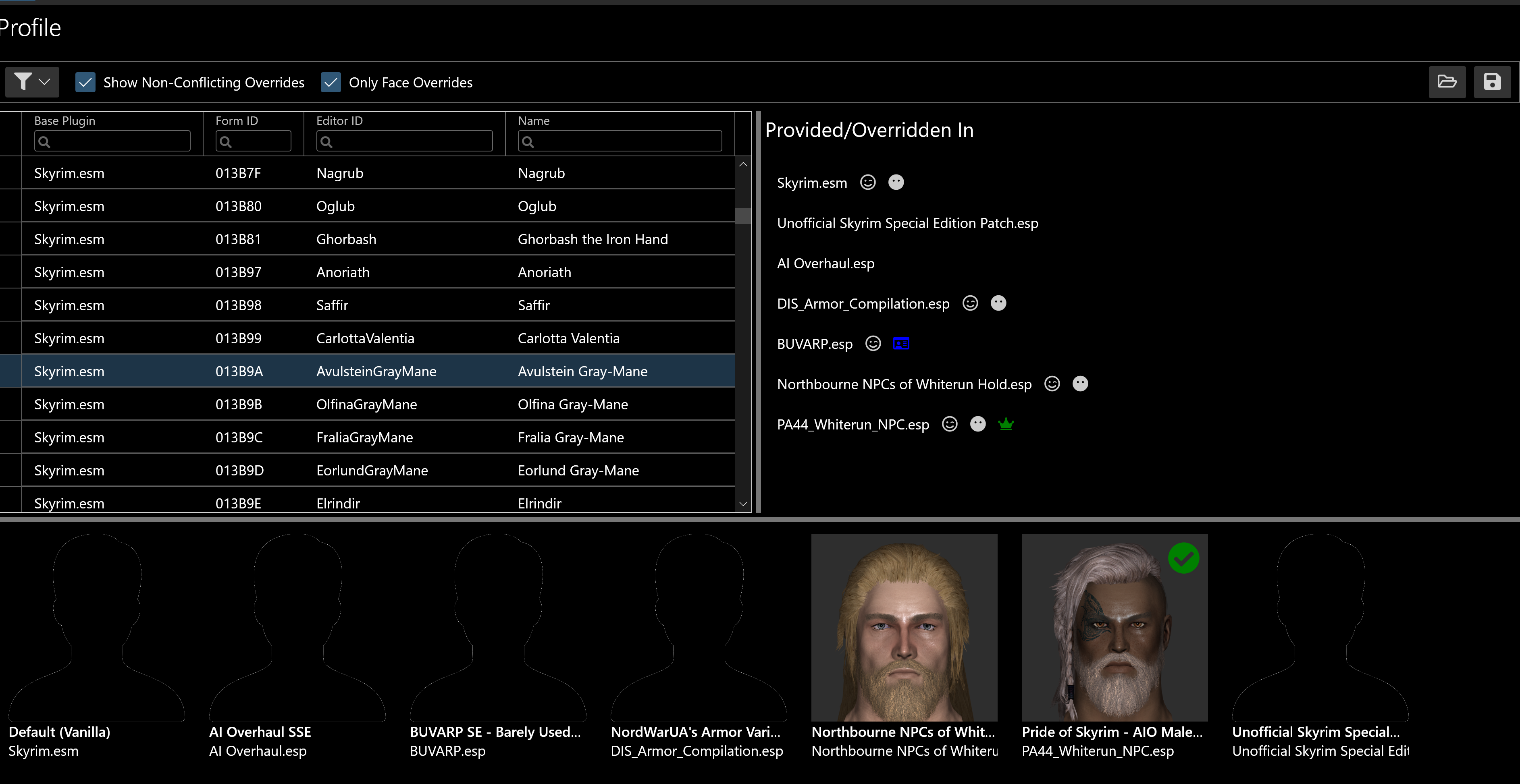
@focustense Believe it or not, I'm back again lol. This time it's more a request on my part regarding a possible feature (idk how difficult it'd be to implement or if you consider it too big a feature creep so feel free to disregard). |
Beta Was this translation helpful? Give feedback.

-
|
There is definitely going to be support for hair mods as a separate category (#6) and may/probably be support for outfit mods (#8). If and when those are implemented, they are probably going to work differently, because in my experience, those types of mods tend to distribute hairstyles/outfits to NPCs on a fairly random or arbitrary basis. They don't get the same attention to detail as true NPC overhauls, and my expectation is that users of the app won't really want the same attention to detail; instead, they can prioritize the hair/outfit mods - or just use their existing load order - and specify whether they want NPC overhaul mods to (a) always override the hair/outfit mods, (b) never override them, or (c) only override them if they supply their own new hair/outfit. Aside from the limited implementation of those subcategories, I'm not planning any other ways to slice and dice, because too many of those and we just end up with a fussy xEdit/zEdit clone. With this app, I'm focused solely on the visuals of NPCs, and expect that for other kinds of edits (bug fixes, AI changes, inventory/leveled lists, perk distribution, etc.) they'll go the usual patching route. And if no patches are available, Wrye Bash tends to already be pretty good at the general mod-mashup task. I wouldn't be surprised if WB is already able to create a perfectly good patch for AI Overhaul + DIS + BUVARP, which I assume are the ones you need to combine; what WB won't do is let you customize any of the visuals. Of that list, DIS could eventually come into EasyNPC scope, but the other two would require a separate compatibility patch (if one is actually needed). |
Beta Was this translation helpful? Give feedback.

-
|
Gotcha. For this particular instance it was really setting DIS as the outfit mod and AI overhaul as the "default source" otherwise (IDK what to do with BUVARP argh so many mod conflicts). I can see how it'd just become a conflict patcher at that point, I just really like the visual cues rather than the way xedit presents it because I can visualize the changes better? if that makes sense (although xedit is the godfather of the whole scene no disrespect intended). |
Beta Was this translation helpful? Give feedback.
-
|
@focustense hey I'm back again. I noticed that EasyNPC isn't detecting mods such as nordic faces, true faces, or kireina, which are all mods that affect npc visuals. I believe the reason is that they are loose files and not esp/espfe/esl based and as such, aren't being recognized by EasyNPC. I didn't see this being addressed in the previous topics in the bug reports, so I was wondering if you had plans to be able to see those and choose from those as well in EasyNPC? EDIT -> @focustense rewritten using steps outlined regarding bringing up a possible issue. 1) I was once again restarting EasyNPC for my particular set of NPCs when I realized I had a couple of mods not showing up as I had expected them to, those outlined previously. I believe the issue lies in them being loose files and not having a recognizable plugins for EasyNPC to spot. ADDENDUM-> I believe it'd be difficult to fix unless you look for all files the provide facegen, not just mods w/ plugins that have facegen. I think this'd also link into the #10 because you'd need the full list of mods I have enabled to do so since there are some mods without plugins that have facegen. Any assistance/wisdom regarding this would be greatly appreciated, and have a good weekend! |
Beta Was this translation helpful? Give feedback.
-
|
It's exactly as you surmise - those aren't detected because there is nothing to detect. EasyNPC is still fundamentally based on NPC records, it looks for record edits and makes sure that your facegens stay consistent and all assets are available and correct. If a mod only replaces facegens and doesn't have a plugin, then it won't appear. The nitty gritty of it can get far more involved, but it's difficult to explain succinctly and tends to devolve into a rant. Suffice it to say that statements such as this one:
are an inversion of reality. These types of mods are actually very fragile, have low compatibility with most overhauls and frequently cause all sorts of problems for both modding tools and "unassisted" modding, including blackface. The recommended workaround would be to create your own plugin for these mods, by copying records (as override is fine) from whatever master plugin the facegens are actually compatible with. Yes, these records will be ITM; don't clean them. Most of the time I assume that the facegens will want vanilla head parts (Skyrim.esm, Update.esm, DLCs, maybe UESP), but there's no guarantee of that, and it would be on you to figure out and test. The other workaround, which doesn't require a plugin, is to have or create previews (mugshots) for the NPCs in these mods. Mugshots always show up, no matter what is actually installed. If a mod exists with the same name, but it has no plugin, you could then select the face plugin containing the record that the facegen files are actually based on - which a lot of the time is going to a vanilla plugin or UESP, but EasyNPC has no way to know that - and double-click on the thumbnail to override just the mod selection. It's on you to identify a compatible face plugin. I don't think this is as good a workaround, because it will generate build warnings and those changes could all be lost if you do a manual reset - but the option is there. |
Beta Was this translation helpful? Give feedback.

-
|
Hi from France, I've encountered the same problem, Try all thoses solutions and it didn't work. I remembered having read somewhere that we shouldn't install data folder under the root (but i did once and it worked fined until... I use Easy PC !). So I've created a mode files and put all the others in it. It works fine, now. Thanks again :) |
Beta Was this translation helpful? Give feedback.


Uh oh!
There was an error while loading. Please reload this page.
-
Hello, I am back once again. Thanks for the prior big fix as it solved the issue I was having before. The new issue that I am facing is that Pride of Skyrim isn't being properly detected by EasyNPC.

This image shows how the AIO is installed but is showing up under a different name than the choice with the mugshot. I think it might have something to do with how the AIO has a bunch of esls and not one esp? I could also try renaming my mod if that would solve the issue.
Beta Was this translation helpful? Give feedback.
All reactions