Kubernetes (K8s) is an orchestration tool with the following features:
- Availability - scale as defined in your desired state
- Resilience - if a container exits/dies, a new one is created
- Storage - Local, NFS, iSCSI, GCEP, AWS EBS and more
- Deployments - with Canary pattern
- Scheduling - with Resource Limitations
- Updates - with Rolling Updates
- Networking and Cluster DNS
- Service Discovery
- Ingress routing and load balancing across replicas
- Security - with RBAC and network policies
- Namespaces - separate resources
Overview of a K8s cluster:
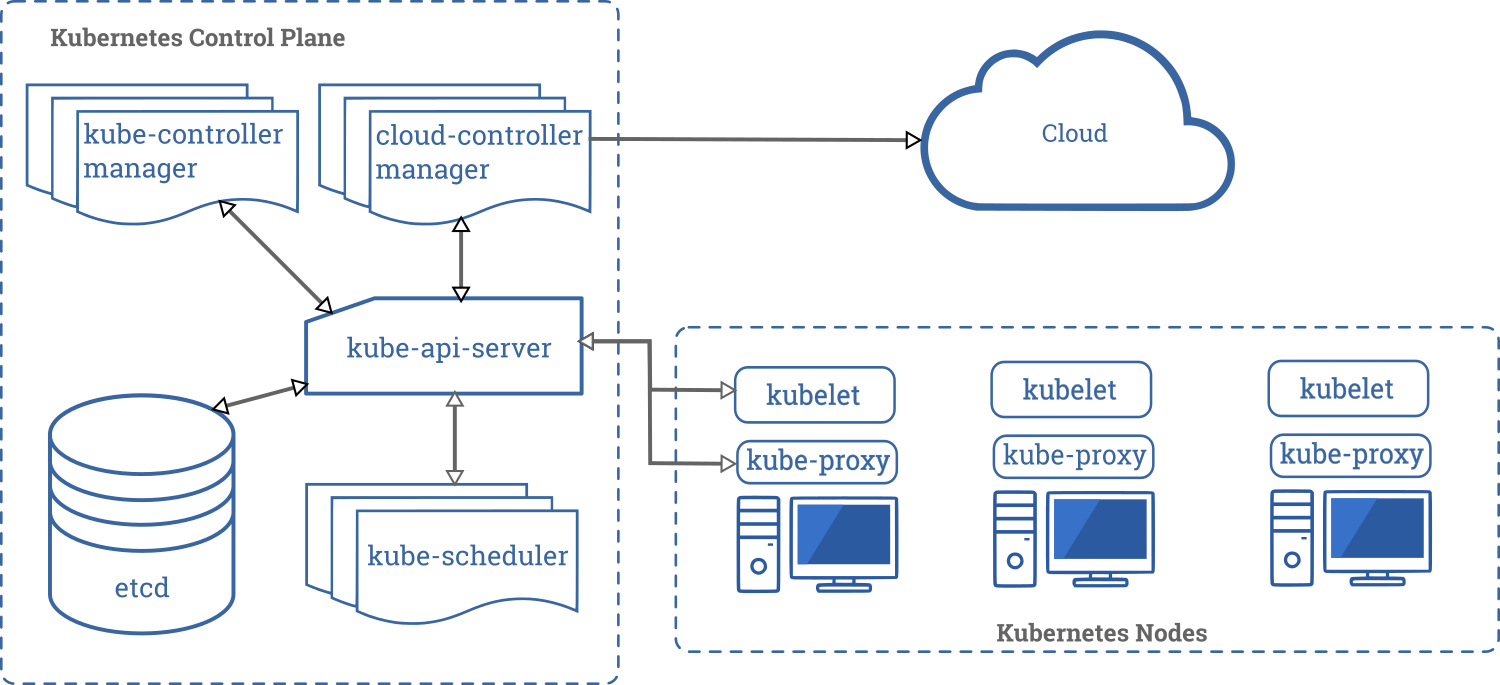
- kube-api-server: Main frontend api server.
- etcd: key-value backend store for all cluster data.
- kube-scheduler: Assigns a node for newly created pods.
- kube-controller manager: Manages node lifetime, replications, endpoints etc.
- cloud-controller manager: A manager towards the the specific cloud provider like GKE or AWS.
- kubelet: Makes sure containers are running in a pod.
- kube-proxy: Manages network rules to allow traffic to/from a pod.
- container runtime: Runs the actual container.
Ref: https://kubernetes.io/docs/concepts/overview/components/
Kubernetes is configured via various objects, see below:

A POD is the smallest managable execution object in K8s.
- Supports scaling, lifecycle, scheduling to worker nodes
- Consists of one or more containers
- Grouping enables strong use-case patterns like init-container, sidecar, ambassador etc.
- Containers can communication
- Only put highly related containers together in a POD
- IP addressable with ports (like VM)
- PODs always see network as a flat network (no NAT), see below

Kubernetes supports multiple virtual clusters backed by the same physical cluster. These virtual clusters are called namespaces

Namespaces do not share anything between them, which is important to know, and thus come in handy when you have multiple users on the same cluster, that you don't want stepping on each other's toes :)
- Check your configuration
- Setup a namespace (optional)
- Setup a simple pod