A Micro.blog plugin that adds a /stats page to your site displaying comprehensive stats about all your published posts. Demo here.
This plugin is built for Micro.blog by @amit.
The plugin is available in the Micro.blog Plug-in directory. Just make sure you are logged in to your account, go to the "Plug-ins" section and click "Find Plug-ins". Install "Posts Stats by @amit".
Once installed, you should see a new Menu entry for "Stats" pointing to /stats. Note that the first run may take some time to display the correct stats.
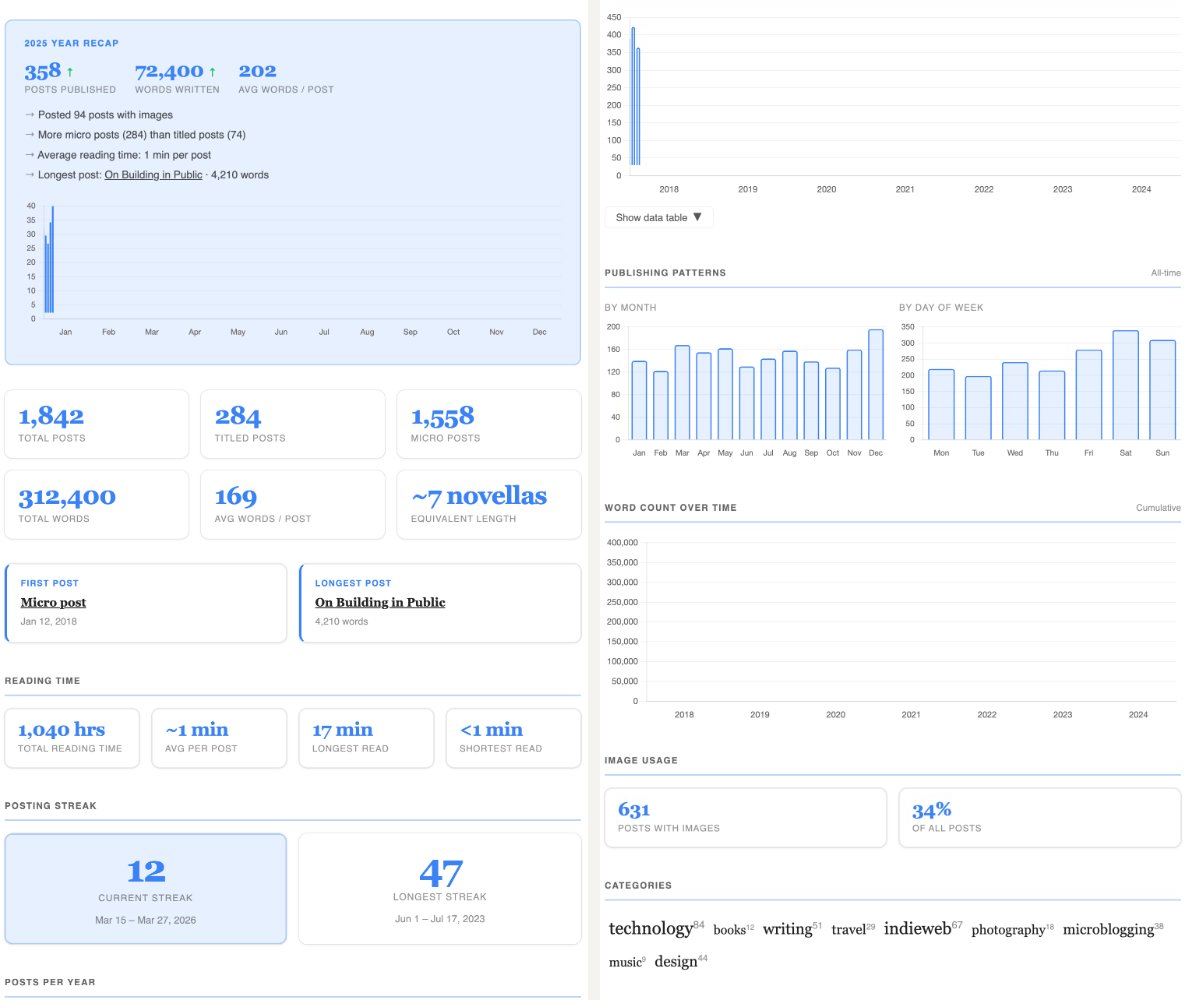
The revamped v2 stats page includes the following sections:
- Summary — Total posts, words, images, and the date range of your writing
- Reading Time — Total reading time, average per post, and your longest and shortest reads
- Publishing Patterns — Posts per month (all-time) and posts by day of week, visualized as bar charts
- Posting Streak — Current streak and your longest streak with date ranges
- Posts by Year — Yearly breakdown with bar chart, expandable table, and per-year word counts
- Top Tags — Your most-used tags as a weighted cloud
- Word Count Over Time — Scatter chart of word count per post across your writing history
- Year Recap — A focused summary for the current year (can be disabled via plugin settings)
The plugin exposes the following shortcodes you can use anywhere in your markdown pages:
{{< poststats/wordcount >}}— Replaced with your total word count{{< poststats/postcount >}}— Replaced with your total post count{{< poststats/detailed >}}— Embeds the full detailed stats layout (same as the/statspage){{< poststats/yearrecap >}}— Embeds just the Year Recap section
The following settings are available via the Micro.blog plugin configuration UI:
| Setting | Description |
|---|---|
use_legacy_stats |
Use the original minimal stats layout instead of the revamped v2 design |
disable_year_recap |
Remove the Year Recap section from the stats page |
The plugin's appearance can be customized by overriding CSS variables in your blog's custom CSS at :root { }.
Colors
--ps-accent— Primary chart/highlight color (default:#3b82f6blue)--ps-accent-light— Chart fill/background tint (default:rgba(59,130,246,0.12))--ps-accent-muted— Secondary chart accent, e.g. hover states (default:rgba(59,130,246,0.35))--ps-up— Trend arrow color when count increased (default:#22c55egreen)--ps-down— Trend arrow color when count decreased (default:#ef4444red)--ps-neutral— Trend arrow color when unchanged (default:#94a3b8grey)
Layout & Shape
--ps-gap— Spacing between cards/sections (default:1rem)--ps-radius— Border radius on cards (default:10px)
Borders & Shadows
--ps-border— Card border color (default:rgba(128,128,128,0.15))--ps-shadow— Card shadow (default: subtle 1px drop shadow + border ring)
Opacity
--ps-muted— Opacity for de-emphasised elements (default:0.5)
There is no built-in option to hide the stats page from the menu. You can work around this in two ways:
- Edit
content/stats.mdvia Design > Edit Custom Themes > Post Stats plugin, and remove the value from themenu:field — h/t Miraz Jordan - Add custom CSS:
nav a[href='/stats/'] { display: none; }— h/t Sven Dahlstrand
Version 2.0.0: Released 27th March, 2026
- Revamped stats page with a modern layout and 8 new sections
- Added reading time stats (total, average, longest, shortest)
- Added posting streak tracking (current and longest streaks)
- Added posts per month chart (all-time totals across all years)
- Added posts by day-of-week chart
- Added top tags section
- Added word count over time scatter chart
- Added image usage stats to the summary
- Introduced
use_legacy_statsplugin param to opt back into the original layout - Extracted chart rendering to a shared partial for consistency
- Fixed chart data to use
jsonifyinstead of string concatenation - Fixed hard-coded Chart.js version with dynamic CDN loading
- Scoped CSS selectors to avoid conflicts with blog themes
- Added cap to category cloud iteration for large tag sets
Version 1.2.6: Released 23rd March, 2026
- Fixed word count crash in year recap when there are no posts for the recap year
- Fixed "since" date not updating dynamically in stats summary
- Minor performance improvement in year recap
Version 1.2.4: Released 7th December, 2025
- Fixed issue there are no published post
Version 1.2: Released 30th December, 2024
- Added Year recap section for year end summary
Version 1.1.3: Released 25th May, 2024
- Make table of posts by year collapsible
Version 1.1: Released 26th January, 2022
- Added a line chart for posts by year (based on Chart.js)
- Added support of category cloud (h/t: Mert Bekir)
- Added stat to show the longest post
- Fixed minor styling issues
Version 1.0.1: Released 28th December, 2021
- Display larger number with commas (digits grouped on thousands)
Version 1.0: Released 27th December, 2021
- First version with a separate Stats page
- Includes stats summary and posts stats grouped by year and category