forked from codenamedevan/pinescriptv6
-
Notifications
You must be signed in to change notification settings - Fork 0
Expand file tree
/
Copy pathdocs-error-messages
More file actions
250 lines (132 loc) · 38.9 KB
/
docs-error-messages
File metadata and controls
250 lines (132 loc) · 38.9 KB
1
2
3
4
5
6
7
8
9
10
11
12
13
14
15
16
17
18
19
20
21
22
23
24
25
26
27
28
29
30
31
32
33
34
35
36
37
38
39
40
41
42
43
44
45
46
47
48
49
50
51
52
53
54
55
56
57
58
59
60
61
62
63
64
65
66
67
68
69
70
71
72
73
74
75
76
77
78
79
80
81
82
83
84
85
86
87
88
89
90
91
92
93
94
95
96
97
98
99
100
101
102
103
104
105
106
107
108
109
110
111
112
113
114
115
116
117
118
119
120
121
122
123
124
125
126
127
128
129
130
131
132
133
134
135
136
137
138
139
140
141
142
143
144
145
146
147
148
149
150
151
152
153
154
155
156
157
158
159
160
161
162
163
164
165
166
167
168
169
170
171
172
173
174
175
176
177
178
179
180
181
182
183
184
185
186
187
188
189
190
191
192
193
194
195
196
197
198
199
200
201
202
203
204
205
206
207
208
209
210
211
212
213
214
215
216
217
218
219
220
221
222
223
224
225
226
227
228
229
230
231
232
233
234
235
236
237
238
239
240
241
242
243
244
245
246
247
248
249
Title: Error messages
URL Source: https://www.tradingview.com/pine-script-docs/error-messages/
Markdown Content:
[The if statement is too long](https://www.tradingview.com/pine-script-docs/error-messages/#the-if-statement-is-too-long)
-------------------------------------------------------------------------------------------------------------------------
This error occurs when the indented code (local block) inside an [`if` structure](https://www.tradingview.com/pine-script-docs/language/conditional-structures/#if-structure) is too large for the compiler. Because of how the compiler works, you won’t receive a message telling you exactly how many lines of code you are over the limit. The only solution now is to split the structure into smaller parts (functions or smaller [if](https://www.tradingview.com/pine-script-reference/v6/#kw_if) statements). The example below shows a reasonably lengthy [if](https://www.tradingview.com/pine-script-reference/v6/#kw_if) statement; theoretically, this would throw `line 4: if statement is too long`:
`//@version=6indicator("My script")var e = 0if barstate.islast a = 1 b = 2 c = 3 d = 4 e := a + b + c + dplot(e)`
To fix this code, you could move these lines into their own function:
`//@version=6indicator("My script")var e = 0doSomeWork() => a = 1 b = 2 c = 3 d = 4 result = a + b + c + dif barstate.islast e := doSomeWork()plot(e)`
[Script requesting too many securities](https://www.tradingview.com/pine-script-docs/error-messages/#script-requesting-too-many-securities)
-------------------------------------------------------------------------------------------------------------------------------------------
The maximum number of securities in script is limited to 40. If you declare a variable as a `request.security` function call and then use that variable as input for other variables and calculations, it will not result in multiple `request.security` calls. But if you will declare a function that calls `request.security` --- every call to this function will count as a `request.security` call.
It is not easy to say how many securities will be called looking at the source code. Following example have exactly 3 calls to `request.security` after compilation:
`//@version=6indicator("Securities count")a = request.security(syminfo.tickerid, '42', close) // (1) first unique security callb = request.security(syminfo.tickerid, '42', close) // same call as above, will not produce new security call after optimizationsplot(a)plot(a + 2)plot(b)sym(p) => // no security call on this line request.security(syminfo.tickerid, p, close)plot(sym('D')) // (2) one indirect call to securityplot(sym('W')) // (3) another indirect call to securityc = request.security(syminfo.tickerid, timeframe.period, open) // result of this line is never used, and will be optimized out`
[Script could not be translated from: null](https://www.tradingview.com/pine-script-docs/error-messages/#script-could-not-be-translated-from-null)
--------------------------------------------------------------------------------------------------------------------------------------------------
`study($)`
Usually this error occurs in version 1 Pine scripts, and means that code is incorrect. Pine Script® of version 2 (and higher) is better at explaining errors of this kind. So you can try to switch to version 2 by adding a [special attribute](https://www.tradingview.com/pine-script-docs/language/script-structure/#version) in the first line. You’ll get `line 2: no viable alternative at character '$'`:
`// @version=2study($)`
[line 2: no viable alternative at character ’$’](https://www.tradingview.com/pine-script-docs/error-messages/#line-2-no-viable-alternative-at-character-)
---------------------------------------------------------------------------------------------------------------------------------------------------------
This error message gives a hint on what is wrong. `$` stands in place of string with script title. For example:
`// @version=2study("title")`
[Mismatched input <…> expecting <???>](https://www.tradingview.com/pine-script-docs/error-messages/#mismatched-input--expecting-)
---------------------------------------------------------------------------------------------------------------------------------
Same as `no viable alternative`, but it is known what should be at that place. Example:
`//@version=6indicator("My Script") plot(1)`
`line 3: mismatched input 'plot' expecting 'end of line without line continuation'`
To fix this you should start line with `plot` on a new line without an indent:
`//@version=6indicator("My Script")plot(1)`
[Loop is too long (> 500 ms)](https://www.tradingview.com/pine-script-docs/error-messages/#loop-is-too-long--500-ms)
--------------------------------------------------------------------------------------------------------------------
We limit the computation time of loop on every historical bar and realtime tick to protect our servers from infinite or very long loops. This limit also fail-fast indicators that will take too long to compute. For example, if you’ll have 5000 bars, and indicator takes 500 milliseconds to compute on each of bars, it would have result in more than 16 minutes of loading:
`//@version=6indicator("Loop is too long", max_bars_back = 101)s = 0for i = 1 to 1e3 // to make it longer for j = 0 to 100 if timestamp(2017, 02, 23, 00, 00) <= time[j] and time[j] < timestamp(2017, 02, 23, 23, 59) s := s + 1plot(s)`
It might be possible to optimize algorithm to overcome this error. In this case, algorithm may be optimized like this:
`//@version=6indicator("Loop is too long", max_bars_back = 101)bar_back_at(t) => i = 0 step = 51 for j = 1 to 100 if i < 0 i := 0 break if step == 0 break if time[i] >= t i := i + step i else i := i - step i step := step / 2 step is = 0for i = 1 to 1e3 // to make it longer s := s - bar_back_at(timestamp(2017, 02, 23, 23, 59)) + bar_back_at(timestamp(2017, 02, 23, 00, 00)) splot(s)`
[Script has too many local variables](https://www.tradingview.com/pine-script-docs/error-messages/#script-has-too-many-local-variables)
---------------------------------------------------------------------------------------------------------------------------------------
This error appears if the script is too large to be compiled. A statement `var=expression` creates a local variable for `var`. Apart from this, it is important to note, that auxiliary variables can be implicitly created during the process of a script compilation. The limit applies to variables created both explicitly and implicitly. The limitation of 1000 variables is applied to each function individually. In fact, the code placed in a _global_ scope of a script also implicitly wrapped up into the main function and the limit of 1000 variables becomes applicable to it. There are few refactorings you can try to avoid this issue:
`var1 = expr1var2 = expr2var3 = var1 + var2`
can be converted into:
`var3 = expr1 + expr2`
[The requested historical offset (X) is beyond the historical buffer’s limit (Y)](https://www.tradingview.com/pine-script-docs/error-messages/#the-requested-historical-offset-x-is-beyond-the-historical-buffers-limit-y)
--------------------------------------------------------------------------------------------------------------------------------------------------------------------------------------------------------------------------
Pine scripts calculate on every bar on the chart, sequentially, left to right, maintaining a historical buffer of values. When a script needs to use a value from a previous bar, it takes that value from the buffer. If a script tries to access a value from a bar further back than the historical buffer extends, it throws this error.
As a simple example, if your code includes a line like `plot(myVar[500])`, the script keeps a buffer of the last 500 historical values of the `myVar` variable. This buffer ensures that on every execution, the `myVar` variable has access to its value 500 bars before the current one.
Pine creates the historical buffer in a way that minimizes issues:
* Initially, the script calculates the historical buffers based on the data from the first several hundred bars. If historical offsets are constant, or if future offsets are not greater than the offsets found during this calculation, the script works without issues. The example above does not cause any issues because the variable is called in the global scope with a constant offset of 500. On the first iteration of the script, it is clear that the buffer size needs to be 500.
* If the script requests a value outside the buffer during calculation on historical data, the script tries to adjust the buffer to a proper length automatically. The script increases the buffer and restarts. This can happen several times until either the re-run limit is reached or the script calculates without the error.
The error can still appear on historical data, but is more likely to occur on realtime data, which is not covered by automatic buffer detection. For example, the following script works when the user first adds it to the chart, but fails with an error when the first realtime tick arrives. This behaviour can be replicated consistently by turning on the Bar Replay feature and pressing Step Forward once. This happens because on historical data, we request `close[500]`, which establishes the size of the historical buffer as 500. When we request `close[1000]` on the first realtime bar, the script returns an error because the requested value is outside the buffer:
`//@version=6indicator("Error on realtime bars")myVar = close[barstate.ishistory ? 500 : 1000]plot(myVar)`
To fix this, we need to ensure the historical buffer of our variable (in this case, [close](https://www.tradingview.com/pine-script-reference/v6/#var_close)) is always large enough.
The following sections describe different methods to ensure that the historical buffer is of a sufficient size.
### [Potential fixes](https://www.tradingview.com/pine-script-docs/error-messages/#potential-fixes)
#### [Use the `max_bars_back()` function](https://www.tradingview.com/pine-script-docs/error-messages/#use-the-max_bars_back-function)
The [max_bars_back()](https://www.tradingview.com/pine-script-reference/v6/#fun_max_bars_back) function sets the size of the historical buffer for a particular variable. To fix the issue in the example script above, we need to ensure the buffer for [close](https://www.tradingview.com/pine-script-reference/v6/#var_close) is at least 1000:
`//@version=6indicator("Error on realtime bars")myVar = close[barstate.ishistory ? 500 : 1000]max_bars_back(close, 1000)plot(myVar)`
#### [Use the `max_bars_back` parameter of the `indicator()` or `strategy()` function](https://www.tradingview.com/pine-script-docs/error-messages/#use-the-max_bars_back-parameter-of-the-indicator-or-strategy-function)
The `max_bars_back` parameter of the [indicator()](https://www.tradingview.com/pine-script-reference/v6/#fun_indicator) and [strategy()](https://www.tradingview.com/pine-script-reference/v6/#fun_strategy) functions provides a handy way to increase the historical buffer for _all_ the variables inside of the script. However, increasing the historical buffer for all variables without a specific need for it negatively impacts performance. Using the [max_bars_back()](https://www.tradingview.com/pine-script-reference/v6/#fun_max_bars_back) function is preferable because it is more precise and more performant.
#### [Use the maximum value manually on history to force a proper buffer size](https://www.tradingview.com/pine-script-docs/error-messages/#use-the-maximum-value-manually-on-history-to-force-a-proper-buffer-size)
Another way to set a specific historical buffer is to call the variable on historical data with the maximum buffer required, regardless of whether it’s needed or not at the moment. For example, the script below assigns the `myVar` variable a `close[1000]` value on the very first bar of the dataset. It makes no practical difference — on the first bar, all past values are [na](https://www.tradingview.com/pine-script-reference/v6/#var_na) — but because of this change, the script sets the variable’s buffer to 1000 and can then work on realtime bars without issues:
`//@version=6indicator("Error on realtime bars")myVar = close[barstate.isfirst ? 1000 : barstate.ishistory ? 500 : 1000]plot(myVar)`
### [Max bars back with Pine drawings](https://www.tradingview.com/pine-script-docs/error-messages/#max-bars-back-with-pine-drawings)
A common reason for the historical offset error is creating drawings that are drawn on realtime data, but extend into the past. For example, the code below runs into the runtime error as soon as the first realtime tick arrives:
`//@version=6indicator("Realtime error with drawings")if barstate.isrealtime line.new(bar_index[500], close, bar_index, close)`
When the example indicator above is calculating on historical data, it does not draw any lines, and so does not call the [time](https://www.tradingview.com/pine-script-reference/v6/#var_time) series at all. In this case, the [time](https://www.tradingview.com/pine-script-reference/v6/#var_time) series takes the default buffer size of 300. On realtime bars, we then request the `bar_index[500]` value, which is converted into `time[500]` by the function. But the script doesn’t have a large enough historical buffer, which causes the error to appear.
In these cases, the historical buffer for the [time](https://www.tradingview.com/pine-script-reference/v6/#var_time) series must be enlarged, even if the drawing functions use [bar_index](https://www.tradingview.com/pine-script-reference/v6/#var_bar_index) exclusively. The easiest fix is to call the [max_bars_back()](https://www.tradingview.com/pine-script-reference/v6/#fun_max_bars_back) function on the [time](https://www.tradingview.com/pine-script-reference/v6/#var_time) series, to ensure that its buffer is large enough:
`//@version=6indicator("Realtime error with drawings")max_bars_back(time, 500)if barstate.isrealtime line.new(bar_index[500], close, bar_index, close)`
[Memory limits exceeded](https://www.tradingview.com/pine-script-docs/error-messages/#memory-limits-exceeded)
-------------------------------------------------------------------------------------------------------------
The most common cause of this error is the retrieval of [objects](https://www.tradingview.com/pine-script-docs/language/objects/#objects) and [collections](https://www.tradingview.com/pine-script-docs/language/type-system/#collections) from `request.*()` functions such as [request.security()](https://www.tradingview.com/pine-script-reference/v6/#fun_request.security). Other possible causes include unnecessary drawing updates, excess historical buffer capacity, or inefficient use of [max_bars_back()](https://www.tradingview.com/pine-script-reference/v6/#fun_max_bars_back).
### [Returning collections from `request.*()` functions](https://www.tradingview.com/pine-script-docs/error-messages/#returning-collections-from-request-functions)
The “Memory limits exceeded” error most often occurs when a script uses `request.*()` functions to retrieve [objects](https://www.tradingview.com/pine-script-docs/language/objects/#objects) or [collections](https://www.tradingview.com/pine-script-docs/language/type-system/#collections) from another symbol or timeframe.
When requesting data from other contexts, the data for _each bar_ is copied and stored in memory to allow the script to reference it later in the main context. This can use a lot of memory, depending on the data. Requesting large collections can easily lead to excessive memory consumption.
The example script below uses [request.security()](https://www.tradingview.com/pine-script-reference/v6/#fun_request.security) to retrieve the result of a [user-defined function](https://www.tradingview.com/pine-script-docs/language/user-defined-functions/) evaluated on the “1D” timeframe. The custom function (`dataFunction()`) creates an array and assigns its reference to a persistent variable declared [using the `var` keyword](https://www.tradingview.com/pine-script-docs/language/arrays/#using-var-and-varip-keywords), then pushes a new [balance of power (BOP)](https://www.tradingview.com/support/solutions/43000589100-balance-of-power-bop/) value into the array and returns the collection’s reference on each bar. Each time that [request.security()](https://www.tradingview.com/pine-script-reference/v6/#fun_request.security) evaluates the `dataFunction()` call on the “1D” timeframe, the result references a _new copy_ of that array. Retrieving a new array from a requested context on each bar consumes a lot of memory. Therefore, this script can _exceed_ the memory limits when running on symbols with a sufficiently lengthy history:
`//@version=6indicator("BOP array in higher timeframe context", "Memory limit demo")//@variable User-input length for calculating average of BOP values. int avgLength = input.int(5, "Average BOP Length", minval = 1)//Returns a copy of the `dataArray` on every bar, which uses a lot of memory.dataFunction() => //@variable Persistent array containing the "balance of power" (BOP) values for all bars from the higher timeframe. var array<float> dataArray = array.new_float(0) //@variable The "balance of power" percentage calculated for the current bar. float bop = (close - open) / (high - low) * 100 dataArray.push(bop) //Return the full collection. dataArray// Request the full BOP array from the 1D timeframe.array<float> reqData = request.security(syminfo.tickerid, "1D", dataFunction())// Plot zero line.hline(0, "Zero line", color.gray, hline.style_dotted)// Latest BOP value and average BOP are calculated in the main context if `reqData` is not `na`.//@variable The latest BOP value from the `reqData` array.float latestValue = na//@variable The average of the last `avgLength` BOP values.float avgBOP = naif not na(reqData) // Retrieve BOP value for the current main context bar. latestValue := reqData.last() // Calculate the average BOP for the most-recent values from the higher timeframe array. //@variable Size of the `reqData` array returned from the higher timeframe. int dataSize = reqData.size() //@variable A subset of the latest values from the `reqData` array. Its size is determined by the `avgLength` set. array<float> lastValues = dataSize >= avgLength ? reqData.slice(dataSize - avgLength, dataSize): reqData avgBOP := lastValues.avg()// Plot the BOP value and average line.color plotColor = latestValue >= 0 ? color.aqua : color.orangeplot(latestValue, "BOP", plotColor, style = plot.style_columns)plot(avgBOP, "Avg", color.purple, linewidth = 3)`
### [How do I fix this?](https://www.tradingview.com/pine-script-docs/error-messages/#how-do-i-fix-this)
Optimize requests and limit the data returned to the main context to ensure that only the _minimum necessary_ data is stored in memory.
If possible, try to return _calculated results_ directly rather than returning the collections themselves, or only return collections _conditionally_, when they are necessary in the main context.
Let’s consider a few common scenarios where scripts need specific data in the main context.
#### [Return last state only](https://www.tradingview.com/pine-script-docs/error-messages/#return-last-state-only)
If a script requires only the _latest_ state of a requested collection, use a [conditional structure](https://www.tradingview.com/pine-script-docs/language/conditional-structures/) or expression with [barstate.islast](https://www.tradingview.com/pine-script-reference/v6/#var_barstate.islast) as the condition to limit retrieving a copy of that collection to the last available bar.
Here, we modified our script to display only the _latest_ average BOP (a single value), rather than plotting an average line. The updated request function now returns the calculated BOP values directly for each bar, and returns the higher timeframe’s array only on the last bar:

`//@version=6indicator("BOP array on last bar", "Memory limit demo")//@variable User-input length for calculating average of BOP values. int avgLength = input.int(5, "Average BOP Length", minval = 1)// Returns the calculated `bop` each bar, and a copy of the `dataArray` on the last bar or `na` otherwise.dataFunction() => //@variable Persistent array containing the "balance of power" (BOP) values for all higher timeframe bars. var array<float> dataArray = array.new_float(0) //@variable The "balance of power" percentage calculated for the current higher timeframe bar. float bop = (close - open) / (high - low) * 100 dataArray.push(bop) // Return the collection on the last bar only. if barstate.islast [bop, dataArray] else [bop, na]// Request calculated BOP value, and BOPs array if on last bar, from the higher timeframe.[reqValue, reqData] = request.security(syminfo.tickerid, "1D", dataFunction())// Plot zero line.hline(0, "Zero line", color.gray, hline.style_dotted)// Plot the BOP value for each main context bar.color plotColor = reqValue >= 0 ? color.aqua : color.orangeplot(reqValue, "BOP", plotColor, style = plot.style_columns)// Calculate the average BOP for most-recent values from the higher timeframe array, and display result in a table cell.if not na(reqData) //@variable Size of the `reqData` array returned from the higher timeframe. int dataSize = reqData.size() //@variable A subset of the latest values from the `reqData` array. Its size is determined by the `avgLength` set. array<float> lastValues = dataSize >= avgLength ? reqData.slice(dataSize - avgLength, dataSize): reqData //@variable The average of the last `avgLength` BOP values. float avgBOP = lastValues.avg() // Display latest average value in a single-cell table. var table displayTable = table.new(position.bottom_right, 1, 1, color.purple) displayTable.cell(0, 0, "Avg of last " + str.tostring(avgLength) + " BOPs: " + str.tostring(avgBOP, "##.##") + "%", text_color = color.white)`
#### [Return calculated results](https://www.tradingview.com/pine-script-docs/error-messages/#return-calculated-results)
If a script needs the _result_ of a calculation on a collection, but does not need the collection itself in the main context, use a [user-defined function](https://www.tradingview.com/pine-script-docs/language/user-defined-functions/) as the request expression. The function can calculate on the collection in the _requested_ context and return only the result to the main context.
For example, we can calculate the average BOP directly within our request function. Therefore, only the calculated values are stored in memory, and the request expression returns a tuple (current BOP and average BOP) to plot the results in the main context:

`//@version=6indicator("Return BOP results only", "Memory limit demo")//@variable User-input length for calculating average of BOP values. int avgLength = input.int(5, "Average BOP Length", minval = 1)// Returns the calculated `bop` and `avgBOP` values directly.dataFunction() => //@variable Persistent array containing the "balance of power" (BOP) values for all higher timeframe bars. var array<float> dataArray = array.new_float(0) //@variable The "balance of power" percentage calculated for the current higher timeframe bar. float bop = (close - open) / (high - low) * 100 dataArray.push(bop) // Calculate the average BOP for the `avgLength` most-recent values. //@variable Size of the `dataArray`. int dataSize = dataArray.size() //@variable A subset of the latest values from the `dataArray`. Its size is determined by the `avgLength` set. array<float> lastValues = dataSize >= avgLength ? dataArray.slice(dataSize - avgLength, dataSize): dataArray //@variable The average of the last `avgLength` BOP values. float avgBOP = lastValues.avg() //Return the calculated results. [bop, avgBOP]// Request BOP and average BOP values from the higher timeframe.[reqValue, reqAverage] = request.security(syminfo.tickerid, "1D", dataFunction())// Plot zero line.hline(0, "Zero line", color.gray, hline.style_dotted)// Plot the BOP value and average line.color plotColor = reqValue >= 0 ? color.aqua : color.orangeplot(reqValue, "BOP", plotColor, style = plot.style_columns)plot(reqAverage, "Avg", color.purple, linewidth = 3)`
#### [Return the collection on some bars](https://www.tradingview.com/pine-script-docs/error-messages/#return-the-collection-on-some-bars)
If a script needs to retrieve a collection in the main context, but _not_ on _every bar_, use [conditional structures](https://www.tradingview.com/pine-script-docs/language/conditional-structures/) or expressions that return collection references only the necessary bars, and [na](https://www.tradingview.com/pine-script-reference/v6/#var_na) on other bars. The logic in the main context can then handle the [na](https://www.tradingview.com/pine-script-reference/v6/#var_na) gaps in the series and perform necessary actions on the reduced collections.
For example, if we want to calculate the average BOP for each _month_ instead of using a user-input length, we can return the array reference from the requested context only when there is a change to a new month; [na](https://www.tradingview.com/pine-script-reference/v6/#var_na) otherwise. We can then maintain the previous month’s values in the main context to keep a valid array for all intra-month bars:
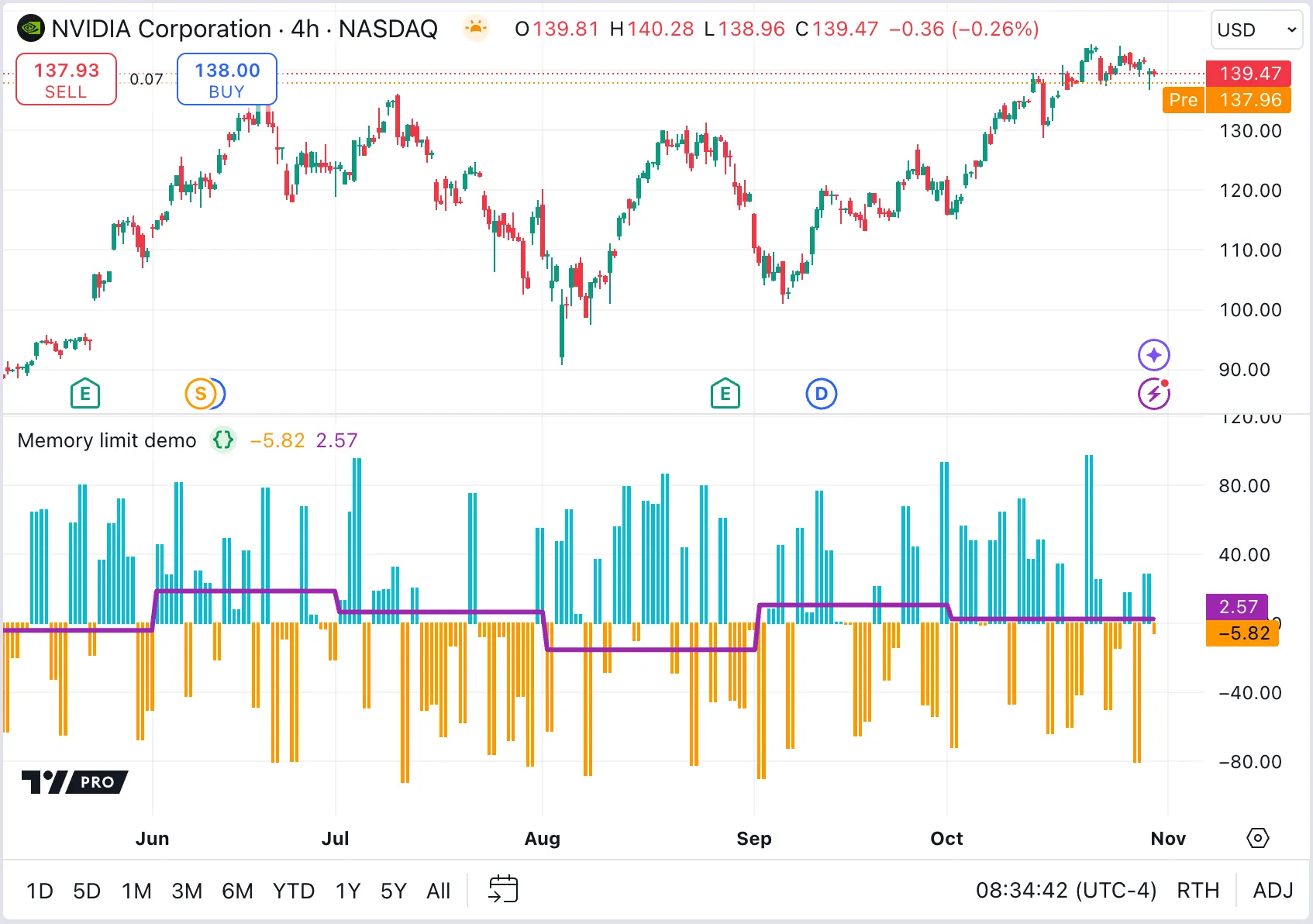
`//@version=6indicator("Monthly BOP array", "Memory limit demo")// Returns the calculated `bop`, and a copy of the `dataArray` on a month's first trading day only, or `na` otherwise.dataFunction() => //@variable Persistent array containing the "balance of power" (BOP) values for all higher timeframe bars. var array<float> dataArray = array.new_float(0) // When a new month starts, return monthly data array to calculate average BOP for completed month. //@variable Array is `na` except on first trading day of each month, when it contains completed month's BOP values. array<float> returnArray = na //@variable Is `true` on the first bar of each month, `false` otherwise. bool isNewMonth = timeframe.change("1M") if isNewMonth returnArray := dataArray //Clear persistent array to start storing new month's data. if isNewMonth[1] dataArray.clear() //@variable The "balance of power" percentage calculated for the current higher timeframe bar. float bop = (close - open) / (high - low) * 100 dataArray.push(bop) //Return the calculated result and the `returnArray`. [bop, returnArray]// Request BOP data from the higher timeframe. (Returns calculated BOP and array of BOP values if new month starts)[reqValue, reqData] = request.security(syminfo.tickerid, "1D", dataFunction())// Calculate the average BOP for the most-recent completed month.//@variable Persistent array that holds the BOP values for the most-recent completed month.var array<float> completedMonthBOPs = array.new_float(0)// If new month starts (i.e., `reqData` is not returned as `na`), then `completedMonthBOPs` is updated with new values.// Otherwise, it persists the last valid values for the rest of the month to adjust for `na` gaps.completedMonthBOPs := na(reqData) ? completedMonthBOPs : reqData//@variable The average BOP for the most-recent completed month.float avgBOP = completedMonthBOPs.avg()// Plot the BOP value and average line.color plotColor = reqValue >= 0 ? color.aqua : color.orangeplot(reqValue, "BOP", plotColor, style = plot.style_columns)plot(avgBOP, "Avg", color.purple, linewidth = 3)`
### [Other possible error sources and their fixes](https://www.tradingview.com/pine-script-docs/error-messages/#other-possible-error-sources-and-their-fixes)
There are a few other ways to optimize scripts to consume less memory.
#### [Minimize `request.*()` calls](https://www.tradingview.com/pine-script-docs/error-messages/#minimize-request-calls)
The `request.*()` functions can be computationally expensive to call, because they retrieve data from additional datasets. Data requests often require significant usage of runtime and memory resources. Excessive or inefficient requests can easily cause scripts to reach the memory limit.
This memory consumption is especially substantial for scripts requesting data from [lower timeframes](https://www.tradingview.com/pine-script-docs/concepts/other-timeframes-and-data/#lower-timeframes), because the `request.()` function returns [arrays](https://www.tradingview.com/pine-script-docs/language/arrays/) of intrabar data for _each_ bar in the script’s main dataset. For example, requesting data from the “1” (one-minute) timeframe on a “1D” chart returns hundreds of minute bars for each “1D” bar where the request executes. In the process, the script must allocate memory to store each requested array so that it can access them later in the main context. Maintaining that much data in memory requires a significant amount of resources.
Programmers can reduce the memory requirements of a script’s requests by:
* Removing _unnecessary_`request.*()` function calls.
* Changing the timeframe of a request to a higher timeframe, effectively reducing the number of retrieved data points.
* Condensing multiple requests to the _same_ context into a single `request.*()` call.
* Using the `request.*()` function’s `calc_bars_count` parameter to restrict the historical bars in the requested dataset.
See the [Minimizing `request.*()` calls](https://www.tradingview.com/pine-script-docs/writing/profiling-and-optimization/#minimizing-request-calls) section of the [Profiling and optimization](https://www.tradingview.com/pine-script-docs/writing/profiling-and-optimization/) page to learn more about optimizing data requests.
#### [Use `max_bars_back` only when necessary](https://www.tradingview.com/pine-script-docs/error-messages/#use-max_bars_back-only-when-necessary)
The `max_bars_back` parameter of an [indicator](https://www.tradingview.com/pine-script-reference/v6/#fun_indicator) or [strategy](https://www.tradingview.com/pine-script-reference/v6/#fun_strategy) sets the size of the _historical buffers_ for all series in a script. Each buffer defines the number of historical data points _maintained in memory_ for the script’s variables and expressions.
By default, the Pine Script runtime system automatically allocates an appropriate buffer for each variable and expression. Therefore, using the `max_bars_back` parameter or [max_bars_back()](https://www.tradingview.com/pine-script-reference/v6/#fun_max_bars_back) function is necessary only when Pine [cannot determine the referencing length of a series](https://www.tradingview.com/support/solutions/43000587849-i-see-pine-cannot-determine-the-referencing-length-of-a-series-try-using-max-bars-back-error/).
If you encounter the referencing length error and must manually set the size of a historical buffer using the `max_bars_back` parameter or the [max_bars_back()](https://www.tradingview.com/pine-script-reference/v6/#fun_max_bars_back) function, ensure that you select the _minimum size_ that accommodates your script’s historical references. Historical buffers that contain more data points than a script requires use excessive memory resources. Read up on how to optimize using `max_bars_back` in [this Help Center article](https://www.tradingview.com/chart/?solution=43000587849).
#### [Minimize historical buffer calculations](https://www.tradingview.com/pine-script-docs/error-messages/#minimize-historical-buffer-calculations)
The Pine Script runtime system automatically creates historical buffers for all variables and expressions in a script. It determines the size of each buffer based on the _historical references_ that the script performs via the [[] history-referencing operator](https://www.tradingview.com/pine-script-docs/language/operators/#--history-referencing-operator) or the functions that reference history internally.
As a script loads on a dataset, historical references to distant points in the dataset can cause the system to reload the script and increase the size of necessary historical buffers. Each increase to historical buffer sizes leads to increased memory consumption. In some cases, buffer resizing can cause the script to exceed the memory limits. Therefore, ensure a script references only _necessary_ historical data in its calculations. When possible, modify the script’s logic to avoid referencing very distant points in history.
Specifying a `calc_bars_count` argument in the [indicator()](https://www.tradingview.com/pine-script-reference/v6/#fun_indicator) or [strategy()](https://www.tradingview.com/pine-script-reference/v6/#fun_strategy) declaration statement can help reduce memory issues, because it restricts the number of historical bars that the script can use for its calculations. Similarly, using [max_bars_back()](https://www.tradingview.com/pine-script-reference/v6/#fun_max_bars_back) to manually define the appropriate size for a buffer can help reduce buffer calculations. When using this function to specify the size of historical buffers, choose the **smallest** possible size that accommodates the script’s historical references to avoid unnecessary memory use.
To learn more about historical buffer calculations and how to optimize them, see the [Minimizing historical buffer calculations](https://www.tradingview.com/pine-script-docs/writing/profiling-and-optimization/#minimizing-historical-buffer-calculations) section of the [Profiling and optimization](https://www.tradingview.com/pine-script-docs/writing/profiling-and-optimization/) page.
#### [Reduce drawing updates for tables](https://www.tradingview.com/pine-script-docs/error-messages/#reduce-drawing-updates-for-tables)
[Tables](https://www.tradingview.com/pine-script-docs/concepts/tables/) only display their _last state_ on a chart. Any updates to a table on historical bars are redundant, because they are not visible. To use the least memory, draw the table _once_, and fill it on the last bar.
To create a table object only once, assign the result of the [table.new()](https://www.tradingview.com/pine-script-reference/v6/#fun_table.new) call to a variable declared with the [var](https://www.tradingview.com/pine-script-reference/v6/#kw_var) keyword. When using [table.cell()](https://www.tradingview.com/pine-script-reference/v6/#fun_table.cell) or the available setter functions to modify the table’s contents, execute those function calls only on the _last_ available bar — where the table’s latest state is visible — by placing the calls in a [conditional structure](https://www.tradingview.com/pine-script-docs/language/conditional-structures/) that uses [barstate.islast](https://www.tradingview.com/pine-script-reference/v6/#var_barstate.islast) as the condition. See the [Tables](https://www.tradingview.com/pine-script-docs/concepts/tables/) page to learn more.
#### [Do not update drawings on historical bars](https://www.tradingview.com/pine-script-docs/error-messages/#do-not-update-drawings-on-historical-bars)
Similar to tables, any updates to other drawing objects such as [lines](https://www.tradingview.com/pine-script-docs/concepts/lines-and-boxes/#lines) and [labels](https://www.tradingview.com/pine-script-docs/concepts/text-and-shapes/#labels) on historical bars are never visible to the user. The user sees only the drawing updates executed on _realtime_ bars.
Eliminate updates to historical drawings during executions on historical bars wherever possible. Refer to the [Reducing drawing updates](https://www.tradingview.com/pine-script-docs/writing/profiling-and-optimization/#reducing-drawing-updates) section of the [Profiling and optimization](https://www.tradingview.com/pine-script-docs/writing/profiling-and-optimization/) page for more information.
#### [Minimize total drawings stored for a chart](https://www.tradingview.com/pine-script-docs/error-messages/#minimize-total-drawings-stored-for-a-chart)
[Drawing objects](https://www.tradingview.com/pine-script-docs/language/type-system/#drawing-types) such as [lines](https://www.tradingview.com/pine-script-docs/concepts/lines-and-boxes/#lines) and [labels](https://www.tradingview.com/pine-script-docs/concepts/text-and-shapes/#labels) can consume a lot of memory, especially if a script _recreates_ drawings unnecessarily.
For example, if a script draws a line from point `x1` to `x2`, then needs to update the line’s endpoint (`x2`), it’s more computationally expensive to delete the existing line and redraw a new line from `x1` to `x3`. Instead, using the _setter_ function [line.set_x2()](https://www.tradingview.com/pine-script-reference/v6/#fun_line.set_x2) to update the existing line’s endpoint is more efficient.
Look for ways to optimize drawing objects in a script:
* Reduce unnecessary redrawing by assigning a single drawing object’s reference to a variable declared with the [var](https://www.tradingview.com/pine-script-reference/v6/#kw_var) keyword, then modifying that object’s properties with the available setter functions.
* Remove unnecessary chart drawings with the `*.delete()` functions (e.g., [line.delete()](https://www.tradingview.com/pine-script-reference/v6/#fun_line.delete) and [label.delete()](https://www.tradingview.com/pine-script-reference/v6/#fun_label.delete)).
* Reduce a script’s drawing limits by specifying values for the `max_lines_count`, `max_labels_count`, `max_boxes_count`, or `max_polylines_count` parameters of the [indicator()](https://www.tradingview.com/pine-script-reference/v6/#fun_indicator) or [strategy()](https://www.tradingview.com/pine-script-reference/v6/#fun_strategy) declaration statement.
#### [Filter dates in strategies](https://www.tradingview.com/pine-script-docs/error-messages/#filter-dates-in-strategies)
The total number of trades or orders simulated by [strategies](https://www.tradingview.com/pine-script-docs/concepts/strategies/) can impact memory consumption. When running strategy scripts that generate frequent orders on large datasets, reduce the number of unnecessary historical orders stored in memory by limiting the _starting point_ of your strategy.
To limit the starting point of a strategy, a simple and effective approach is to use a [conditional structure](https://www.tradingview.com/pine-script-docs/language/conditional-structures) that activates the strategy’s [order placement commands](https://www.tradingview.com/pine-script-docs/concepts/strategies/#order-placement-and-cancellation) only when the bar’s opening or closing time comes after a specified date.
See the [How do I filter trades by a date or time range?](https://www.tradingview.com/pine-script-docs/faq/strategies/#how-do-i-filter-trades-by-a-date-or-time-range) portion of our [Strategies FAQ page](https://www.tradingview.com/pine-script-docs/faq/strategies/) for an example of this technique.