In this section, we will learn about the Traditional web server model and the Node.js process model and understand why we should use Node.js.
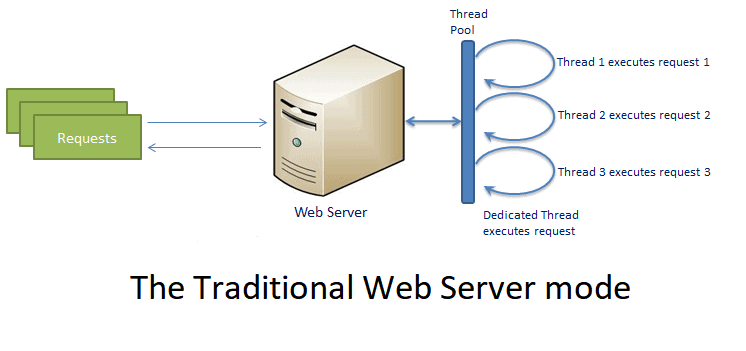
In the traditional web server model, each request is handled by a dedicated thread from the thread pool. If no thread is available in the thread pool at any point of time then the request waits till the next available thread. Dedicated thread executes a particular request and does not return to thread pool until it completes the execution and returns a response.
👉 Any Web Application developed without Node JS, typically follows this model. Simply we can call this model as Request/Response Model.
👉 Client sends request to the server, then server do some processing based on clients request, prepare response and send it back to the client.
In Node.js processes user requests differently when compared to a traditional web server model. Node.js runs in a single process and the application code runs in a single thread and thereby needs less resources than other platforms. All the user requests to your web application will be handled by a single thread and all the I/O work or long running job is performed asynchronously for a particular request.
Here's figure illustrates the web server model using Node.js.
Node.js Process Model 👇
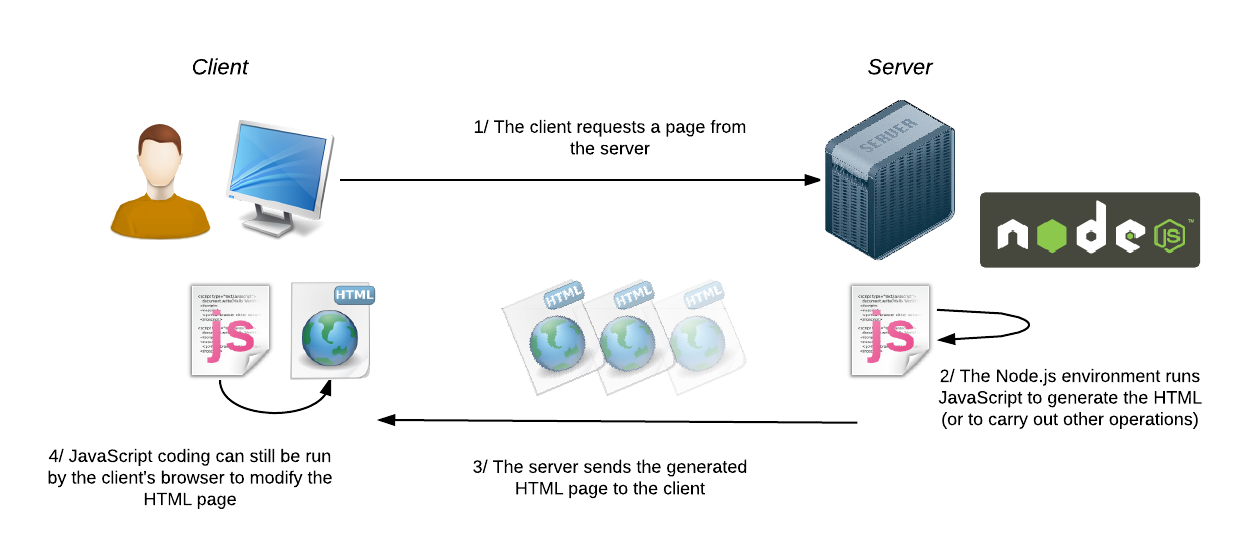
So, this single thread doesn't have to wait for the request to complete and is free to handle the next request. When asynchronous I/O work completes then it processes the request further and sends the response. An event loop is constantly watching for the events to be raised for an asynchronous job and executing callback function when the job completes internally.
📌 Clients Send request to Web Server. 📌 Node JS Web Server internally maintains a Limited Thread pool to provide services to the Client Requests. 📌 Node JS Web Server receives those requests and places them into a Queue. It is known as “Event Queue”. 📌 Event Loop uses Single Thread only. It is main heart of Node JS Platform Processing Model. 📌 Even Loop checks any Client Request is placed in Event Queue. If no, then wait for incoming requests for indefinitely. Now,we'll into the module and module types in Node.js
📌 Module in Node.js is a simple or complex functionality organized in single or multiple JavaScript files which can be reused throughout the Node.js application. 📌 Each module in Node.js has its own context, so it cannot interfere with other modules or pollute global scope. Also, each module can be placed in a separate .js file under a separate folder. 📌 Node.js implements CommonJS modules standard. CommonJS is a group of volunteers who define JavaScript standards for web server, desktop, and console application.
Node.js includes three types of modules:
Core Modules
Local Modules
Third Party Modules
Node.js is a light weight framework. The core modules include bare minimum functionalities of Node.js. These core modules are compiled into its binary distribution and load automatically when Node.js process starts. However, you need to import the core module first in order to use it in your application.
| Core module | Description |
|---|---|
| http | http module includes classes, methods and events to create Node.js http server. |
| url | url module includes methods for URL resolution and parsing. |
| querystring | querystring module includes methods to deal with query string. |
| path | path module includes methods to deal with file paths. |
| fs | fs module includes classes, methods, and events to work with file I/O. |
| util | util module includes utility functions useful for programmers. |
In order to use Node.js core or NPM modules, you first need to import it using require() function as shown below.
var module = require('module_name');
The following example demonstrates how to use Node.js http module to create a web server. var http = require('http');
{
 var server = http.createServer(function(req, res){
  //write code here
});
server.listen(5000);
}
Local modules are modules created locally in your Node.js application. These modules include different functionalities of your application in separate files and folders. You can also package it and distribute it via NPM, so that Node.js community can use it. For example, if you need to connect to MongoDB and fetch data then you can create a module for it, which can be reused in your application.
simple logging module which logs the information, warning or error to the console.
{
var log = {
            info: function (info) {
                console.log('Info: ' + info);
            },
            warning:function (warning) {
                console.log('Warning: ' + warning);
            },
            error:function (error) {
                console.log('Error: ' + error);
            }
    };
module.exports = log
}
The module.exports is a special object which is included in every JS file in the Node.js application by default. Use module.exports or exports to expose a function, object or variable as a module in Node.js.
Now, let's see how to use the above logging module in our application.
var myLogModule = require('./Log.js');
myLogModule.info('Node.js started');
☝️demonstrates how to use the above logging module contained in Log.js.
The require() function returns a log object because logging module exposes an object in Log.js using module.exports. So now you can use logging module as an object and call any of its function using dot notation e.g myLogModule.info() or myLogModule.warning() or myLogModule.error() Third Party Modules
👉 The 3rd party modules can be downloaded using NPM (Node Package Manager). 👉 3rd party modules can be install inside the project folder or globally.
Load and Use Third Party Module with Example: 3rd party modules can be downloaded using NPM.
npm install --save module_name //Install and save in package.json
//Install express module
npm install --save express
npm install --save mongoose
//Install multiple module at once
npm install --save express mongoose
Thank you.