A Binary Search Tree (BST) is a tree in which all the nodes follow the below-mentioned properties −
-
The value of the key of the left sub-tree is less than the value of its parent (root) node's key.
-
The value of the key of the right sub-tree is greater than or equal to the value of its parent (root) node's key.
Thus, BST divides all its sub-trees into two segments; the left sub-tree and the right sub-tree and can be defined as −
left_subtree (keys) < node (key) ≤ right_subtree (keys)
BST is a collection of nodes arranged in a way where they maintain BST properties. Each node has a key and an associated value. While searching, the desired key is compared to the keys in BST and if found, the associated value is retrieved.
Following is a pictorial representation of BST −
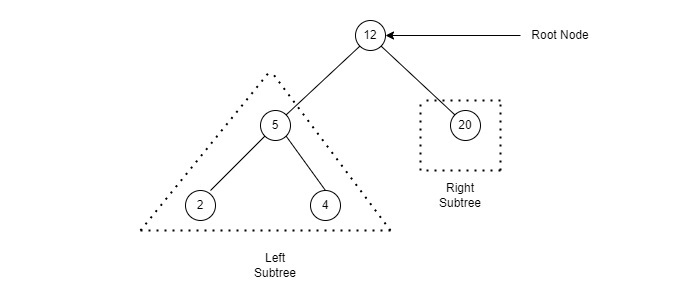
We observe that the root node key (27) has all less-valued keys on the left sub-tree and the higher valued keys on the right sub-tree.

This is a very straight forward operation. First, the root node is inserted, then the next value is compared with the root node. If the value is greater than root, it is added to the right subtree, and if it is lesser than the root, it is added to the left subtree.
from above image :
-
There is a list of 6 elements that need to be inserted in a BST in order from left to right
-
Insert 12 as the root node and compare next values 7 and 9 for inserting accordingly into the right and left subtree
-
Compare the remaining values 19, 5, and 10 with the root node 12 and place them accordingly. 19 > 12 place it as the right child of 12, 5 < 12 & 5 < 7, hence place it as left child of 7.
-
Now compare 10, 10 is < 12 & 10 is > 7 & 10 is > 9, place 10 as right subtree of 9.
insert(root,value)
{
    if(root==null){
        root = newNode(value);
        return;
    }
    if(root.data>value){
        if(root.left==null){
            root.left = newNode(value);
           return;
        }
        insert(root.left,value);
    }
    if(root.data< value){
        if(root.right==null){
            root.right = newNode(value);
           return;
        }
        insert(root.right,value);
    }
}
Let's take one example
Suppose we want to insert following numbers :
50, 70, 60, 20, 90, 10, 40
Insert 50

Insert 70:
As 70 > 50, so insert 70 to the right of 50.
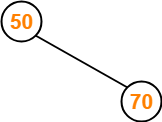
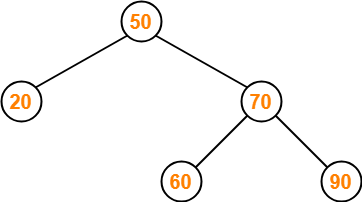
Insert 60:
-
As 60 > 50, so insert 60 to the right of 50.
-
As 60 < 70, so insert 60 to the left of 70.
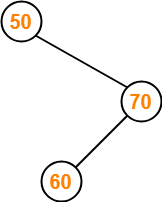
Insert 20:
As 20 < 50, so insert 20 to the left of 50.
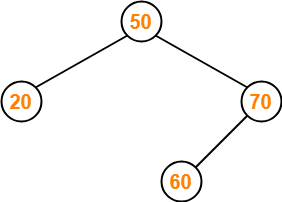
Insert 90:
- As 90 > 50, so insert 90 to the right of 50.
- As 90 > 70, so insert 90 to the right of 70.
Insert 10:
-
As 10 < 50, so insert 10 to the left of 50.
-
As 10 < 20, so insert 10 to the left of 20.
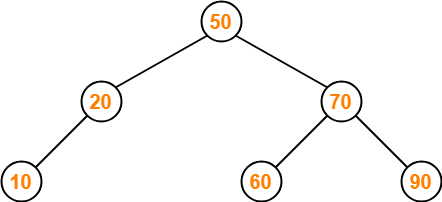
Insert 40:
-
As 40 < 50, so insert 40 to the left of 50.
-
As 40 > 20, so insert 40 to the right of 20.
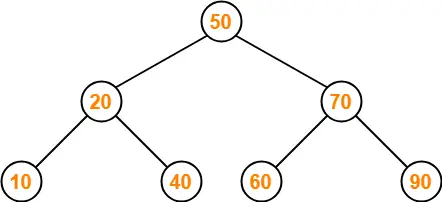
This is the required Binary Search Tree
20
30
40
50
60
70
80
Delete function is used to delete the specified node from a binary search tree. However, we must delete a node from a binary search tree in such a way, that the property of binary search tree doesn't violate. There are three situations of deleting a node from binary search tree.
It has Three Cases:
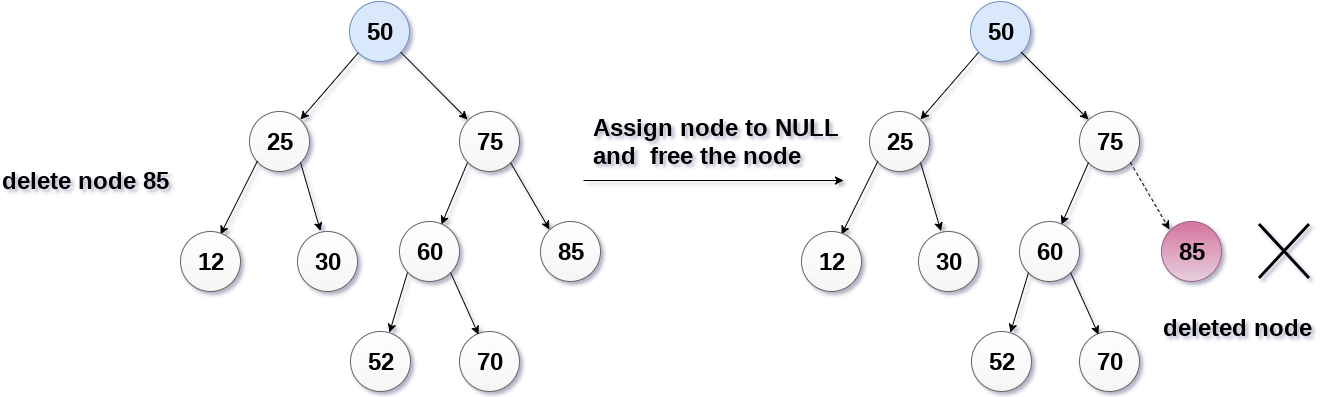
Case-1: The node to be deleted is a leaf node:
It is the simplest case, in this case, replace the leaf node with the NULL and simple free the allocated space.
In the following image, we are deleting the node 85, since the node is a leaf node, therefore the node will be replaced with NULL and allocated space will be freed.
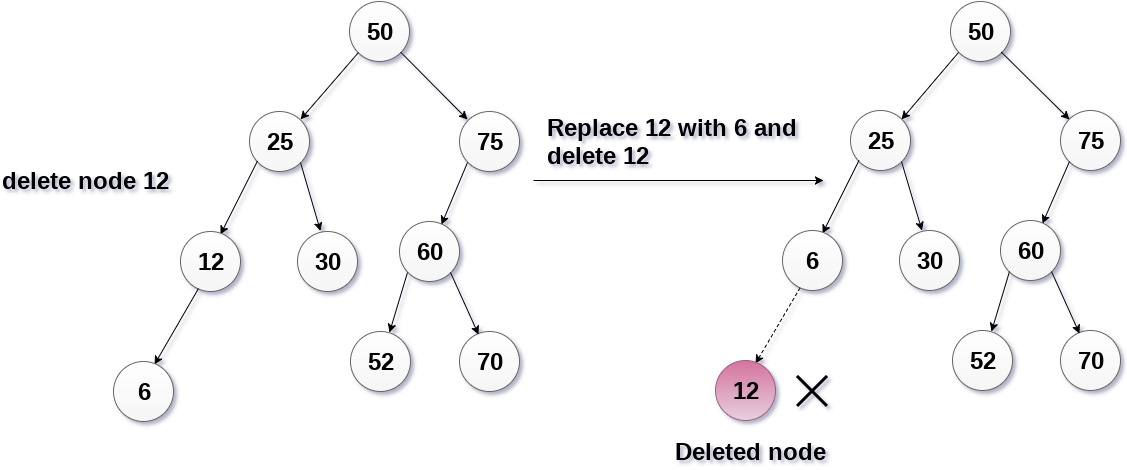
Case-2: The node to be deleted has only one child:
In this case, replace the node with its child and delete the child node, which now contains the value which is to be deleted. Simply replace it with the NULL and free the allocated space.
In the following image, the node 12 is to be deleted. It has only one child. The node will be replaced with its child node and the replaced node 12 (which is now leaf node) will simply be deleted.
Case-3: The node to be deleted has two children:
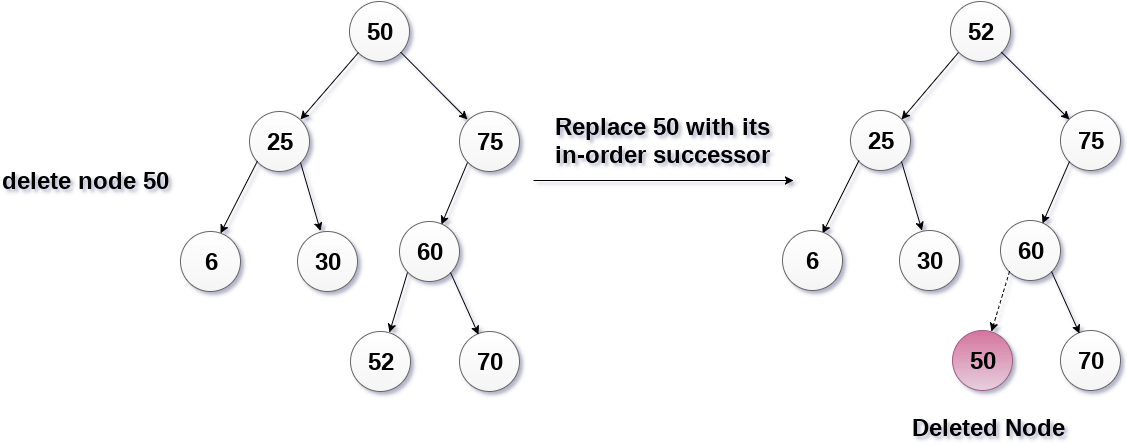
It is a bit complexed case compare to other two cases. However, the node which is to be deleted, is replaced with its in-order successor or predecessor recursively until the node value (to be deleted) is placed on the leaf of the tree. After the procedure, replace the node with NULL and free the allocated space.
In the following image, the node 50 is to be deleted which is the root node of the tree. The in-order traversal of the tree given below.
6, 25, 30, 50, 52, 60, 70, 75.
replace 50 with its in-order successor 52. Now, 50 will be moved to the leaf of the tree, which will simply be deleted.
Delete (TREE, ITEM)

Step 1: IF TREE = NULL
   Write "item not found in the tree" ELSE IF ITEM < TREE -> DATA
  Delete(TREE->LEFT, ITEM)
  ELSE IF ITEM > TREE -> DATA
   Delete(TREE -> RIGHT, ITEM)
  ELSE IF TREE -> LEFT AND TREE -> RIGHT
  SET TEMP = findLargestNode(TREE -> LEFT)
  SET TREE -> DATA = TEMP -> DATA
   Delete(TREE -> LEFT, TEMP -> DATA)
  ELSE
   SET TEMP = TREE
   IF TREE -> LEFT = NULL AND TREE -> RIGHT = NULL
   SET TREE = NULL
  ELSE IF TREE -> LEFT != NULL
  SET TREE = TREE -> LEFT
  ELSE
    SET TREE = TREE -> RIGHT
  [END OF IF]
  FREE TEMP
[END OF IF]
Step 2: END
Inorder traversal of the given tree
20 30 40 50 60 70 80
Delete 20
Inorder traversal of the modified tree
30 40 50 60 70 80
Delete 30
Inorder traversal of the modified tree
40 50 60 70 80
Delete 50
Inorder traversal of the modified tree
40 60 70 80
Contributed by Sudeep Shukla With 💜.

