An explaination about how to setup with ESP32.
ESP32 is a series of low-cost, low-power system on a chip microcontrollers with integrated Wi-Fi and dual-mode Bluetooth. (Wikipedia)
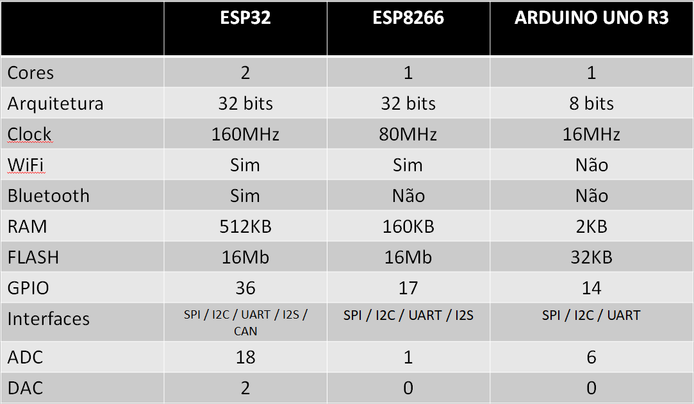
SPECS comparison between ESP32 & ESP8266 & ADRUINO UNO R3
2 - Then open ADRUINO IDE to link the ESP32 package in the IDE By going to FILE->PREFERENCES and add this URL to the Additional Board Manager (https://raw.githubusercontent.com/espressif/arduino-esp32/gh-pages/package_esp32_index.json).
IF YOU DON'T HAVE ADRUINO IDE DOWNLOAD IT FROM THIS LINK --> https://www.arduino.cc/en/software
3 - Then go to TOOLS => BOARD => BOARDS MANAGER then search for ESP32 and click install.
4 - After that you need to specify which Board of ESP32 you want to work on By going to TOOLS => BOARDS, then find the board you have from the list.
5 - Enable the port COM from TOOLS => PORT.
6 - Then test that ADRUINO IDE examples by going to FILE => EXAMPLES => and select an example code to try it out.
Finally this is only an explanation of how to setup ESP32 chip and make sure it works and ready for programming using ARDUINO IDE.
- https://www.youtube.com/watch?v=xPlN_Tk3VLQ (DroneBot Workshop)
- https://randomnerdtutorials.com/installing-the-esp32-board-in-arduino-ide-windows-instructions/ (Random Nerd